

Announcing Rsbuild 2.0
April 22, 2026


We are pleased to announce the official release of Rsbuild 2.0.
Rsbuild is a modern build tool powered by Rspack and a key part of the Rstack ecosystem. Around it, we've built a set of higher-level tools, including Rspress, Rslib, Rstest, Storybook Rsbuild, and more. These tools share a unified build foundation and plugin system through Rsbuild, delivering a consistent development experience across application development, library builds, documentation sites, and testing.
Since the 1.0 release, Rsbuild's weekly npm downloads have grown by more than 15x, and it has become the preferred build tool for new Rspack projects. More teams are also migrating from tools such as webpack and Create React App to Rsbuild to improve both build performance and developer experience.
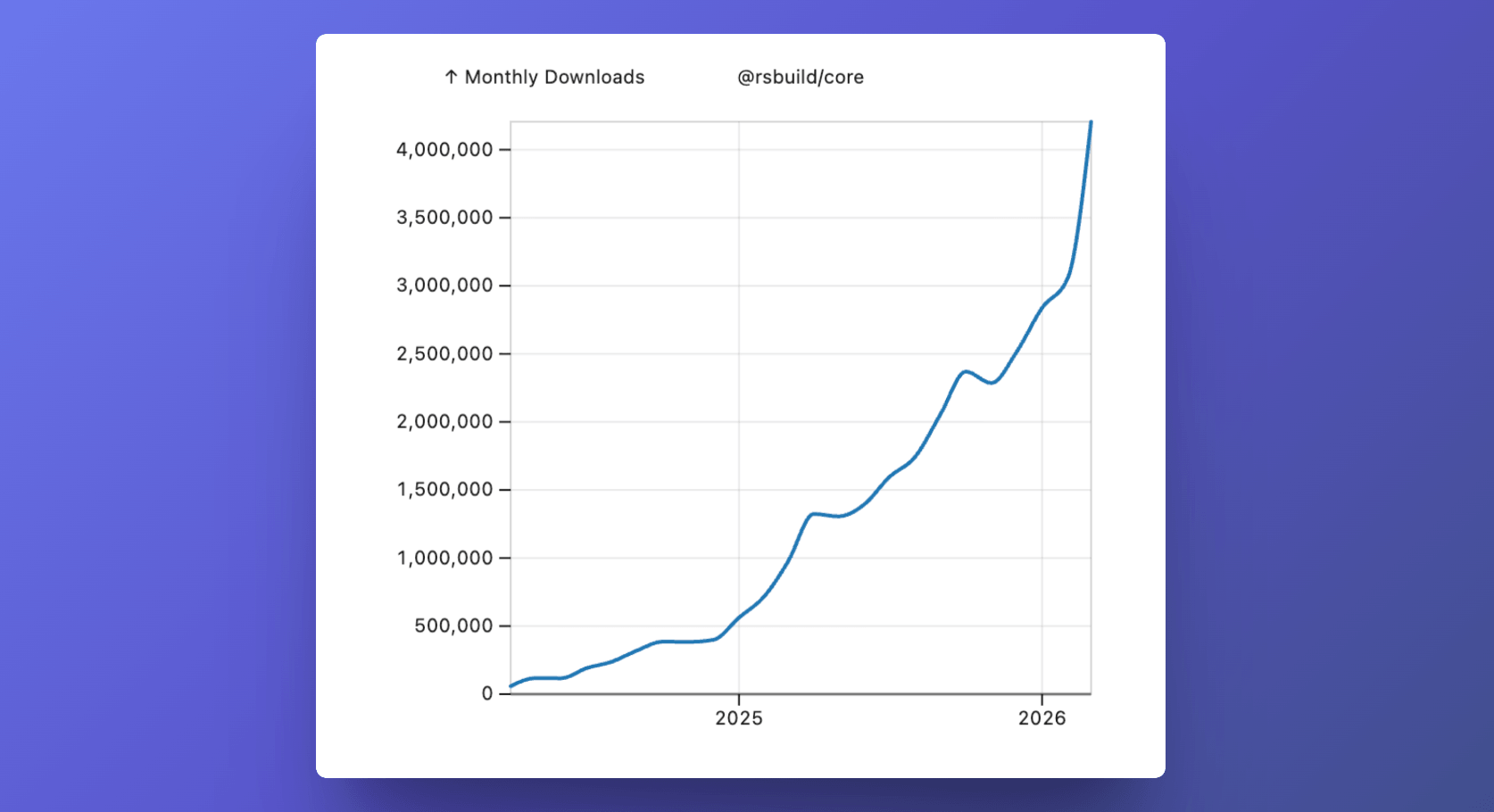
To help the ecosystem upgrade smoothly to 2.0, we spent three months validating and refining this release, publishing more than 20 preview versions along the way. Rslib, Rstest, Rspress, Storybook Rsbuild, and Modern.js have all completed the upgrade and are now running stably in production.
The main improvements in 2.0 include:
- New features:
- Lighter weight:
- Safer by default:
- More modern:
Upgrade to Rspack 2.0
Rsbuild 2.0 is powered by Rspack 2.0. This brings faster builds, new output optimization capabilities, and many improvements under the hood.
For more details, see the Rspack 2.0 announcement post.
React Server Components support
React Server Components (RSC) are a type of pre-rendered React component that combines data fetching and component logic while reducing the amount of JavaScript sent to the client.
To make RSC easier to use in Rsbuild-based web apps and frameworks, we introduced the rsbuild-plugin-rsc plugin. It is built on top of Rspack's built-in RSC support and uses Rsbuild's Environments API to organize multiple environments, such as client and server, in a unified way. This reduces both integration and configuration costs.
The plugin is still experimental. It can already run the React Router RSC example, and it has also been adopted by the Modern.js framework.
We're also working with the TanStack team and plan to add support for TanStack Start and TanStack's RSC in future releases. TanStack Start is a full-stack framework built on TanStack Router, and we're excited to explore more possibilities for RSC together.
Dev server and client communication
While working on React Server Components support, we found that some scenarios require communication between the dev server and the browser. For example, after the server completes some work, it may need to actively notify the client to run related logic.
To support this, Rsbuild 2.0 provides a set of communication APIs:
- The server can send messages to the client for the current environment through hot.send
- The client can listen to these custom events through
import.meta.webpackHot.on
These APIs reuse the existing HMR channel, so no additional WebSocket connection is required. Messages are sent only to the matching environment, avoiding unnecessary broadcasts.
For example, when server-side state changes, you can notify the client to update instead of triggering a full page refresh:
- Send a message from the server:
- Listen for the message on the client:
Extending the built-in server
Rsbuild 2.0 adds the server.setup option, which allows you to run initialization logic when the dev server or preview server starts.
Compared with the existing server.setupMiddlewares, this option is more powerful. You can use it to customize the built-in Rsbuild server by registering middleware, running tasks before startup, or injecting different logic for dev and preview modes. With server.setup, these tasks can be handled directly in the Rsbuild config.
For example, you can add a simple endpoint for local development and preview:
Custom logger support
With the new customLogger option, you can define a different logger for each Rsbuild instance.
This makes it possible to use different log levels, output prefixes, or custom logging systems without modifying the global logger instance.
See the logging guide for more details.
Easier chunk splitting configuration
In 1.x, Rsbuild provided common chunk splitting strategies through performance.chunkSplit. However, its design differed significantly from Rspack's splitChunks, so developers had to learn additional concepts such as strategy and forceSplitting. It also made it harder for coding agents to generate splitChunks configurations that matched community conventions directly, often requiring extra conversion.
For this reason, Rsbuild 2.0 introduces the new splitChunks option. Its behavior is fully aligned with Rspack's splitChunks, and an additional preset option provides built-in presets.
For example, you can use the per-package preset to split each package into a separate chunk:
performance.chunkSplitis deprecated in 2.0, but existing configurations will continue to work. We recommend migrating by following Migrate from performance.chunkSplit.
create-rsbuild template updates
Alongside the core improvements, we also updated the templates in create-rsbuild to make project scaffolding better aligned with current development practices:
AGENTS.mdis now generated by default, and you can install Agent Skills such as rsbuild-best-practices during initialization.- When creating a React project, you can choose React Compiler as an optional tool.
- Experimental support for Rslint has been added. Rslint is a high-performance linter built on
typescript-go. - Outdated React 18 and Vue 2 templates have been removed.
Reduced dependencies
Rsbuild 2.0 reduces its default dependencies by moving packages that are only needed in specific scenarios out of the default install set. This reduces the number of default dependencies from 13 to 4 and cuts installation size by about 2 MB.
The main changes are:
- core-js is no longer installed by default. Install it manually when using output.polyfill.
- @module-federation/runtime-tools is no longer installed by default. Install it manually when using moduleFederation.options. Module Federation 2.0 is not affected.
- The webpack-bundle-analyzer dependency has been removed. We recommend using Rsdoctor for bundle analysis, or installing and registering
webpack-bundle-analyzeryourself.
Default host change
The default value of server.host has changed from '0.0.0.0' to 'localhost'. By default, the dev server and preview server now listen only on the local machine and are no longer exposed to other devices on the local network.
This change follows a secure-by-default principle. In most local development scenarios, the dev server does not need to be exposed externally. Listening only on the local address reduces accidental exposure and lowers the risk of scans or attacks on shared networks.
If you need to access the page from devices on the local network, you can enable network access explicitly:
You can also enable it quickly with the --host CLI option:
Proxy middleware upgrade
The http-proxy-middleware used by the dev server has been upgraded from v2 to the latest v4 release. At the same time, its underlying dependency has been switched from the unmaintained http-proxy to httpxy, which is actively maintained by the unjs community.
This brings several improvements:
- HTTP/2 proxy support
- Fixes for known security issues
- No longer relying on Node.js's deprecated
url.parse()API
Some fields in
server.proxyhave changed. When upgrading, please refer to Migrate from v1 to v2.
Pure ESM package
@rsbuild/core is now published as a pure ESM package, and its CommonJS build output has been removed. This change only affects how Rsbuild itself is distributed, reducing installation size by about 500 KB.
In Node.js 20 and later, the runtime natively supports loading ESM modules through require(esm). For most projects that still use Rsbuild through its JavaScript API, this change should have no practical impact and does not require any code changes.
Node.js support
Starting from 2.0, the minimum supported Node.js versions for Rsbuild are 20.19+ or 22.12+. Since Node.js 18 reached end of life in late April 2025, 2.0 no longer supports it.
We usually remove support for a Node.js version about one year after it enters EOL, to give the community and users more time to upgrade.
Updated default targets
Rsbuild 2.0 updates its default targets so build output targets more modern browsers and Node.js versions.
For web output, the default browserslist now matches the baseline widely available on 2025-05-01 query. This query is based on the Baseline Widely Available feature set as of May 1, 2025.
The default values change as follows:
- Chrome 87 -> 107
- Edge 88 -> 107
- Firefox 78 -> 104
- Safari 14 -> 16
This means that if you do not explicitly configure browserslist, Rsbuild will generate more modern JavaScript and CSS by default while reducing syntax downleveling and polyfills.
For Node.js output, the default target version is also raised from Node.js 16 to Node.js 20.
If you have already configured the target environment explicitly through .browserslistrc, package.json#browserslist, or output.overrideBrowserslist, these changes will not affect your project.
ESM Node.js output
For Node.js output, Rsbuild 2.0 now generates unminified ES modules by default instead of the minified CommonJS output used in Rsbuild v1.
This better matches common practice in modern Node.js applications. At the same time, leaving server-side code unminified by default helps preserve readable stack traces and makes debugging easier.
Note that the runtime must be able to load ESM. For example, you can set "type": "module" in package.json, or use .mjs as the output file extension. If your project still depends on CommonJS, you can switch back explicitly:
Updated decorator version
With the underlying SWC now supporting the 2023-11 decorator version, Rsbuild updates the default value of decorators.version from 2022-03 to 2023-11.
2023-11 is the latest proposal version. It corresponds to the specification after the TC39 meeting in November 2023 and is also the default behavior in Babel 8. If you need to keep the old behavior, you can specify the version explicitly:
Upgrading to Rsbuild 2.0
For most projects, upgrading to Rsbuild 2.0 should be relatively smooth. Although 2.0 introduces some default behavior and breaking changes, most come with a clear migration path, and in most cases you do not need to modify application code.
If you are using a coding agent with skill support, you can install the rsbuild-v2-upgrade skill to let the agent automatically help with dependency upgrades, configuration updates, and migration checks, reducing manual work.
For the full migration guide and the complete list of breaking changes, see Upgrading from v1 to v2.
Acknowledgments
Rsbuild is primarily developed by the Rstack team, and it also relies on contributions from community members and support from users. Since the 1.0 release, many developers have helped move Rsbuild forward through their contributions. We would like to thank everyone who has been part of that journey:
@9aoy, @adammark, @ahabhgk, @alexUXUI, @bodia-uz, @Brennvo, @caohuilin, @Cheese-Yu, @chenjiahan, @Chevindu, @Colin3191, @colinaaa, @CPunisher, @davide97g, @Deku-nattsu, @DeveshSapkale, @dovigod, @Draculabo, @easy1090, @escaton, @fansenze, @fi3ework, @gaoachao, @GiveMe-A-Name, @GRAMMAC1, @hai-x, @hangCode2001, @hardfist, @hasnum-stack, @htoooth, @Huxpro, @ianzone, @iceprosurface, @inottn, @jerrykingxyz, @jkzing, @JounQin, @JSerFeng, @JSH-data, @junhea, @junxiongchu, @lguzzon, @LingyuCoder, @lluisemper, @lxKylin, @mhutter, @miownag, @mycoin, @nikhilsnayak, @notzheng, @Nsttt, @nyqykk, @puxiao, @qmakani, @quininer, @RobHannay, @roli-lpci, @s-chance, @s-r-x, @sagar-dwivedi, @Sang-Sang33, @schu34, @ScriptedAlchemy, @Shucei, @shulaoda, @Simon-He95, @slobo, @snatvb, @SoonIter, @stormslowly, @SyMind, @T9-Forever, @thinkasany, @Timeless0911, @TinsFox, @valorkin, @vegerot, @VenDream, @wangi4myself, @wChenonly, @wjw99830, @wralith, @wxiaoyun, @xbzhang2020, @xc2, @xettri, @xiaohp, @xuexb, @xun082, @yifancong, @ymq001, @zackarychapple, @zalishchuk, @zoolsher