<?xml version="1.0" encoding="utf-8"?>
<feed xmlns="http://www.w3.org/2005/Atom">
    <id>releases-atom</id>
    <title>Rsbuild Blogs</title>
    <updated>2026-05-12T13:13:42.909Z</updated>
    <generator>https://github.com/jpmonette/feed</generator>
    <link rel="alternate" href="https://rsbuild.rs"/>
    <subtitle>Rsbuild is a high-performance build tool powered by Rspack.</subtitle>
    <icon>https://assets.rspack.rs/rsbuild/favicon-128x128.png</icon>
    <entry>
        <title type="html"><![CDATA[Announcing Rsbuild 2.0]]></title>
        <id>/blog/v2-0</id>
        <link href="https://rsbuild.rs/blog/v2-0"/>
        <updated>2026-04-22T12:00:00.000Z</updated>
        <summary type="html"><![CDATA[Rsbuild 2.0 is out, featuring Rspack 2.0, RSC support, and more modern defaults.]]></summary>
        <content type="html"><![CDATA[<!--$--><p><em>April 22, 2026</em></p>
<h1 class="rp-toc-include" id="announcing-rsbuild-20"><a href="#announcing-rsbuild-20" class="rp-header-anchor rp-link" aria-hidden="true">#</a>Announcing Rsbuild 2.0<!-- --> </h1><div class="rp-not-doc rp-llms-container"><button class="rp-not-doc rp-llms-button rp-llms-copy-button"><div class="rp-llms-copy-button__icon-wrapper"><svg xmlns="http://www.w3.org/2000/svg" width="32" height="32" viewBox="0 0 24 24" class="rp-llms-copy-button__icon-success"><path fill="currentColor" d="m9.55 18-5.7-5.7 1.425-1.425L9.55 15.15l9.175-9.175L20.15 7.4z"></path></svg><svg xmlns="http://www.w3.org/2000/svg" width="32" height="32" viewBox="0 0 24 24" class="rp-llms-copy-button__icon-copy"><path fill="currentColor" d="M20 8v12H8V8zm0-2H8a2 2 0 0 0-2 2v12a2 2 0 0 0 2 2h12a2 2 0 0 0 2-2V8a2 2 0 0 0-2-2"></path><path fill="currentColor" d="M4 16H2V4a2 2 0 0 1 2-2h12v2H4Z"></path></svg></div><span>Copy Markdown</span></button><button class="rp-llms-button rp-llms-view-options__trigger "><svg width="1em" height="1em" viewBox="0 0 32 32" class="rp-llms-view-options__arrow "><path fill="currentColor" d="M16 22 6 12l1.4-1.4 8.6 8.6 8.6-8.6L26 12z"></path></svg></button></div>
<p><img src="https://assets.rspack.rs/rsbuild/rsbuild-banner-v2.0.png" alt=""/></p>
<p>We are pleased to announce the official release of Rsbuild 2.0.</p>
<p>Rsbuild is a modern build tool powered by Rspack and a key part of the Rstack ecosystem. Around it, we&#x27;ve built a set of higher-level tools, including <a href="https://github.com/web-infra-dev/rspress" target="_blank" rel="noopener noreferrer" class="rp-link">Rspress</a>, <a href="https://github.com/web-infra-dev/rslib" target="_blank" rel="noopener noreferrer" class="rp-link">Rslib</a>, <a href="https://github.com/web-infra-dev/rstest" target="_blank" rel="noopener noreferrer" class="rp-link">Rstest</a>, <a href="https://github.com/rstackjs/storybook-rsbuild" target="_blank" rel="noopener noreferrer" class="rp-link">Storybook Rsbuild</a>, and more. These tools share a unified build foundation and plugin system through Rsbuild, delivering a consistent development experience across application development, library builds, documentation sites, and testing.</p>
<p>Since the 1.0 release, Rsbuild&#x27;s weekly npm downloads have grown by more than <strong>15x</strong>, and it has become the preferred build tool for new Rspack projects. More teams are also migrating from tools such as webpack and Create React App to Rsbuild to improve both build performance and developer experience.</p>
<p><img src="https://assets.rspack.rs/rsbuild/assets/rsbuild-2-0-downloads.png" alt=""/></p>
<p>To help the ecosystem upgrade smoothly to 2.0, we spent three months validating and refining this release, publishing more than 20 preview versions along the way. Rslib, Rstest, Rspress, Storybook Rsbuild, and Modern.js have all completed the upgrade and are now running stably in production.</p>
<p>The main improvements in 2.0 include:</p>
<ul>
<li>New features:<!-- -->
<ul>
<li><a href="#upgrade-to-rspack-20" class="rp-link">Upgrade to Rspack 2.0</a></li>
<li><a href="#react-server-components-support" class="rp-link">React Server Components support</a></li>
<li><a href="#dev-server-and-client-communication" class="rp-link">Dev server and client communication</a></li>
<li><a href="#extending-the-built-in-server" class="rp-link">Extending the built-in server</a></li>
<li><a href="#custom-logger-support" class="rp-link">Custom logger support</a></li>
<li><a href="#easier-chunk-splitting-configuration" class="rp-link">Easier chunk splitting configuration</a></li>
<li><a href="#create-rsbuild-template-updates" class="rp-link">create-rsbuild template updates</a></li>
</ul>
</li>
<li>Lighter weight:<!-- -->
<ul>
<li><a href="#reduced-dependencies" class="rp-link">Reduced dependencies</a></li>
</ul>
</li>
<li>Safer by default:<!-- -->
<ul>
<li><a href="#default-host-change" class="rp-link">Default host change</a></li>
<li><a href="#proxy-middleware-upgrade" class="rp-link">Proxy middleware upgrade</a></li>
</ul>
</li>
<li>More modern:<!-- -->
<ul>
<li><a href="#pure-esm-package" class="rp-link">Pure ESM package</a></li>
<li><a href="#nodejs-support" class="rp-link">Node.js support</a></li>
<li><a href="#updated-default-targets" class="rp-link">Updated default targets</a></li>
<li><a href="#esm-nodejs-output" class="rp-link">ESM Node.js output</a></li>
<li><a href="#updated-decorator-version" class="rp-link">Updated decorator version</a></li>
</ul>
</li>
</ul>
<h2 class="rp-toc-include" id="upgrade-to-rspack-20"><a href="#upgrade-to-rspack-20" class="rp-header-anchor rp-link" aria-hidden="true">#</a>Upgrade to Rspack 2.0</h2>
<p>Rsbuild 2.0 is powered by Rspack 2.0. This brings faster builds, new output optimization capabilities, and many improvements under the hood.</p>
<p>For more details, see the <a href="https://rspack.rs/blog/announcing-2-0" target="_blank" rel="noopener noreferrer" class="rp-link">Rspack 2.0 announcement post</a>.</p>
<h2 class="rp-toc-include" id="react-server-components-support"><a href="#react-server-components-support" class="rp-header-anchor rp-link" aria-hidden="true">#</a>React Server Components support</h2>
<p><a href="https://react.dev/reference/rsc/server-components" target="_blank" rel="noopener noreferrer" class="rp-link">React Server Components</a> (RSC) are a type of pre-rendered React component that combines data fetching and component logic while reducing the amount of JavaScript sent to the client.</p>
<p>To make RSC easier to use in Rsbuild-based web apps and frameworks, we introduced the <a href="https://github.com/rstackjs/rsbuild-plugin-rsc" target="_blank" rel="noopener noreferrer" class="rp-link">rsbuild-plugin-rsc</a> plugin. It is built on top of Rspack&#x27;s built-in RSC support and uses Rsbuild&#x27;s <a href="/guide/advanced/environments" class="rp-link">Environments API</a> to organize multiple environments, such as client and server, in a unified way. This reduces both integration and configuration costs.</p>
<div class="rp-codeblock language-ts"><div class="rp-codeblock__title">rsbuild.config.ts</div><div class="rp-codeblock__content"><div class="rp-codeblock__content__scroll-container rp-scrollbar rp-scrollbar--always"><pre class="shiki css-variables" style="background-color:var(--shiki-background);color:var(--shiki-foreground)" tabindex="0" data-lang="ts" data-title="rsbuild.config.ts"><code><span class="line"><span style="color:var(--shiki-token-keyword)">import</span><span style="color:var(--shiki-foreground)"> { defineConfig } </span><span style="color:var(--shiki-token-keyword)">from</span><span style="color:var(--shiki-token-string-expression)"> &#x27;@rsbuild/core&#x27;</span><span style="color:var(--shiki-foreground)">;</span></span>
<span class="line"><span style="color:var(--shiki-token-keyword)">import</span><span style="color:var(--shiki-foreground)"> { pluginReact } </span><span style="color:var(--shiki-token-keyword)">from</span><span style="color:var(--shiki-token-string-expression)"> &#x27;@rsbuild/plugin-react&#x27;</span><span style="color:var(--shiki-foreground)">;</span></span>
<span class="line"><span style="color:var(--shiki-token-keyword)">import</span><span style="color:var(--shiki-foreground)"> { pluginRSC } </span><span style="color:var(--shiki-token-keyword)">from</span><span style="color:var(--shiki-token-string-expression)"> &#x27;rsbuild-plugin-rsc&#x27;</span><span style="color:var(--shiki-foreground)">;</span></span>
<span class="line"></span>
<span class="line"><span style="color:var(--shiki-token-keyword)">export</span><span style="color:var(--shiki-token-keyword)"> default</span><span style="color:var(--shiki-token-function)"> defineConfig</span><span style="color:var(--shiki-foreground)">({</span></span>
<span class="line"><span style="color:var(--shiki-foreground)">  plugins</span><span style="color:var(--shiki-token-keyword)">:</span><span style="color:var(--shiki-foreground)"> [</span></span>
<span class="line"><span style="color:var(--shiki-token-function)">    pluginReact</span><span style="color:var(--shiki-foreground)">()</span><span style="color:var(--shiki-token-punctuation)">,</span></span>
<span class="line"><span style="color:var(--shiki-token-function)">    pluginRSC</span><span style="color:var(--shiki-foreground)">({</span></span>
<span class="line"><span style="color:var(--shiki-token-comment)">      // Plugin options</span></span>
<span class="line"><span style="color:var(--shiki-foreground)">    })</span><span style="color:var(--shiki-token-punctuation)">,</span></span>
<span class="line"><span style="color:var(--shiki-foreground)">  ]</span><span style="color:var(--shiki-token-punctuation)">,</span></span>
<span class="line"><span style="color:var(--shiki-foreground)">  environments</span><span style="color:var(--shiki-token-keyword)">:</span><span style="color:var(--shiki-foreground)"> {</span></span>
<span class="line"><span style="color:var(--shiki-foreground)">    server</span><span style="color:var(--shiki-token-keyword)">:</span><span style="color:var(--shiki-foreground)"> {</span></span>
<span class="line"><span style="color:var(--shiki-token-comment)">      // Server config...</span></span>
<span class="line"><span style="color:var(--shiki-foreground)">    }</span><span style="color:var(--shiki-token-punctuation)">,</span></span>
<span class="line"><span style="color:var(--shiki-foreground)">    client</span><span style="color:var(--shiki-token-keyword)">:</span><span style="color:var(--shiki-foreground)"> {</span></span>
<span class="line"><span style="color:var(--shiki-token-comment)">      // Client config...</span></span>
<span class="line"><span style="color:var(--shiki-foreground)">    }</span><span style="color:var(--shiki-token-punctuation)">,</span></span>
<span class="line"><span style="color:var(--shiki-foreground)">  }</span><span style="color:var(--shiki-token-punctuation)">,</span></span>
<span class="line"><span style="color:var(--shiki-foreground)">});</span></span></code></pre></div><div class="rp-code-button-group"><button class="rp-code-button-group__button rp-code-wrap-button" title="Toggle code wrap"><svg xmlns="http://www.w3.org/2000/svg" width="32" height="32" viewBox="0 0 24 24" class="rp-code-button-group__icon rp-code-button-group__icon--wrapped"><path fill="currentColor" d="M21 5H3v2h18zM3 19h7v-2H3zm0-6h15c1 0 2 .43 2 2s-1 2-2 2h-2v-2l-4 3 4 3v-2h2c2.95 0 4-1.27 4-4 0-2.72-1-4-4-4H3z"></path></svg><svg xmlns="http://www.w3.org/2000/svg" width="32" height="32" viewBox="0 0 24 24" class="rp-code-button-group__icon rp-code-button-group__icon--wrap"><path fill="currentColor" d="M16 7H3V5h13zM3 19h13v-2H3zm19-7-4-3v2H3v2h15v2z"></path></svg></button><button class="rp-code-button-group__button rp-code-copy-button" title="Copy code"><svg xmlns="http://www.w3.org/2000/svg" width="32" height="32" viewBox="0 0 24 24" class="rp-code-button-group__icon rp-code-copy-button__icon rp-code-copy-button__icon--copy"><path fill="currentColor" d="M20 8v12H8V8zm0-2H8a2 2 0 0 0-2 2v12a2 2 0 0 0 2 2h12a2 2 0 0 0 2-2V8a2 2 0 0 0-2-2"></path><path fill="currentColor" d="M4 16H2V4a2 2 0 0 1 2-2h12v2H4Z"></path></svg><svg xmlns="http://www.w3.org/2000/svg" width="32" height="32" viewBox="0 0 24 24" class="rp-code-button-group__icon rp-code-copy-button__icon rp-code-copy-button__icon--success"><path fill="currentColor" d="m9.55 18-5.7-5.7 1.425-1.425L9.55 15.15l9.175-9.175L20.15 7.4z"></path></svg></button></div></div></div>
<p>The plugin is still experimental. It can already run the <a href="https://github.com/rstackjs/rsbuild-plugin-rsc/tree/main/examples/react-router" target="_blank" rel="noopener noreferrer" class="rp-link">React Router RSC example</a>, and it has also been adopted by the <a href="https://modernjs.dev/guides/basic-features/render/rsc" target="_blank" rel="noopener noreferrer" class="rp-link">Modern.js framework</a>.</p>
<p>We&#x27;re also working with the <a href="https://tanstack.com/" target="_blank" rel="noopener noreferrer" class="rp-link">TanStack</a> team and plan to add support for <a href="https://tanstack.com/start" target="_blank" rel="noopener noreferrer" class="rp-link">TanStack Start</a> and <a href="https://tanstack.com/blog/react-server-components" target="_blank" rel="noopener noreferrer" class="rp-link">TanStack&#x27;s RSC</a> in future releases. TanStack Start is a full-stack framework built on TanStack Router, and we&#x27;re excited to explore more possibilities for RSC together.</p>
<h2 class="rp-toc-include" id="dev-server-and-client-communication"><a href="#dev-server-and-client-communication" class="rp-header-anchor rp-link" aria-hidden="true">#</a>Dev server and client communication</h2>
<p>While working on React Server Components support, we found that some scenarios require communication between the dev server and the browser. For example, after the server completes some work, it may need to actively notify the client to run related logic.</p>
<p>To support this, Rsbuild 2.0 provides a set of communication APIs:</p>
<ul>
<li>The server can send messages to the client for the current environment through <a href="/api/javascript-api/environment-api#hotsend" class="rp-link">hot.send</a></li>
<li>The client can listen to these custom events through <code>import.meta.webpackHot.on</code></li>
</ul>
<p>These APIs reuse the existing HMR channel, so no additional WebSocket connection is required. Messages are sent only to the matching environment, avoiding unnecessary broadcasts.</p>
<p>For example, when server-side state changes, you can notify the client to update instead of triggering a full page refresh:</p>
<ul>
<li>Send a message from the server:</li>
</ul>
<div class="rp-codeblock language-ts"><div class="rp-codeblock__title">rsbuild.config.ts</div><div class="rp-codeblock__content"><div class="rp-codeblock__content__scroll-container rp-scrollbar rp-scrollbar--always"><pre class="shiki css-variables" style="background-color:var(--shiki-background);color:var(--shiki-foreground)" tabindex="0" data-lang="ts" data-title="rsbuild.config.ts"><code><span class="line"><span style="color:var(--shiki-token-constant)">server</span><span style="color:var(--shiki-token-function)">.</span><span style="color:var(--shiki-token-constant)">environments</span><span style="color:var(--shiki-token-function)">.</span><span style="color:var(--shiki-token-constant)">web</span><span style="color:var(--shiki-token-function)">.</span><span style="color:var(--shiki-token-constant)">hot</span><span style="color:var(--shiki-token-function)">.send</span><span style="color:var(--shiki-foreground)">(</span><span style="color:var(--shiki-token-string-expression)">&#x27;data-change&#x27;</span><span style="color:var(--shiki-token-punctuation)">,</span><span style="color:var(--shiki-foreground)"> {</span></span>
<span class="line"><span style="color:var(--shiki-foreground)">  count</span><span style="color:var(--shiki-token-keyword)">:</span><span style="color:var(--shiki-token-constant)"> 1</span><span style="color:var(--shiki-token-punctuation)">,</span></span>
<span class="line"><span style="color:var(--shiki-foreground)">});</span></span></code></pre></div><div class="rp-code-button-group"><button class="rp-code-button-group__button rp-code-wrap-button" title="Toggle code wrap"><svg xmlns="http://www.w3.org/2000/svg" width="32" height="32" viewBox="0 0 24 24" class="rp-code-button-group__icon rp-code-button-group__icon--wrapped"><path fill="currentColor" d="M21 5H3v2h18zM3 19h7v-2H3zm0-6h15c1 0 2 .43 2 2s-1 2-2 2h-2v-2l-4 3 4 3v-2h2c2.95 0 4-1.27 4-4 0-2.72-1-4-4-4H3z"></path></svg><svg xmlns="http://www.w3.org/2000/svg" width="32" height="32" viewBox="0 0 24 24" class="rp-code-button-group__icon rp-code-button-group__icon--wrap"><path fill="currentColor" d="M16 7H3V5h13zM3 19h13v-2H3zm19-7-4-3v2H3v2h15v2z"></path></svg></button><button class="rp-code-button-group__button rp-code-copy-button" title="Copy code"><svg xmlns="http://www.w3.org/2000/svg" width="32" height="32" viewBox="0 0 24 24" class="rp-code-button-group__icon rp-code-copy-button__icon rp-code-copy-button__icon--copy"><path fill="currentColor" d="M20 8v12H8V8zm0-2H8a2 2 0 0 0-2 2v12a2 2 0 0 0 2 2h12a2 2 0 0 0 2-2V8a2 2 0 0 0-2-2"></path><path fill="currentColor" d="M4 16H2V4a2 2 0 0 1 2-2h12v2H4Z"></path></svg><svg xmlns="http://www.w3.org/2000/svg" width="32" height="32" viewBox="0 0 24 24" class="rp-code-button-group__icon rp-code-copy-button__icon rp-code-copy-button__icon--success"><path fill="currentColor" d="m9.55 18-5.7-5.7 1.425-1.425L9.55 15.15l9.175-9.175L20.15 7.4z"></path></svg></button></div></div></div>
<ul>
<li>Listen for the message on the client:</li>
</ul>
<div class="rp-codeblock language-ts"><div class="rp-codeblock__title">src/dev-sync.ts</div><div class="rp-codeblock__content"><div class="rp-codeblock__content__scroll-container rp-scrollbar rp-scrollbar--always"><pre class="shiki css-variables" style="background-color:var(--shiki-background);color:var(--shiki-foreground)" tabindex="0" data-lang="ts" data-title="src/dev-sync.ts"><code><span class="line"><span style="color:var(--shiki-token-keyword)">if</span><span style="color:var(--shiki-foreground)"> (</span><span style="color:var(--shiki-token-keyword)">import</span><span style="color:var(--shiki-foreground)">.</span><span style="color:var(--shiki-token-constant)">meta</span><span style="color:var(--shiki-foreground)">.webpackHot) {</span></span>
<span class="line"><span style="color:var(--shiki-token-keyword)">  import</span><span style="color:var(--shiki-token-function)">.</span><span style="color:var(--shiki-token-constant)">meta</span><span style="color:var(--shiki-token-function)">.</span><span style="color:var(--shiki-token-constant)">webpackHot</span><span style="color:var(--shiki-token-function)">.on</span><span style="color:var(--shiki-foreground)">(</span><span style="color:var(--shiki-token-string-expression)">&#x27;data-change&#x27;</span><span style="color:var(--shiki-token-punctuation)">,</span><span style="color:var(--shiki-foreground)"> ({ count }) </span><span style="color:var(--shiki-token-keyword)">=&gt;</span><span style="color:var(--shiki-foreground)"> {</span></span>
<span class="line"><span style="color:var(--shiki-token-constant)">    console</span><span style="color:var(--shiki-token-function)">.log</span><span style="color:var(--shiki-foreground)">(</span><span style="color:var(--shiki-token-string-expression)">&#x27;data updated:&#x27;</span><span style="color:var(--shiki-token-punctuation)">,</span><span style="color:var(--shiki-foreground)"> count);</span></span>
<span class="line"><span style="color:var(--shiki-foreground)">  });</span></span>
<span class="line"><span style="color:var(--shiki-foreground)">}</span></span></code></pre></div><div class="rp-code-button-group"><button class="rp-code-button-group__button rp-code-wrap-button" title="Toggle code wrap"><svg xmlns="http://www.w3.org/2000/svg" width="32" height="32" viewBox="0 0 24 24" class="rp-code-button-group__icon rp-code-button-group__icon--wrapped"><path fill="currentColor" d="M21 5H3v2h18zM3 19h7v-2H3zm0-6h15c1 0 2 .43 2 2s-1 2-2 2h-2v-2l-4 3 4 3v-2h2c2.95 0 4-1.27 4-4 0-2.72-1-4-4-4H3z"></path></svg><svg xmlns="http://www.w3.org/2000/svg" width="32" height="32" viewBox="0 0 24 24" class="rp-code-button-group__icon rp-code-button-group__icon--wrap"><path fill="currentColor" d="M16 7H3V5h13zM3 19h13v-2H3zm19-7-4-3v2H3v2h15v2z"></path></svg></button><button class="rp-code-button-group__button rp-code-copy-button" title="Copy code"><svg xmlns="http://www.w3.org/2000/svg" width="32" height="32" viewBox="0 0 24 24" class="rp-code-button-group__icon rp-code-copy-button__icon rp-code-copy-button__icon--copy"><path fill="currentColor" d="M20 8v12H8V8zm0-2H8a2 2 0 0 0-2 2v12a2 2 0 0 0 2 2h12a2 2 0 0 0 2-2V8a2 2 0 0 0-2-2"></path><path fill="currentColor" d="M4 16H2V4a2 2 0 0 1 2-2h12v2H4Z"></path></svg><svg xmlns="http://www.w3.org/2000/svg" width="32" height="32" viewBox="0 0 24 24" class="rp-code-button-group__icon rp-code-copy-button__icon rp-code-copy-button__icon--success"><path fill="currentColor" d="m9.55 18-5.7-5.7 1.425-1.425L9.55 15.15l9.175-9.175L20.15 7.4z"></path></svg></button></div></div></div>
<h2 class="rp-toc-include" id="extending-the-built-in-server"><a href="#extending-the-built-in-server" class="rp-header-anchor rp-link" aria-hidden="true">#</a>Extending the built-in server</h2>
<p>Rsbuild 2.0 adds the <a href="/config/server/setup" class="rp-link">server.setup</a> option, which allows you to run initialization logic when the dev server or preview server starts.</p>
<p>Compared with the existing <code>server.setupMiddlewares</code>, this option is more powerful. You can use it to customize the built-in Rsbuild server by registering middleware, running tasks before startup, or injecting different logic for dev and preview modes. With <code>server.setup</code>, these tasks can be handled directly in the Rsbuild config.</p>
<p>For example, you can add a simple endpoint for local development and preview:</p>
<div class="rp-codeblock language-ts"><div class="rp-codeblock__title">rsbuild.config.ts</div><div class="rp-codeblock__content"><div class="rp-codeblock__content__scroll-container rp-scrollbar rp-scrollbar--always"><pre class="shiki css-variables" style="background-color:var(--shiki-background);color:var(--shiki-foreground)" tabindex="0" data-lang="ts" data-title="rsbuild.config.ts"><code><span class="line"><span style="color:var(--shiki-token-keyword)">export</span><span style="color:var(--shiki-token-keyword)"> default</span><span style="color:var(--shiki-foreground)"> {</span></span>
<span class="line"><span style="color:var(--shiki-foreground)">  server</span><span style="color:var(--shiki-token-keyword)">:</span><span style="color:var(--shiki-foreground)"> {</span></span>
<span class="line"><span style="color:var(--shiki-token-function)">    setup</span><span style="color:var(--shiki-token-keyword)">:</span><span style="color:var(--shiki-foreground)"> ({ server }) </span><span style="color:var(--shiki-token-keyword)">=&gt;</span><span style="color:var(--shiki-foreground)"> {</span></span>
<span class="line"><span style="color:var(--shiki-token-constant)">      server</span><span style="color:var(--shiki-token-function)">.</span><span style="color:var(--shiki-token-constant)">middlewares</span><span style="color:var(--shiki-token-function)">.use</span><span style="color:var(--shiki-foreground)">((req</span><span style="color:var(--shiki-token-punctuation)">,</span><span style="color:var(--shiki-foreground)"> res</span><span style="color:var(--shiki-token-punctuation)">,</span><span style="color:var(--shiki-foreground)"> next) </span><span style="color:var(--shiki-token-keyword)">=&gt;</span><span style="color:var(--shiki-foreground)"> {</span></span>
<span class="line"><span style="color:var(--shiki-token-keyword)">        if</span><span style="color:var(--shiki-foreground)"> (</span><span style="color:var(--shiki-token-constant)">req</span><span style="color:var(--shiki-foreground)">.url </span><span style="color:var(--shiki-token-keyword)">===</span><span style="color:var(--shiki-token-string-expression)"> &#x27;/api/health&#x27;</span><span style="color:var(--shiki-foreground)">) {</span></span>
<span class="line"><span style="color:var(--shiki-token-constant)">          res</span><span style="color:var(--shiki-token-function)">.end</span><span style="color:var(--shiki-foreground)">(</span><span style="color:var(--shiki-token-string-expression)">&#x27;ok&#x27;</span><span style="color:var(--shiki-foreground)">);</span></span>
<span class="line"><span style="color:var(--shiki-token-keyword)">          return</span><span style="color:var(--shiki-foreground)">;</span></span>
<span class="line"><span style="color:var(--shiki-foreground)">        }</span></span>
<span class="line"><span style="color:var(--shiki-token-function)">        next</span><span style="color:var(--shiki-foreground)">();</span></span>
<span class="line"><span style="color:var(--shiki-foreground)">      });</span></span>
<span class="line"><span style="color:var(--shiki-foreground)">    }</span><span style="color:var(--shiki-token-punctuation)">,</span></span>
<span class="line"><span style="color:var(--shiki-foreground)">  }</span><span style="color:var(--shiki-token-punctuation)">,</span></span>
<span class="line"><span style="color:var(--shiki-foreground)">};</span></span></code></pre></div><div class="rp-code-button-group"><button class="rp-code-button-group__button rp-code-wrap-button" title="Toggle code wrap"><svg xmlns="http://www.w3.org/2000/svg" width="32" height="32" viewBox="0 0 24 24" class="rp-code-button-group__icon rp-code-button-group__icon--wrapped"><path fill="currentColor" d="M21 5H3v2h18zM3 19h7v-2H3zm0-6h15c1 0 2 .43 2 2s-1 2-2 2h-2v-2l-4 3 4 3v-2h2c2.95 0 4-1.27 4-4 0-2.72-1-4-4-4H3z"></path></svg><svg xmlns="http://www.w3.org/2000/svg" width="32" height="32" viewBox="0 0 24 24" class="rp-code-button-group__icon rp-code-button-group__icon--wrap"><path fill="currentColor" d="M16 7H3V5h13zM3 19h13v-2H3zm19-7-4-3v2H3v2h15v2z"></path></svg></button><button class="rp-code-button-group__button rp-code-copy-button" title="Copy code"><svg xmlns="http://www.w3.org/2000/svg" width="32" height="32" viewBox="0 0 24 24" class="rp-code-button-group__icon rp-code-copy-button__icon rp-code-copy-button__icon--copy"><path fill="currentColor" d="M20 8v12H8V8zm0-2H8a2 2 0 0 0-2 2v12a2 2 0 0 0 2 2h12a2 2 0 0 0 2-2V8a2 2 0 0 0-2-2"></path><path fill="currentColor" d="M4 16H2V4a2 2 0 0 1 2-2h12v2H4Z"></path></svg><svg xmlns="http://www.w3.org/2000/svg" width="32" height="32" viewBox="0 0 24 24" class="rp-code-button-group__icon rp-code-copy-button__icon rp-code-copy-button__icon--success"><path fill="currentColor" d="m9.55 18-5.7-5.7 1.425-1.425L9.55 15.15l9.175-9.175L20.15 7.4z"></path></svg></button></div></div></div>
<h2 class="rp-toc-include" id="custom-logger-support"><a href="#custom-logger-support" class="rp-header-anchor rp-link" aria-hidden="true">#</a>Custom logger support</h2>
<p>With the new <a href="/config/custom-logger" class="rp-link">customLogger</a> option, you can define a different logger for each Rsbuild instance.</p>
<p>This makes it possible to use different log levels, output prefixes, or custom logging systems without modifying the <a href="/api/javascript-api/core#logger" class="rp-link">global logger instance</a>.</p>
<div class="rp-codeblock language-ts"><div class="rp-codeblock__title">rsbuild.config.ts</div><div class="rp-codeblock__content"><div class="rp-codeblock__content__scroll-container rp-scrollbar rp-scrollbar--always"><pre class="shiki css-variables" style="background-color:var(--shiki-background);color:var(--shiki-foreground)" tabindex="0" data-lang="ts" data-title="rsbuild.config.ts"><code><span class="line"><span style="color:var(--shiki-token-keyword)">import</span><span style="color:var(--shiki-foreground)"> { createLogger</span><span style="color:var(--shiki-token-punctuation)">,</span><span style="color:var(--shiki-foreground)"> defineConfig } </span><span style="color:var(--shiki-token-keyword)">from</span><span style="color:var(--shiki-token-string-expression)"> &#x27;@rsbuild/core&#x27;</span><span style="color:var(--shiki-foreground)">;</span></span>
<span class="line"></span>
<span class="line"><span style="color:var(--shiki-token-keyword)">const</span><span style="color:var(--shiki-token-constant)"> customLogger</span><span style="color:var(--shiki-token-keyword)"> =</span><span style="color:var(--shiki-token-function)"> createLogger</span><span style="color:var(--shiki-foreground)">({</span></span>
<span class="line"><span style="color:var(--shiki-foreground)">  level</span><span style="color:var(--shiki-token-keyword)">:</span><span style="color:var(--shiki-token-string-expression)"> &#x27;warn&#x27;</span><span style="color:var(--shiki-token-punctuation)">,</span></span>
<span class="line"><span style="color:var(--shiki-foreground)">  prefix</span><span style="color:var(--shiki-token-keyword)">:</span><span style="color:var(--shiki-token-string-expression)"> &#x27;[web]&#x27;</span><span style="color:var(--shiki-token-punctuation)">,</span></span>
<span class="line"><span style="color:var(--shiki-foreground)">});</span></span>
<span class="line"></span>
<span class="line"><span style="color:var(--shiki-token-keyword)">export</span><span style="color:var(--shiki-token-keyword)"> default</span><span style="color:var(--shiki-token-function)"> defineConfig</span><span style="color:var(--shiki-foreground)">({</span></span>
<span class="line"><span style="color:var(--shiki-foreground)">  customLogger</span><span style="color:var(--shiki-token-punctuation)">,</span></span>
<span class="line"><span style="color:var(--shiki-foreground)">});</span></span></code></pre></div><div class="rp-code-button-group"><button class="rp-code-button-group__button rp-code-wrap-button" title="Toggle code wrap"><svg xmlns="http://www.w3.org/2000/svg" width="32" height="32" viewBox="0 0 24 24" class="rp-code-button-group__icon rp-code-button-group__icon--wrapped"><path fill="currentColor" d="M21 5H3v2h18zM3 19h7v-2H3zm0-6h15c1 0 2 .43 2 2s-1 2-2 2h-2v-2l-4 3 4 3v-2h2c2.95 0 4-1.27 4-4 0-2.72-1-4-4-4H3z"></path></svg><svg xmlns="http://www.w3.org/2000/svg" width="32" height="32" viewBox="0 0 24 24" class="rp-code-button-group__icon rp-code-button-group__icon--wrap"><path fill="currentColor" d="M16 7H3V5h13zM3 19h13v-2H3zm19-7-4-3v2H3v2h15v2z"></path></svg></button><button class="rp-code-button-group__button rp-code-copy-button" title="Copy code"><svg xmlns="http://www.w3.org/2000/svg" width="32" height="32" viewBox="0 0 24 24" class="rp-code-button-group__icon rp-code-copy-button__icon rp-code-copy-button__icon--copy"><path fill="currentColor" d="M20 8v12H8V8zm0-2H8a2 2 0 0 0-2 2v12a2 2 0 0 0 2 2h12a2 2 0 0 0 2-2V8a2 2 0 0 0-2-2"></path><path fill="currentColor" d="M4 16H2V4a2 2 0 0 1 2-2h12v2H4Z"></path></svg><svg xmlns="http://www.w3.org/2000/svg" width="32" height="32" viewBox="0 0 24 24" class="rp-code-button-group__icon rp-code-copy-button__icon rp-code-copy-button__icon--success"><path fill="currentColor" d="m9.55 18-5.7-5.7 1.425-1.425L9.55 15.15l9.175-9.175L20.15 7.4z"></path></svg></button></div></div></div>
<blockquote>
<p>See the <a href="/guide/advanced/logging" class="rp-link">logging guide</a> for more details.</p>
</blockquote>
<h2 class="rp-toc-include" id="easier-chunk-splitting-configuration"><a href="#easier-chunk-splitting-configuration" class="rp-header-anchor rp-link" aria-hidden="true">#</a>Easier chunk splitting configuration</h2>
<p>In 1.x, Rsbuild provided common chunk splitting strategies through <a href="https://v1.rsbuild.rs/config/performance/chunk-split" target="_blank" rel="noopener noreferrer" class="rp-link">performance.chunkSplit</a>. However, its design differed significantly from Rspack&#x27;s <code>splitChunks</code>, so developers had to learn additional concepts such as <code>strategy</code> and <code>forceSplitting</code>. It also made it harder for coding agents to generate <code>splitChunks</code> configurations that matched community conventions directly, often requiring extra conversion.</p>
<p>For this reason, Rsbuild 2.0 introduces the new <a href="/config/split-chunks" class="rp-link">splitChunks</a> option. Its behavior is fully aligned with Rspack&#x27;s <code>splitChunks</code>, and an additional <code>preset</code> option provides built-in presets.</p>
<p>For example, you can use the <code>per-package</code> preset to split each package into a separate chunk:</p>
<div class="rp-codeblock language-ts"><div class="rp-codeblock__title">rsbuild.config.ts</div><div class="rp-codeblock__content"><div class="rp-codeblock__content__scroll-container rp-scrollbar rp-scrollbar--always"><pre class="shiki css-variables" style="background-color:var(--shiki-background);color:var(--shiki-foreground)" tabindex="0" data-lang="ts" data-title="rsbuild.config.ts"><code><span class="line"><span style="color:var(--shiki-token-keyword)">export</span><span style="color:var(--shiki-token-keyword)"> default</span><span style="color:var(--shiki-foreground)"> {</span></span>
<span class="line"><span style="color:var(--shiki-foreground)">  splitChunks</span><span style="color:var(--shiki-token-keyword)">:</span><span style="color:var(--shiki-foreground)"> {</span></span>
<span class="line"><span style="color:var(--shiki-foreground)">    preset</span><span style="color:var(--shiki-token-keyword)">:</span><span style="color:var(--shiki-token-string-expression)"> &#x27;per-package&#x27;</span><span style="color:var(--shiki-token-punctuation)">,</span></span>
<span class="line"><span style="color:var(--shiki-foreground)">    chunks</span><span style="color:var(--shiki-token-keyword)">:</span><span style="color:var(--shiki-token-string-expression)"> &#x27;all&#x27;</span><span style="color:var(--shiki-token-punctuation)">,</span></span>
<span class="line"><span style="color:var(--shiki-foreground)">  }</span><span style="color:var(--shiki-token-punctuation)">,</span></span>
<span class="line"><span style="color:var(--shiki-foreground)">};</span></span></code></pre></div><div class="rp-code-button-group"><button class="rp-code-button-group__button rp-code-wrap-button" title="Toggle code wrap"><svg xmlns="http://www.w3.org/2000/svg" width="32" height="32" viewBox="0 0 24 24" class="rp-code-button-group__icon rp-code-button-group__icon--wrapped"><path fill="currentColor" d="M21 5H3v2h18zM3 19h7v-2H3zm0-6h15c1 0 2 .43 2 2s-1 2-2 2h-2v-2l-4 3 4 3v-2h2c2.95 0 4-1.27 4-4 0-2.72-1-4-4-4H3z"></path></svg><svg xmlns="http://www.w3.org/2000/svg" width="32" height="32" viewBox="0 0 24 24" class="rp-code-button-group__icon rp-code-button-group__icon--wrap"><path fill="currentColor" d="M16 7H3V5h13zM3 19h13v-2H3zm19-7-4-3v2H3v2h15v2z"></path></svg></button><button class="rp-code-button-group__button rp-code-copy-button" title="Copy code"><svg xmlns="http://www.w3.org/2000/svg" width="32" height="32" viewBox="0 0 24 24" class="rp-code-button-group__icon rp-code-copy-button__icon rp-code-copy-button__icon--copy"><path fill="currentColor" d="M20 8v12H8V8zm0-2H8a2 2 0 0 0-2 2v12a2 2 0 0 0 2 2h12a2 2 0 0 0 2-2V8a2 2 0 0 0-2-2"></path><path fill="currentColor" d="M4 16H2V4a2 2 0 0 1 2-2h12v2H4Z"></path></svg><svg xmlns="http://www.w3.org/2000/svg" width="32" height="32" viewBox="0 0 24 24" class="rp-code-button-group__icon rp-code-copy-button__icon rp-code-copy-button__icon--success"><path fill="currentColor" d="m9.55 18-5.7-5.7 1.425-1.425L9.55 15.15l9.175-9.175L20.15 7.4z"></path></svg></button></div></div></div>
<blockquote>
<p><code>performance.chunkSplit</code> is deprecated in 2.0, but existing configurations will continue to work. We recommend migrating by following <a href="/guide/upgrade/v1-to-v2#migrate-performancechunksplit" class="rp-link">Migrate from performance.chunkSplit</a>.</p>
</blockquote>
<h2 class="rp-toc-include" id="create-rsbuild-template-updates"><a href="#create-rsbuild-template-updates" class="rp-header-anchor rp-link" aria-hidden="true">#</a>create-rsbuild template updates</h2>
<p>Alongside the core improvements, we also updated the templates in <code>create-rsbuild</code> to make project scaffolding better aligned with current development practices:</p>
<ul>
<li><code>AGENTS.md</code> is now generated by default, and you can install Agent Skills such as <a href="https://github.com/rstackjs/agent-skills?tab=readme-ov-file#rsbuild-skills" target="_blank" rel="noopener noreferrer" class="rp-link">rsbuild-best-practices</a> during initialization.</li>
<li>When creating a React project, you can choose <a href="/guide/framework/react#react-compiler" class="rp-link">React Compiler</a> as an optional tool.</li>
<li>Experimental support for <a href="https://github.com/web-infra-dev/rslint" target="_blank" rel="noopener noreferrer" class="rp-link">Rslint</a> has been added. Rslint is a high-performance linter built on <code>typescript-go</code>.</li>
<li>Outdated React 18 and Vue 2 templates have been removed.</li>
</ul>
<h2 class="rp-toc-include" id="reduced-dependencies"><a href="#reduced-dependencies" class="rp-header-anchor rp-link" aria-hidden="true">#</a>Reduced dependencies</h2>
<p>Rsbuild 2.0 reduces its default dependencies by moving packages that are only needed in specific scenarios out of the default install set. This reduces the number of default dependencies from 13 to 4 and cuts installation size by about 2 MB.</p>
<p>The main changes are:</p>
<ul>
<li><a href="https://www.npmjs.com/package/core-js" target="_blank" rel="noopener noreferrer" class="rp-link">core-js</a> is no longer installed by default. Install it manually when using <a href="/config/output/polyfill" class="rp-link">output.polyfill</a>.</li>
<li><a href="https://www.npmjs.com/package/@module-federation/runtime-tools" target="_blank" rel="noopener noreferrer" class="rp-link">@module-federation/runtime-tools</a> is no longer installed by default. Install it manually when using <a href="/config/module-federation/options" class="rp-link">moduleFederation.options</a>. Module Federation 2.0 is not affected.</li>
<li>The <a href="https://www.npmjs.com/package/webpack-bundle-analyzer" target="_blank" rel="noopener noreferrer" class="rp-link">webpack-bundle-analyzer</a> dependency has been removed. We recommend using <a href="/guide/debug/rsdoctor" class="rp-link">Rsdoctor</a> for bundle analysis, or installing and registering <code>webpack-bundle-analyzer</code> yourself.</li>
</ul>
<h2 class="rp-toc-include" id="default-host-change"><a href="#default-host-change" class="rp-header-anchor rp-link" aria-hidden="true">#</a>Default host change</h2>
<p>The default value of <a href="/config/server/host" class="rp-link">server.host</a> has changed from <code>&#x27;0.0.0.0&#x27;</code> to <code>&#x27;localhost&#x27;</code>. By default, the dev server and preview server now listen only on the local machine and are no longer exposed to other devices on the local network.</p>
<p>This change follows a secure-by-default principle. In most local development scenarios, the dev server does not need to be exposed externally. Listening only on the local address reduces accidental exposure and lowers the risk of scans or attacks on shared networks.</p>
<p>If you need to access the page from devices on the local network, you can enable network access explicitly:</p>
<div class="rp-codeblock language-ts"><div class="rp-codeblock__title">rsbuild.config.ts</div><div class="rp-codeblock__content"><div class="rp-codeblock__content__scroll-container rp-scrollbar rp-scrollbar--always"><pre class="shiki css-variables" style="background-color:var(--shiki-background);color:var(--shiki-foreground)" tabindex="0" data-lang="ts" data-title="rsbuild.config.ts"><code><span class="line"><span style="color:var(--shiki-token-keyword)">export</span><span style="color:var(--shiki-token-keyword)"> default</span><span style="color:var(--shiki-foreground)"> {</span></span>
<span class="line"><span style="color:var(--shiki-foreground)">  server</span><span style="color:var(--shiki-token-keyword)">:</span><span style="color:var(--shiki-foreground)"> {</span></span>
<span class="line"><span style="color:var(--shiki-foreground)">    host</span><span style="color:var(--shiki-token-keyword)">:</span><span style="color:var(--shiki-token-string-expression)"> &#x27;0.0.0.0&#x27;</span><span style="color:var(--shiki-token-punctuation)">,</span></span>
<span class="line"><span style="color:var(--shiki-foreground)">  }</span><span style="color:var(--shiki-token-punctuation)">,</span></span>
<span class="line"><span style="color:var(--shiki-foreground)">};</span></span></code></pre></div><div class="rp-code-button-group"><button class="rp-code-button-group__button rp-code-wrap-button" title="Toggle code wrap"><svg xmlns="http://www.w3.org/2000/svg" width="32" height="32" viewBox="0 0 24 24" class="rp-code-button-group__icon rp-code-button-group__icon--wrapped"><path fill="currentColor" d="M21 5H3v2h18zM3 19h7v-2H3zm0-6h15c1 0 2 .43 2 2s-1 2-2 2h-2v-2l-4 3 4 3v-2h2c2.95 0 4-1.27 4-4 0-2.72-1-4-4-4H3z"></path></svg><svg xmlns="http://www.w3.org/2000/svg" width="32" height="32" viewBox="0 0 24 24" class="rp-code-button-group__icon rp-code-button-group__icon--wrap"><path fill="currentColor" d="M16 7H3V5h13zM3 19h13v-2H3zm19-7-4-3v2H3v2h15v2z"></path></svg></button><button class="rp-code-button-group__button rp-code-copy-button" title="Copy code"><svg xmlns="http://www.w3.org/2000/svg" width="32" height="32" viewBox="0 0 24 24" class="rp-code-button-group__icon rp-code-copy-button__icon rp-code-copy-button__icon--copy"><path fill="currentColor" d="M20 8v12H8V8zm0-2H8a2 2 0 0 0-2 2v12a2 2 0 0 0 2 2h12a2 2 0 0 0 2-2V8a2 2 0 0 0-2-2"></path><path fill="currentColor" d="M4 16H2V4a2 2 0 0 1 2-2h12v2H4Z"></path></svg><svg xmlns="http://www.w3.org/2000/svg" width="32" height="32" viewBox="0 0 24 24" class="rp-code-button-group__icon rp-code-copy-button__icon rp-code-copy-button__icon--success"><path fill="currentColor" d="m9.55 18-5.7-5.7 1.425-1.425L9.55 15.15l9.175-9.175L20.15 7.4z"></path></svg></button></div></div></div>
<p>You can also enable it quickly with the <code>--host</code> CLI option:</p>
<div class="rp-codeblock language-bash"><div class="rp-codeblock__content"><div class="rp-codeblock__content__scroll-container rp-scrollbar rp-scrollbar--always"><pre class="shiki css-variables" style="background-color:var(--shiki-background);color:var(--shiki-foreground)" tabindex="0" data-lang="bash"><code><span class="line"><span style="color:var(--shiki-token-function)">rsbuild</span><span style="color:var(--shiki-token-string)"> --host</span></span></code></pre></div><div class="rp-code-button-group"><button class="rp-code-button-group__button rp-code-wrap-button" title="Toggle code wrap"><svg xmlns="http://www.w3.org/2000/svg" width="32" height="32" viewBox="0 0 24 24" class="rp-code-button-group__icon rp-code-button-group__icon--wrapped"><path fill="currentColor" d="M21 5H3v2h18zM3 19h7v-2H3zm0-6h15c1 0 2 .43 2 2s-1 2-2 2h-2v-2l-4 3 4 3v-2h2c2.95 0 4-1.27 4-4 0-2.72-1-4-4-4H3z"></path></svg><svg xmlns="http://www.w3.org/2000/svg" width="32" height="32" viewBox="0 0 24 24" class="rp-code-button-group__icon rp-code-button-group__icon--wrap"><path fill="currentColor" d="M16 7H3V5h13zM3 19h13v-2H3zm19-7-4-3v2H3v2h15v2z"></path></svg></button><button class="rp-code-button-group__button rp-code-copy-button" title="Copy code"><svg xmlns="http://www.w3.org/2000/svg" width="32" height="32" viewBox="0 0 24 24" class="rp-code-button-group__icon rp-code-copy-button__icon rp-code-copy-button__icon--copy"><path fill="currentColor" d="M20 8v12H8V8zm0-2H8a2 2 0 0 0-2 2v12a2 2 0 0 0 2 2h12a2 2 0 0 0 2-2V8a2 2 0 0 0-2-2"></path><path fill="currentColor" d="M4 16H2V4a2 2 0 0 1 2-2h12v2H4Z"></path></svg><svg xmlns="http://www.w3.org/2000/svg" width="32" height="32" viewBox="0 0 24 24" class="rp-code-button-group__icon rp-code-copy-button__icon rp-code-copy-button__icon--success"><path fill="currentColor" d="m9.55 18-5.7-5.7 1.425-1.425L9.55 15.15l9.175-9.175L20.15 7.4z"></path></svg></button></div></div></div>
<h2 class="rp-toc-include" id="proxy-middleware-upgrade"><a href="#proxy-middleware-upgrade" class="rp-header-anchor rp-link" aria-hidden="true">#</a>Proxy middleware upgrade</h2>
<p>The <a href="https://github.com/chimurai/http-proxy-middleware" target="_blank" rel="noopener noreferrer" class="rp-link">http-proxy-middleware</a> used by the dev server has been upgraded from v2 to the latest v4 release. At the same time, its underlying dependency has been switched from the unmaintained <a href="https://www.npmjs.com/package/http-proxy" target="_blank" rel="noopener noreferrer" class="rp-link">http-proxy</a> to <a href="https://npmx.dev/package/httpxy" target="_blank" rel="noopener noreferrer" class="rp-link">httpxy</a>, which is actively maintained by the <a href="https://github.com/unjs" target="_blank" rel="noopener noreferrer" class="rp-link">unjs community</a>.</p>
<p>This brings several improvements:</p>
<ul>
<li>HTTP/2 proxy support</li>
<li>Fixes for known security issues</li>
<li>No longer relying on Node.js&#x27;s deprecated <code>url.parse()</code> API</li>
</ul>
<blockquote>
<p>Some fields in <code>server.proxy</code> have changed. When upgrading, please refer to <a href="/guide/upgrade/v1-to-v2#proxy-middleware-upgraded" class="rp-link">Migrate from v1 to v2</a>.</p>
</blockquote>
<h2 class="rp-toc-include" id="pure-esm-package"><a href="#pure-esm-package" class="rp-header-anchor rp-link" aria-hidden="true">#</a>Pure ESM package</h2>
<p><a href="https://www.npmjs.com/package/@rsbuild/core" target="_blank" rel="noopener noreferrer" class="rp-link">@rsbuild/core</a> is now published as a pure ESM package, and its CommonJS build output has been removed. This change only affects how Rsbuild itself is distributed, reducing installation size by about 500 KB.</p>
<p>In Node.js 20 and later, the runtime natively supports loading ESM modules through <a href="https://nodejs.org/api/modules.html#loading-ecmascript-modules-using-require" target="_blank" rel="noopener noreferrer" class="rp-link">require(esm)</a>. For most projects that still use Rsbuild through its JavaScript API, this change should have no practical impact and does not require any code changes.</p>
<h2 class="rp-toc-include" id="nodejs-support"><a href="#nodejs-support" class="rp-header-anchor rp-link" aria-hidden="true">#</a>Node.js support</h2>
<p>Starting from 2.0, the minimum supported Node.js versions for Rsbuild are <code>20.19+</code> or <code>22.12+</code>. Since Node.js 18 reached end of life in late April 2025, 2.0 no longer supports it.</p>
<blockquote>
<p>We usually remove support for a Node.js version about one year after it enters EOL, to give the community and users more time to upgrade.</p>
</blockquote>
<h2 class="rp-toc-include" id="updated-default-targets"><a href="#updated-default-targets" class="rp-header-anchor rp-link" aria-hidden="true">#</a>Updated default targets</h2>
<p>Rsbuild 2.0 updates its default targets so build output targets more modern browsers and Node.js versions.</p>
<p>For web output, the default browserslist now aligns with the widely available range defined by <a href="https://web-platform-dx.github.io/web-features/" target="_blank" rel="noopener noreferrer" class="rp-link">Baseline</a>. Specifically, it uses the target set for <a href="https://browsersl.ist/#q=baseline+widely+available+on+2025-05-01" target="_blank" rel="noopener noreferrer" class="rp-link">2025-05-01</a>, which represents the Web platform capabilities widely supported by mainstream browsers at that point.</p>
<p>The default values change as follows:</p>
<ul>
<li>Chrome 87 -&gt; 107</li>
<li>Edge 88 -&gt; 107</li>
<li>Firefox 78 -&gt; 104</li>
<li>Safari 14 -&gt; 16</li>
</ul>
<p>This means that if you do not explicitly configure browserslist, Rsbuild will generate more modern JavaScript and CSS by default while reducing syntax downleveling and polyfills.</p>
<p>For Node.js output, the default target version is also raised from Node.js 16 to Node.js 20.</p>
<p>If you have already configured the target environment explicitly through <code>.browserslistrc</code>, <code>package.json#browserslist</code>, or <a href="/config/output/override-browserslist" class="rp-link">output.overrideBrowserslist</a>, these changes will not affect your project.</p>
<h2 class="rp-toc-include" id="esm-nodejs-output"><a href="#esm-nodejs-output" class="rp-header-anchor rp-link" aria-hidden="true">#</a>ESM Node.js output</h2>
<p>For Node.js output, Rsbuild 2.0 now generates unminified ES modules by default instead of the minified CommonJS output used in Rsbuild v1.</p>
<p>This better matches common practice in modern Node.js applications. At the same time, leaving server-side code unminified by default helps preserve readable stack traces and makes debugging easier.</p>
<p>Note that the runtime must be able to load ESM. For example, you can set <code>&quot;type&quot;: &quot;module&quot;</code> in <code>package.json</code>, or use <code>.mjs</code> as the output file extension. If your project still depends on CommonJS, you can switch back explicitly:</p>
<div class="rp-codeblock language-ts"><div class="rp-codeblock__title">rsbuild.config.ts</div><div class="rp-codeblock__content"><div class="rp-codeblock__content__scroll-container rp-scrollbar rp-scrollbar--always"><pre class="shiki css-variables" style="background-color:var(--shiki-background);color:var(--shiki-foreground)" tabindex="0" data-lang="ts" data-title="rsbuild.config.ts"><code><span class="line"><span style="color:var(--shiki-token-keyword)">export</span><span style="color:var(--shiki-token-keyword)"> default</span><span style="color:var(--shiki-foreground)"> {</span></span>
<span class="line"><span style="color:var(--shiki-foreground)">  output</span><span style="color:var(--shiki-token-keyword)">:</span><span style="color:var(--shiki-foreground)"> {</span></span>
<span class="line"><span style="color:var(--shiki-foreground)">    target</span><span style="color:var(--shiki-token-keyword)">:</span><span style="color:var(--shiki-token-string-expression)"> &#x27;node&#x27;</span><span style="color:var(--shiki-token-punctuation)">,</span></span>
<span class="line"><span style="color:var(--shiki-foreground)">    module</span><span style="color:var(--shiki-token-keyword)">:</span><span style="color:var(--shiki-token-constant)"> false</span><span style="color:var(--shiki-token-punctuation)">,</span></span>
<span class="line"><span style="color:var(--shiki-foreground)">    minify</span><span style="color:var(--shiki-token-keyword)">:</span><span style="color:var(--shiki-token-constant)"> true</span><span style="color:var(--shiki-token-punctuation)">,</span></span>
<span class="line"><span style="color:var(--shiki-foreground)">  }</span><span style="color:var(--shiki-token-punctuation)">,</span></span>
<span class="line"><span style="color:var(--shiki-foreground)">};</span></span></code></pre></div><div class="rp-code-button-group"><button class="rp-code-button-group__button rp-code-wrap-button" title="Toggle code wrap"><svg xmlns="http://www.w3.org/2000/svg" width="32" height="32" viewBox="0 0 24 24" class="rp-code-button-group__icon rp-code-button-group__icon--wrapped"><path fill="currentColor" d="M21 5H3v2h18zM3 19h7v-2H3zm0-6h15c1 0 2 .43 2 2s-1 2-2 2h-2v-2l-4 3 4 3v-2h2c2.95 0 4-1.27 4-4 0-2.72-1-4-4-4H3z"></path></svg><svg xmlns="http://www.w3.org/2000/svg" width="32" height="32" viewBox="0 0 24 24" class="rp-code-button-group__icon rp-code-button-group__icon--wrap"><path fill="currentColor" d="M16 7H3V5h13zM3 19h13v-2H3zm19-7-4-3v2H3v2h15v2z"></path></svg></button><button class="rp-code-button-group__button rp-code-copy-button" title="Copy code"><svg xmlns="http://www.w3.org/2000/svg" width="32" height="32" viewBox="0 0 24 24" class="rp-code-button-group__icon rp-code-copy-button__icon rp-code-copy-button__icon--copy"><path fill="currentColor" d="M20 8v12H8V8zm0-2H8a2 2 0 0 0-2 2v12a2 2 0 0 0 2 2h12a2 2 0 0 0 2-2V8a2 2 0 0 0-2-2"></path><path fill="currentColor" d="M4 16H2V4a2 2 0 0 1 2-2h12v2H4Z"></path></svg><svg xmlns="http://www.w3.org/2000/svg" width="32" height="32" viewBox="0 0 24 24" class="rp-code-button-group__icon rp-code-copy-button__icon rp-code-copy-button__icon--success"><path fill="currentColor" d="m9.55 18-5.7-5.7 1.425-1.425L9.55 15.15l9.175-9.175L20.15 7.4z"></path></svg></button></div></div></div>
<h2 class="rp-toc-include" id="updated-decorator-version"><a href="#updated-decorator-version" class="rp-header-anchor rp-link" aria-hidden="true">#</a>Updated decorator version</h2>
<p>With the underlying SWC now supporting the <code>2023-11</code> decorator version, Rsbuild updates the default value of <a href="/config/source/decorators#decoratorsversion" class="rp-link">decorators.version</a> from <code>2022-03</code> to <code>2023-11</code>.</p>
<p><code>2023-11</code> is the latest proposal version. It corresponds to the specification after the TC39 meeting in November 2023 and is also the default behavior in Babel 8. If you need to keep the old behavior, you can specify the version explicitly:</p>
<div class="rp-codeblock language-ts"><div class="rp-codeblock__title">rsbuild.config.ts</div><div class="rp-codeblock__content"><div class="rp-codeblock__content__scroll-container rp-scrollbar rp-scrollbar--always"><pre class="shiki css-variables" style="background-color:var(--shiki-background);color:var(--shiki-foreground)" tabindex="0" data-lang="ts" data-title="rsbuild.config.ts"><code><span class="line"><span style="color:var(--shiki-token-keyword)">export</span><span style="color:var(--shiki-token-keyword)"> default</span><span style="color:var(--shiki-foreground)"> {</span></span>
<span class="line"><span style="color:var(--shiki-foreground)">  source</span><span style="color:var(--shiki-token-keyword)">:</span><span style="color:var(--shiki-foreground)"> {</span></span>
<span class="line"><span style="color:var(--shiki-foreground)">    decorators</span><span style="color:var(--shiki-token-keyword)">:</span><span style="color:var(--shiki-foreground)"> {</span></span>
<span class="line"><span style="color:var(--shiki-foreground)">      version</span><span style="color:var(--shiki-token-keyword)">:</span><span style="color:var(--shiki-token-string-expression)"> &#x27;2022-03&#x27;</span><span style="color:var(--shiki-token-punctuation)">,</span></span>
<span class="line"><span style="color:var(--shiki-foreground)">    }</span><span style="color:var(--shiki-token-punctuation)">,</span></span>
<span class="line"><span style="color:var(--shiki-foreground)">  }</span><span style="color:var(--shiki-token-punctuation)">,</span></span>
<span class="line"><span style="color:var(--shiki-foreground)">};</span></span></code></pre></div><div class="rp-code-button-group"><button class="rp-code-button-group__button rp-code-wrap-button" title="Toggle code wrap"><svg xmlns="http://www.w3.org/2000/svg" width="32" height="32" viewBox="0 0 24 24" class="rp-code-button-group__icon rp-code-button-group__icon--wrapped"><path fill="currentColor" d="M21 5H3v2h18zM3 19h7v-2H3zm0-6h15c1 0 2 .43 2 2s-1 2-2 2h-2v-2l-4 3 4 3v-2h2c2.95 0 4-1.27 4-4 0-2.72-1-4-4-4H3z"></path></svg><svg xmlns="http://www.w3.org/2000/svg" width="32" height="32" viewBox="0 0 24 24" class="rp-code-button-group__icon rp-code-button-group__icon--wrap"><path fill="currentColor" d="M16 7H3V5h13zM3 19h13v-2H3zm19-7-4-3v2H3v2h15v2z"></path></svg></button><button class="rp-code-button-group__button rp-code-copy-button" title="Copy code"><svg xmlns="http://www.w3.org/2000/svg" width="32" height="32" viewBox="0 0 24 24" class="rp-code-button-group__icon rp-code-copy-button__icon rp-code-copy-button__icon--copy"><path fill="currentColor" d="M20 8v12H8V8zm0-2H8a2 2 0 0 0-2 2v12a2 2 0 0 0 2 2h12a2 2 0 0 0 2-2V8a2 2 0 0 0-2-2"></path><path fill="currentColor" d="M4 16H2V4a2 2 0 0 1 2-2h12v2H4Z"></path></svg><svg xmlns="http://www.w3.org/2000/svg" width="32" height="32" viewBox="0 0 24 24" class="rp-code-button-group__icon rp-code-copy-button__icon rp-code-copy-button__icon--success"><path fill="currentColor" d="m9.55 18-5.7-5.7 1.425-1.425L9.55 15.15l9.175-9.175L20.15 7.4z"></path></svg></button></div></div></div>
<h2 class="rp-toc-include" id="upgrading-to-rsbuild-20"><a href="#upgrading-to-rsbuild-20" class="rp-header-anchor rp-link" aria-hidden="true">#</a>Upgrading to Rsbuild 2.0</h2>
<p>For most projects, upgrading to Rsbuild 2.0 should be relatively smooth. Although 2.0 introduces some default behavior and breaking changes, most come with a clear migration path, and in most cases you do not need to modify application code.</p>
<p>If you are using a coding agent with skill support, you can install the <a href="https://github.com/rstackjs/agent-skills#rsbuild-v2-upgrade" target="_blank" rel="noopener noreferrer" class="rp-link">rsbuild-v2-upgrade</a> skill to let the agent automatically help with dependency upgrades, configuration updates, and migration checks, reducing manual work.</p>
<div class="rp-codeblock language-bash"><div class="rp-codeblock__content"><div class="rp-codeblock__content__scroll-container rp-scrollbar rp-scrollbar--always"><pre class="shiki css-variables" style="background-color:var(--shiki-background);color:var(--shiki-foreground)" tabindex="0" data-lang="bash"><code><span class="line"><span style="color:var(--shiki-token-function)">npx</span><span style="color:var(--shiki-token-string)"> skills</span><span style="color:var(--shiki-token-string)"> add</span><span style="color:var(--shiki-token-string)"> rstackjs/agent-skills</span><span style="color:var(--shiki-token-string)"> --skill</span><span style="color:var(--shiki-token-string)"> rsbuild-v2-upgrade</span></span></code></pre></div><div class="rp-code-button-group"><button class="rp-code-button-group__button rp-code-wrap-button" title="Toggle code wrap"><svg xmlns="http://www.w3.org/2000/svg" width="32" height="32" viewBox="0 0 24 24" class="rp-code-button-group__icon rp-code-button-group__icon--wrapped"><path fill="currentColor" d="M21 5H3v2h18zM3 19h7v-2H3zm0-6h15c1 0 2 .43 2 2s-1 2-2 2h-2v-2l-4 3 4 3v-2h2c2.95 0 4-1.27 4-4 0-2.72-1-4-4-4H3z"></path></svg><svg xmlns="http://www.w3.org/2000/svg" width="32" height="32" viewBox="0 0 24 24" class="rp-code-button-group__icon rp-code-button-group__icon--wrap"><path fill="currentColor" d="M16 7H3V5h13zM3 19h13v-2H3zm19-7-4-3v2H3v2h15v2z"></path></svg></button><button class="rp-code-button-group__button rp-code-copy-button" title="Copy code"><svg xmlns="http://www.w3.org/2000/svg" width="32" height="32" viewBox="0 0 24 24" class="rp-code-button-group__icon rp-code-copy-button__icon rp-code-copy-button__icon--copy"><path fill="currentColor" d="M20 8v12H8V8zm0-2H8a2 2 0 0 0-2 2v12a2 2 0 0 0 2 2h12a2 2 0 0 0 2-2V8a2 2 0 0 0-2-2"></path><path fill="currentColor" d="M4 16H2V4a2 2 0 0 1 2-2h12v2H4Z"></path></svg><svg xmlns="http://www.w3.org/2000/svg" width="32" height="32" viewBox="0 0 24 24" class="rp-code-button-group__icon rp-code-copy-button__icon rp-code-copy-button__icon--success"><path fill="currentColor" d="m9.55 18-5.7-5.7 1.425-1.425L9.55 15.15l9.175-9.175L20.15 7.4z"></path></svg></button></div></div></div>
<p>For the full migration guide and the complete list of breaking changes, see <a href="/guide/upgrade/v1-to-v2" class="rp-link">Migrate from v1 to v2</a>.</p>
<h2 class="rp-toc-include" id="acknowledgments"><a href="#acknowledgments" class="rp-header-anchor rp-link" aria-hidden="true">#</a>Acknowledgments</h2>
<p>Rsbuild is primarily developed by the Rstack team, and it also relies on contributions from community members and support from users. Since the 1.0 release, many developers have helped move Rsbuild forward through their contributions. We would like to thank everyone who has been part of that journey:</p>
<!-- -->
<p><a href="https://github.com/9aoy" target="_blank" rel="noopener noreferrer" class="rp-link">@9aoy</a>, <a href="https://github.com/adammark" target="_blank" rel="noopener noreferrer" class="rp-link">@adammark</a>, <a href="https://github.com/ahabhgk" target="_blank" rel="noopener noreferrer" class="rp-link">@ahabhgk</a>, <a href="https://github.com/alexUXUI" target="_blank" rel="noopener noreferrer" class="rp-link">@alexUXUI</a>, <a href="https://github.com/bodia-uz" target="_blank" rel="noopener noreferrer" class="rp-link">@bodia-uz</a>, <a href="https://github.com/Brennvo" target="_blank" rel="noopener noreferrer" class="rp-link">@Brennvo</a>, <a href="https://github.com/caohuilin" target="_blank" rel="noopener noreferrer" class="rp-link">@caohuilin</a>, <a href="https://github.com/Cheese-Yu" target="_blank" rel="noopener noreferrer" class="rp-link">@Cheese-Yu</a>, <a href="https://github.com/chenjiahan" target="_blank" rel="noopener noreferrer" class="rp-link">@chenjiahan</a>, <a href="https://github.com/Chevindu" target="_blank" rel="noopener noreferrer" class="rp-link">@Chevindu</a>, <a href="https://github.com/Colin3191" target="_blank" rel="noopener noreferrer" class="rp-link">@Colin3191</a>, <a href="https://github.com/colinaaa" target="_blank" rel="noopener noreferrer" class="rp-link">@colinaaa</a>,
<a href="https://github.com/CPunisher" target="_blank" rel="noopener noreferrer" class="rp-link">@CPunisher</a>, <a href="https://github.com/davide97g" target="_blank" rel="noopener noreferrer" class="rp-link">@davide97g</a>, <a href="https://github.com/Deku-nattsu" target="_blank" rel="noopener noreferrer" class="rp-link">@Deku-nattsu</a>, <a href="https://github.com/DeveshSapkale" target="_blank" rel="noopener noreferrer" class="rp-link">@DeveshSapkale</a>, <a href="https://github.com/dovigod" target="_blank" rel="noopener noreferrer" class="rp-link">@dovigod</a>, <a href="https://github.com/Draculabo" target="_blank" rel="noopener noreferrer" class="rp-link">@Draculabo</a>, <a href="https://github.com/easy1090" target="_blank" rel="noopener noreferrer" class="rp-link">@easy1090</a>, <a href="https://github.com/escaton" target="_blank" rel="noopener noreferrer" class="rp-link">@escaton</a>, <a href="https://github.com/fansenze" target="_blank" rel="noopener noreferrer" class="rp-link">@fansenze</a>, <a href="https://github.com/fi3ework" target="_blank" rel="noopener noreferrer" class="rp-link">@fi3ework</a>, <a href="https://github.com/gaoachao" target="_blank" rel="noopener noreferrer" class="rp-link">@gaoachao</a>, <a href="https://github.com/GiveMe-A-Name" target="_blank" rel="noopener noreferrer" class="rp-link">@GiveMe-A-Name</a>,
<a href="https://github.com/GRAMMAC1" target="_blank" rel="noopener noreferrer" class="rp-link">@GRAMMAC1</a>, <a href="https://github.com/hai-x" target="_blank" rel="noopener noreferrer" class="rp-link">@hai-x</a>, <a href="https://github.com/hangCode2001" target="_blank" rel="noopener noreferrer" class="rp-link">@hangCode2001</a>, <a href="https://github.com/hardfist" target="_blank" rel="noopener noreferrer" class="rp-link">@hardfist</a>, <a href="https://github.com/hasnum-stack" target="_blank" rel="noopener noreferrer" class="rp-link">@hasnum-stack</a>, <a href="https://github.com/htoooth" target="_blank" rel="noopener noreferrer" class="rp-link">@htoooth</a>, <a href="https://github.com/Huxpro" target="_blank" rel="noopener noreferrer" class="rp-link">@Huxpro</a>, <a href="https://github.com/ianzone" target="_blank" rel="noopener noreferrer" class="rp-link">@ianzone</a>, <a href="https://github.com/iceprosurface" target="_blank" rel="noopener noreferrer" class="rp-link">@iceprosurface</a>, <a href="https://github.com/inottn" target="_blank" rel="noopener noreferrer" class="rp-link">@inottn</a>, <a href="https://github.com/jerrykingxyz" target="_blank" rel="noopener noreferrer" class="rp-link">@jerrykingxyz</a>, <a href="https://github.com/jkzing" target="_blank" rel="noopener noreferrer" class="rp-link">@jkzing</a>,
<a href="https://github.com/JounQin" target="_blank" rel="noopener noreferrer" class="rp-link">@JounQin</a>, <a href="https://github.com/JSerFeng" target="_blank" rel="noopener noreferrer" class="rp-link">@JSerFeng</a>, <a href="https://github.com/JSH-data" target="_blank" rel="noopener noreferrer" class="rp-link">@JSH-data</a>, <a href="https://github.com/junhea" target="_blank" rel="noopener noreferrer" class="rp-link">@junhea</a>, <a href="https://github.com/junxiongchu" target="_blank" rel="noopener noreferrer" class="rp-link">@junxiongchu</a>, <a href="https://github.com/lguzzon" target="_blank" rel="noopener noreferrer" class="rp-link">@lguzzon</a>, <a href="https://github.com/LingyuCoder" target="_blank" rel="noopener noreferrer" class="rp-link">@LingyuCoder</a>, <a href="https://github.com/lluisemper" target="_blank" rel="noopener noreferrer" class="rp-link">@lluisemper</a>, <a href="https://github.com/lxKylin" target="_blank" rel="noopener noreferrer" class="rp-link">@lxKylin</a>, <a href="https://github.com/mhutter" target="_blank" rel="noopener noreferrer" class="rp-link">@mhutter</a>, <a href="https://github.com/miownag" target="_blank" rel="noopener noreferrer" class="rp-link">@miownag</a>, <a href="https://github.com/mycoin" target="_blank" rel="noopener noreferrer" class="rp-link">@mycoin</a>,
<a href="https://github.com/nikhilsnayak" target="_blank" rel="noopener noreferrer" class="rp-link">@nikhilsnayak</a>, <a href="https://github.com/notzheng" target="_blank" rel="noopener noreferrer" class="rp-link">@notzheng</a>, <a href="https://github.com/Nsttt" target="_blank" rel="noopener noreferrer" class="rp-link">@Nsttt</a>, <a href="https://github.com/nyqykk" target="_blank" rel="noopener noreferrer" class="rp-link">@nyqykk</a>, <a href="https://github.com/puxiao" target="_blank" rel="noopener noreferrer" class="rp-link">@puxiao</a>, <a href="https://github.com/qmakani" target="_blank" rel="noopener noreferrer" class="rp-link">@qmakani</a>, <a href="https://github.com/quininer" target="_blank" rel="noopener noreferrer" class="rp-link">@quininer</a>, <a href="https://github.com/RobHannay" target="_blank" rel="noopener noreferrer" class="rp-link">@RobHannay</a>, <a href="https://github.com/roli-lpci" target="_blank" rel="noopener noreferrer" class="rp-link">@roli-lpci</a>, <a href="https://github.com/s-chance" target="_blank" rel="noopener noreferrer" class="rp-link">@s-chance</a>, <a href="https://github.com/s-r-x" target="_blank" rel="noopener noreferrer" class="rp-link">@s-r-x</a>, <a href="https://github.com/sagar-dwivedi" target="_blank" rel="noopener noreferrer" class="rp-link">@sagar-dwivedi</a>,
<a href="https://github.com/Sang-Sang33" target="_blank" rel="noopener noreferrer" class="rp-link">@Sang-Sang33</a>, <a href="https://github.com/schu34" target="_blank" rel="noopener noreferrer" class="rp-link">@schu34</a>, <a href="https://github.com/ScriptedAlchemy" target="_blank" rel="noopener noreferrer" class="rp-link">@ScriptedAlchemy</a>, <a href="https://github.com/Shucei" target="_blank" rel="noopener noreferrer" class="rp-link">@Shucei</a>, <a href="https://github.com/shulaoda" target="_blank" rel="noopener noreferrer" class="rp-link">@shulaoda</a>, <a href="https://github.com/Simon-He95" target="_blank" rel="noopener noreferrer" class="rp-link">@Simon-He95</a>, <a href="https://github.com/slobo" target="_blank" rel="noopener noreferrer" class="rp-link">@slobo</a>, <a href="https://github.com/snatvb" target="_blank" rel="noopener noreferrer" class="rp-link">@snatvb</a>, <a href="https://github.com/SoonIter" target="_blank" rel="noopener noreferrer" class="rp-link">@SoonIter</a>, <a href="https://github.com/stormslowly" target="_blank" rel="noopener noreferrer" class="rp-link">@stormslowly</a>, <a href="https://github.com/SyMind" target="_blank" rel="noopener noreferrer" class="rp-link">@SyMind</a>, <a href="https://github.com/T9-Forever" target="_blank" rel="noopener noreferrer" class="rp-link">@T9-Forever</a>,
<a href="https://github.com/thinkasany" target="_blank" rel="noopener noreferrer" class="rp-link">@thinkasany</a>, <a href="https://github.com/Timeless0911" target="_blank" rel="noopener noreferrer" class="rp-link">@Timeless0911</a>, <a href="https://github.com/TinsFox" target="_blank" rel="noopener noreferrer" class="rp-link">@TinsFox</a>, <a href="https://github.com/valorkin" target="_blank" rel="noopener noreferrer" class="rp-link">@valorkin</a>, <a href="https://github.com/vegerot" target="_blank" rel="noopener noreferrer" class="rp-link">@vegerot</a>, <a href="https://github.com/VenDream" target="_blank" rel="noopener noreferrer" class="rp-link">@VenDream</a>, <a href="https://github.com/wangi4myself" target="_blank" rel="noopener noreferrer" class="rp-link">@wangi4myself</a>, <a href="https://github.com/wChenonly" target="_blank" rel="noopener noreferrer" class="rp-link">@wChenonly</a>, <a href="https://github.com/wjw99830" target="_blank" rel="noopener noreferrer" class="rp-link">@wjw99830</a>, <a href="https://github.com/wralith" target="_blank" rel="noopener noreferrer" class="rp-link">@wralith</a>, <a href="https://github.com/wxiaoyun" target="_blank" rel="noopener noreferrer" class="rp-link">@wxiaoyun</a>, <a href="https://github.com/xbzhang2020" target="_blank" rel="noopener noreferrer" class="rp-link">@xbzhang2020</a>,
<a href="https://github.com/xc2" target="_blank" rel="noopener noreferrer" class="rp-link">@xc2</a>, <a href="https://github.com/xettri" target="_blank" rel="noopener noreferrer" class="rp-link">@xettri</a>, <a href="https://github.com/xiaohp" target="_blank" rel="noopener noreferrer" class="rp-link">@xiaohp</a>, <a href="https://github.com/xuexb" target="_blank" rel="noopener noreferrer" class="rp-link">@xuexb</a>, <a href="https://github.com/xun082" target="_blank" rel="noopener noreferrer" class="rp-link">@xun082</a>, <a href="https://github.com/yifancong" target="_blank" rel="noopener noreferrer" class="rp-link">@yifancong</a>, <a href="https://github.com/ymq001" target="_blank" rel="noopener noreferrer" class="rp-link">@ymq001</a>, <a href="https://github.com/zackarychapple" target="_blank" rel="noopener noreferrer" class="rp-link">@zackarychapple</a>, <a href="https://github.com/zalishchuk" target="_blank" rel="noopener noreferrer" class="rp-link">@zalishchuk</a>, <a href="https://github.com/zoolsher" target="_blank" rel="noopener noreferrer" class="rp-link">@zoolsher</a></p>
<!--/$-->]]></content>
    </entry>
    <entry>
        <title type="html"><![CDATA[Announcing Rsbuild 1.0]]></title>
        <id>/blog/v1-0</id>
        <link href="https://rsbuild.rs/blog/v1-0"/>
        <updated>2024-09-10T18:00:00.000Z</updated>
        <summary type="html"><![CDATA[Rsbuild 1.0 officially launches with faster builds, simpler configuration, a growing plugin ecosystem, and broader adoption across Rstack.]]></summary>
        <content type="html"><![CDATA[<!--$--><p><em>September 10, 2024</em></p>
<h1 class="rp-toc-include" id="announcing-rsbuild-10"><a href="#announcing-rsbuild-10" class="rp-header-anchor rp-link" aria-hidden="true">#</a>Announcing Rsbuild 1.0<!-- --> </h1><div class="rp-not-doc rp-llms-container"><button class="rp-not-doc rp-llms-button rp-llms-copy-button"><div class="rp-llms-copy-button__icon-wrapper"><svg xmlns="http://www.w3.org/2000/svg" width="32" height="32" viewBox="0 0 24 24" class="rp-llms-copy-button__icon-success"><path fill="currentColor" d="m9.55 18-5.7-5.7 1.425-1.425L9.55 15.15l9.175-9.175L20.15 7.4z"></path></svg><svg xmlns="http://www.w3.org/2000/svg" width="32" height="32" viewBox="0 0 24 24" class="rp-llms-copy-button__icon-copy"><path fill="currentColor" d="M20 8v12H8V8zm0-2H8a2 2 0 0 0-2 2v12a2 2 0 0 0 2 2h12a2 2 0 0 0 2-2V8a2 2 0 0 0-2-2"></path><path fill="currentColor" d="M4 16H2V4a2 2 0 0 1 2-2h12v2H4Z"></path></svg></div><span>Copy Markdown</span></button><button class="rp-llms-button rp-llms-view-options__trigger "><svg width="1em" height="1em" viewBox="0 0 32 32" class="rp-llms-view-options__arrow "><path fill="currentColor" d="M16 22 6 12l1.4-1.4 8.6 8.6 8.6-8.6L26 12z"></path></svg></button></div>
<p><img src="https://assets.rspack.rs/rsbuild/assets/rsbuild-1-0-banner.png" alt=""/></p>
<p>We are pleased to announce the release of Rsbuild 1.0!</p>
<h2 class="rp-toc-include" id="why-rsbuild"><a href="#why-rsbuild" class="rp-header-anchor rp-link" aria-hidden="true">#</a>Why Rsbuild</h2>
<p>For a long time, developers using webpack have been bothered by two major issues: <strong>slow build times and configuration complexity</strong>.</p>
<p>We have used Rust to rewrite webpack into <a href="https://github.com/web-infra-dev/rspack" target="_blank" rel="noopener noreferrer" class="rp-link">Rspack</a>, which addresses the slow build issue. However, to maintain compatibility with the webpack ecosystem, Rspack retains webpack&#x27;s configuration and API, which means it still has some complexity and a learning curve.</p>
<h3 class="rp-toc-include" id="evolution-of-the-ecosystem"><a href="#evolution-of-the-ecosystem" class="rp-header-anchor rp-link" aria-hidden="true">#</a>Evolution of the ecosystem</h3>
<p>In the early days, there were some excellent tools within the webpack ecosystem, such as Create React App (CRA) and Vue CLI. These tools provided best practices for building React or Vue applications, while hiding the complex webpack configuration. As a result, many React and Vue users used these tools to build applications without having to configure webpack from scratch.</p>
<p>As the ecosystem evolved, full-stack web frameworks such as Next.js, Nuxt, and Remix became popular; Vite was introduced as a lightweight build tool and also gained popularity. However, CRA and Vue CLI gradually stopped being maintained.</p>
<p>When we look at the npm download numbers for webpack, CRA, and Vue CLI, we find that a large number of projects are still using these tools. For example, webpack has about 25 million weekly downloads, and CRA has nearly 3 million weekly downloads. Many of these projects are CSR applications that do not require the SSR features of full-stack frameworks. Vite seems like a good choice, but after using Vite in our ByteDance projects, we found that migrating from webpack to Vite comes with high costs and introduces new problems, such as dev and build inconsistency, and slow page refreshes in large applications during development.</p>
<p>For the webpack ecosystem, we discovered a sad fact: <strong>the webpack ecosystem lacks a build tool that is easy to use and well maintained</strong>. The tool should be as user-friendly as CRA and Vue CLI, fully meet the needs of CSR application development, and have features such as fast startup and plugin support similar to Vite.</p>
<h3 class="rp-toc-include" id="the-birth-of-rsbuild"><a href="#the-birth-of-rsbuild" class="rp-header-anchor rp-link" aria-hidden="true">#</a>The birth of Rsbuild</h3>
<p>During the development of Rspack, we became aware of the above problems and decided to create a modern build tool based on Rspack called <strong>Rsbuild</strong>.</p>
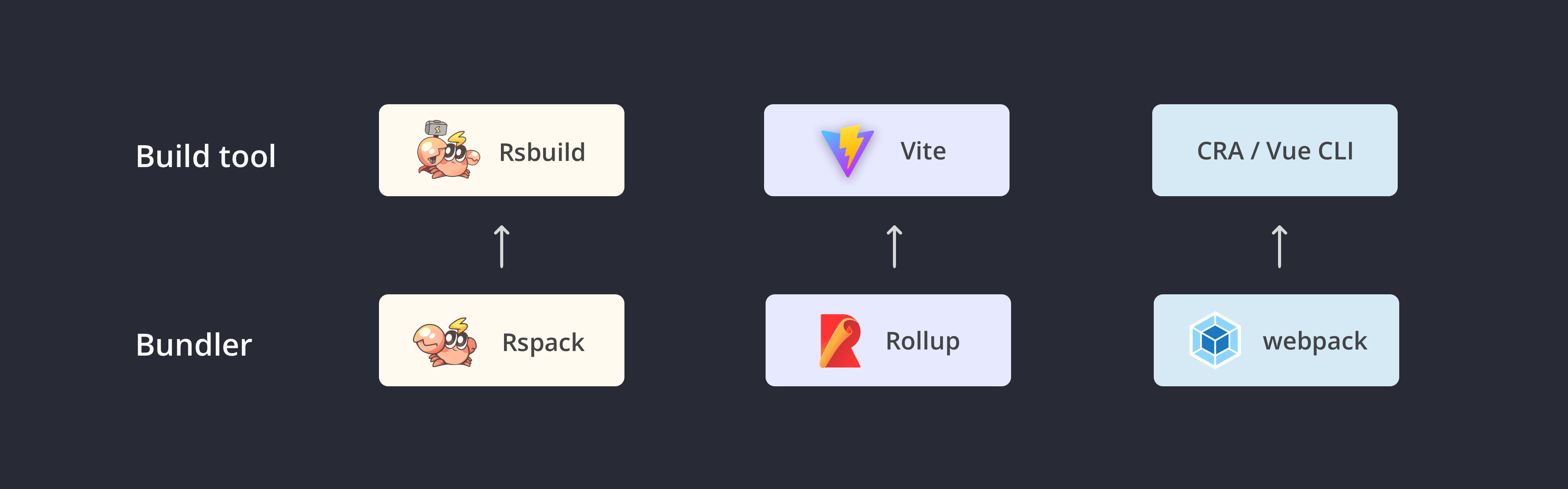
<p><img src="https://assets.rspack.rs/rsbuild/assets/rsbuild-1-0-build-tools.png" alt=""/></p>
<p>Rsbuild is built on top of Rspack. We designed Rsbuild with an easy-to-use, TypeScript-friendly API and a set of carefully designed configurations to fully leverage the Rspack&#x27;s build performance while reducing configuration complexity and high up-front costs.</p>
<p>When developing Rsbuild, we learned best practices from the best tools in the community and focused on two usage scenarios:</p>
<ul>
<li>As a lightweight build tool: Helps developers quickly set up web applications with out-of-the-box support for CSR applications.</li>
<li>As a shared infrastructure: Provides <a href="/api/start/" class="rp-link">JavaScript API</a> and <a href="/plugins/dev/" class="rp-link">Plugin API</a> for higher-level tools and frameworks, allowing developers to easily build their tools or frameworks on top of Rsbuild.</li>
</ul>
<h2 class="rp-toc-include" id="performance"><a href="#performance" class="rp-header-anchor rp-link" aria-hidden="true">#</a>Performance</h2>
<p><strong>Rsbuild is currently the fastest build tool in the webpack and Rspack ecosystem</strong>. Here is a comparison between Rsbuild, Create React App, Vite, and Rspack CLI:</p>
<div class="rp-table-scroll-container rp-scrollbar"><table><thead><tr><th>Metric</th><th>Create React App</th><th>Vite (with SWC)</th><th>Rspack CLI</th><th>Rsbuild</th><th>Rsbuild vs CRA</th></tr></thead><tbody><tr><td>dev startup time (1000 modules)</td><td>5.47s</td><td>1.29s</td><td>0.66s</td><td>0.39s</td><td><strong>14x faster</strong></td></tr><tr><td>build time (1000 modules)</td><td>5.69s</td><td>1.39s</td><td>0.51s</td><td>0.27s</td><td><strong>20x faster</strong></td></tr><tr><td>npm dependencies count</td><td>1241</td><td>15</td><td>283</td><td>14</td><td><strong>99% reduction</strong></td></tr><tr><td>npm install size</td><td>146.6MB</td><td>56.3MB</td><td>75.1MB</td><td>59.1MB</td><td><strong>60% reduction</strong></td></tr></tbody></table></div>
<p>Compared to the <a href="https://npmjs.com/package/@rspack/cli" target="_blank" rel="noopener noreferrer" class="rp-link">Rspack CLI</a>, Rsbuild provides a richer set of features while demonstrating superior performance.</p>
<p>This is because Rspack CLI needs to maintain compatibility with the <a href="https://npmjs.com/package/webpack-cli" target="_blank" rel="noopener noreferrer" class="rp-link">webpack-cli</a>. It relies on the <code>webpack-dev-server</code> and provides the same default behavior as webpack, which has some performance limitations. Rsbuild, on the other hand, is designed for modern web development. We have reimplemented a lighter CLI, dev server, and build process for Rsbuild, resulting in faster startup speeds and fewer npm dependencies.</p>
<blockquote>
<p>See the <a href="/guide/start/" class="rp-link">Rsbuild Introduction</a> for more comparisons between Rsbuild, webpack, Vue CLI, and Vite.</p>
</blockquote>
<h2 class="rp-toc-include" id="who-is-using"><a href="#who-is-using" class="rp-header-anchor rp-link" aria-hidden="true">#</a>Who is using</h2>
<p>In the <a href="https://rspack.rs/blog/announcing-1-0" target="_blank" rel="noopener noreferrer" class="rp-link">Rspack 1.0 Announcement</a>, we introduced that Rspack is growing rapidly, with almost half of Rspack users using Rsbuild and giving us lots of positive feedback.</p>
<p>At ByteDance, we use Rsbuild as the cornerstone of our internal web frameworks to support thousands of web projects. These projects cover diverse use cases, including desktop web applications, mobile web applications, cross-platform web applications, documentation sites, and more.</p>
<p>For the community, we have open-sourced a high-performance toolchain based on Rsbuild, including the static site generator <a href="https://github.com/web-infra-dev/rspress" target="_blank" rel="noopener noreferrer" class="rp-link">Rspress</a>, the library development tool <a href="https://github.com/web-infra-dev/rslib" target="_blank" rel="noopener noreferrer" class="rp-link">Rslib</a>, the full-stack React framework <a href="https://github.com/web-infra-dev/modern.js" target="_blank" rel="noopener noreferrer" class="rp-link">Modern.js</a>, and the <a href="https://github.com/rstackjs/storybook-rsbuild" target="_blank" rel="noopener noreferrer" class="rp-link">Storybook Rsbuild</a>. The extensibility of Rsbuild allows these tools to flexibly integrate with Rsbuild and share its plugin ecosystem.</p>
<p>After releasing Rsbuild 1.0, we also plan to collaborate with some excellent teams like <a href="https://github.com/remix-run/remix" target="_blank" rel="noopener noreferrer" class="rp-link">Remix</a>, to bring Rsbuild to more web frameworks.</p>
<h2 class="rp-toc-include" id="plugin-ecosystem"><a href="#plugin-ecosystem" class="rp-header-anchor rp-link" aria-hidden="true">#</a>Plugin ecosystem</h2>
<p>The Rsbuild plugin ecosystem is constantly evolving. There are currently over 50 <a href="https://github.com/rstackjs/awesome-rstack#rsbuild-plugins" target="_blank" rel="noopener noreferrer" class="rp-link">Rsbuild plugins</a> available in the community. We provide several advanced features through plugins to support the development of production-grade applications, such as <a href="https://github.com/rstackjs/rsbuild-plugin-type-check" target="_blank" rel="noopener noreferrer" class="rp-link">type checking</a>, <a href="https://github.com/rstackjs/rsbuild-plugin-check-syntax" target="_blank" rel="noopener noreferrer" class="rp-link">compatibility checking</a>, and <a href="https://github.com/rstackjs/rsbuild-plugin-assets-retry" target="_blank" rel="noopener noreferrer" class="rp-link">static assets retry</a>. Thanks to Rspack&#x27;s compatibility with webpack, Rsbuild also supports most webpack plugins.</p>
<p>Compared to webpack or Rspack, the Rsbuild plugin API is more straightforward and beginner-friendly, allowing developers to easily create plugins to meet their specific needs.</p>
<p>For example, let us implement a plugin that outputs a file to the dist directory. The implementation comparison between Rspack and Rsbuild is as follows:</p>
<p><img src="https://assets.rspack.rs/rsbuild/assets/rsbuild-1-0-plugin-compare.png" alt=""/></p>
<p>As shown, the API style of the Rsbuild plugin is similar to esbuild, it can be defined by a function. The plugin hooks have been simplified to avoid verbose APIs, making plugin development more intuitive.</p>
<h2 class="rp-toc-include" id="how-to-use-10"><a href="#how-to-use-10" class="rp-header-anchor rp-link" aria-hidden="true">#</a>How to use 1.0</h2>
<ul>
<li>If you haven&#x27;t used Rsbuild before, you can experience it through the <a href="https://codesandbox.io/p/github/rstackjs/rsbuild-codesandbox-example" target="_blank" rel="noopener noreferrer" class="rp-link">CodeSandbox example</a> or refer to the <a href="/guide/start/quick-start" class="rp-link">Quick start</a> to use Rsbuild.</li>
<li>If you are using Rsbuild 0.7 or earlier, please note that 1.0 includes some breaking changes. You can refer to the <a href="/guide/upgrade/v0-to-v1" class="rp-link">Migrating from 0.x</a> document to upgrade.</li>
<li>Rsbuild also provides migration guides for projects that use webpack, CRA, Vue CLI, etc. See <a href="/guide/start/quick-start#migrate-from-existing-projects" class="rp-link">Migrate from Existing Projects</a>.</li>
</ul>
<blockquote>
<p>Give a star 🌟 to the <a href="https://github.com/web-infra-dev/rsbuild" target="_blank" rel="noopener noreferrer" class="rp-link">Rsbuild GitHub repository</a>.</p>
</blockquote>
<h2 class="rp-toc-include" id="whats-next"><a href="#whats-next" class="rp-header-anchor rp-link" aria-hidden="true">#</a>What&#x27;s next</h2>
<p>Rsbuild 1.0 provides several advanced features for the development of enterprise applications and higher-level tools, such as the <a href="/guide/advanced/environments" class="rp-link">multi-environment build API</a>, <a href="/guide/advanced/ssr" class="rp-link">SSR API</a>, <a href="/plugins/dev/" class="rp-link">plugin API</a>, <a href="/guide/advanced/module-federation" class="rp-link">Module Federation support</a>, and <a href="https://github.com/web-infra-dev/rslib" target="_blank" rel="noopener noreferrer" class="rp-link">library build (Rslib)</a>. We plan to continue to enhance these features to better support the development of the Rsbuild ecosystem.</p>
<p>In the next 12 to 18 months, Rsbuild will evolve together with Rspack, adopting Rspack&#x27;s new features as soon as they become available. These features include persistent caching, faster HMR, and TypeScript-based optimizations. For more details, see <a href="https://rspack.rs/blog/announcing-1-0#whats-next" target="_blank" rel="noopener noreferrer" class="rp-link">Rspack - What&#x27;s next</a>.</p>
<p>Finally, a big thank you to all the developers who have contributed to Rsbuild ❤️:</p>
<p><img src="https://assets.rspack.rs/rsbuild/assets/rsbuild-1-0-contributors.png" alt=""/></p><!--/$-->]]></content>
    </entry>
    <entry>
        <title type="html"><![CDATA[Announcing Rsbuild 0.7]]></title>
        <id>/blog/v0-7</id>
        <link href="https://rsbuild.rs/blog/v0-7"/>
        <updated>2024-05-28T18:00:00.000Z</updated>
        <summary type="html"><![CDATA[Rsbuild 0.7 adds Storybook support, faster Sass compilation, and typed CSS Modules.]]></summary>
        <content type="html"><![CDATA[<!--$--><p><em>May 28, 2024</em></p>
<h1 class="rp-toc-include" id="announcing-rsbuild-07"><a href="#announcing-rsbuild-07" class="rp-header-anchor rp-link" aria-hidden="true">#</a>Announcing Rsbuild 0.7<!-- --> </h1><div class="rp-not-doc rp-llms-container"><button class="rp-not-doc rp-llms-button rp-llms-copy-button"><div class="rp-llms-copy-button__icon-wrapper"><svg xmlns="http://www.w3.org/2000/svg" width="32" height="32" viewBox="0 0 24 24" class="rp-llms-copy-button__icon-success"><path fill="currentColor" d="m9.55 18-5.7-5.7 1.425-1.425L9.55 15.15l9.175-9.175L20.15 7.4z"></path></svg><svg xmlns="http://www.w3.org/2000/svg" width="32" height="32" viewBox="0 0 24 24" class="rp-llms-copy-button__icon-copy"><path fill="currentColor" d="M20 8v12H8V8zm0-2H8a2 2 0 0 0-2 2v12a2 2 0 0 0 2 2h12a2 2 0 0 0 2-2V8a2 2 0 0 0-2-2"></path><path fill="currentColor" d="M4 16H2V4a2 2 0 0 1 2-2h12v2H4Z"></path></svg></div><span>Copy Markdown</span></button><button class="rp-llms-button rp-llms-view-options__trigger "><svg width="1em" height="1em" viewBox="0 0 32 32" class="rp-llms-view-options__arrow "><path fill="currentColor" d="M16 22 6 12l1.4-1.4 8.6 8.6 8.6-8.6L26 12z"></path></svg></button></div>
<p><img src="https://assets.rspack.rs/rsbuild/rsbuild-banner-v0-7.png" alt=""/></p>
<p>Rsbuild 0.7 has been released with Rspack 0.7!</p>
<p>This is the last minor release before the Rsbuild 1.0. After this, the Rspack team will focus on the development of 1.0 and aim to launch the Rspack / Rsbuild 1.0 alpha version soon.</p>
<p>Notable changes in Rsbuild 0.7:</p>
<ul>
<li><a href="#support-for-storybook" class="rp-link">Support for Storybook</a></li>
<li><a href="#faster-sass-compilation" class="rp-link">Faster Sass Compilation</a></li>
<li><a href="#better-css-supports" class="rp-link">Better CSS supports</a></li>
<li><a href="#typed-css-modules" class="rp-link">Typed CSS Modules</a></li>
<li><a href="#esmcjs-exports" class="rp-link">ESM/CJS Exports</a></li>
<li><a href="#breaking-changes" class="rp-link">Breaking Changes</a></li>
</ul>
<h2 class="rp-toc-include" id="support-for-storybook"><a href="#support-for-storybook" class="rp-header-anchor rp-link" aria-hidden="true">#</a>Support for Storybook</h2>
<p>Rsbuild now supports Storybook!</p>
<p><a href="https://github.com/rstackjs/storybook-rsbuild" target="_blank" rel="noopener noreferrer" class="rp-link">storybook-builder-rsbuild</a> is a Storybook builder based on Storybook v8 and Rsbuild that allows you to quickly build your components and stories.</p>
<p><img src="https://assets.rspack.rs/rsbuild/rsbuild-banner-with-storybook.png" alt=""/></p>
<ul>
<li>For projects using Rsbuild, you can now quickly integrate Storybook and reuse your existing Rsbuild config.</li>
<li>For projects using the Storybook webpack builder, you can now upgrade to Rsbuild and <strong>get ~5x faster build performance</strong>.</li>
</ul>
<p>We provide <code>storybook-react-rsbuild</code> and <code>storybook-vue3-rsbuild</code> to support React and Vue 3. For example, to integrate React:</p>
<div class="rp-codeblock language-js"><div class="rp-codeblock__title">.storybook/main.js</div><div class="rp-codeblock__content"><div class="rp-codeblock__content__scroll-container rp-scrollbar rp-scrollbar--always"><pre class="shiki css-variables" style="background-color:var(--shiki-background);color:var(--shiki-foreground)" tabindex="0" data-lang="js" data-title=".storybook/main.js"><code><span class="line"><span style="color:var(--shiki-token-keyword)">import</span><span style="color:var(--shiki-foreground)"> { StorybookConfig } </span><span style="color:var(--shiki-token-keyword)">from</span><span style="color:var(--shiki-token-string-expression)"> &#x27;storybook-react-rsbuild&#x27;</span><span style="color:var(--shiki-foreground)">;</span></span>
<span class="line"></span>
<span class="line"><span style="color:var(--shiki-token-keyword)">const</span><span style="color:var(--shiki-token-constant)"> config</span><span style="color:var(--shiki-token-keyword)">:</span><span style="color:var(--shiki-token-function)"> StorybookConfig</span><span style="color:var(--shiki-token-keyword)"> =</span><span style="color:var(--shiki-foreground)"> {</span></span>
<span class="line"><span style="color:var(--shiki-foreground)">  framework</span><span style="color:var(--shiki-token-keyword)">:</span><span style="color:var(--shiki-token-string-expression)"> &#x27;storybook-react-rsbuild&#x27;</span><span style="color:var(--shiki-token-punctuation)">,</span></span>
<span class="line"><span style="color:var(--shiki-foreground)">};</span></span>
<span class="line"></span>
<span class="line"><span style="color:var(--shiki-token-keyword)">export</span><span style="color:var(--shiki-token-keyword)"> default</span><span style="color:var(--shiki-foreground)"> config;</span></span></code></pre></div><div class="rp-code-button-group"><button class="rp-code-button-group__button rp-code-wrap-button" title="Toggle code wrap"><svg xmlns="http://www.w3.org/2000/svg" width="32" height="32" viewBox="0 0 24 24" class="rp-code-button-group__icon rp-code-button-group__icon--wrapped"><path fill="currentColor" d="M21 5H3v2h18zM3 19h7v-2H3zm0-6h15c1 0 2 .43 2 2s-1 2-2 2h-2v-2l-4 3 4 3v-2h2c2.95 0 4-1.27 4-4 0-2.72-1-4-4-4H3z"></path></svg><svg xmlns="http://www.w3.org/2000/svg" width="32" height="32" viewBox="0 0 24 24" class="rp-code-button-group__icon rp-code-button-group__icon--wrap"><path fill="currentColor" d="M16 7H3V5h13zM3 19h13v-2H3zm19-7-4-3v2H3v2h15v2z"></path></svg></button><button class="rp-code-button-group__button rp-code-copy-button" title="Copy code"><svg xmlns="http://www.w3.org/2000/svg" width="32" height="32" viewBox="0 0 24 24" class="rp-code-button-group__icon rp-code-copy-button__icon rp-code-copy-button__icon--copy"><path fill="currentColor" d="M20 8v12H8V8zm0-2H8a2 2 0 0 0-2 2v12a2 2 0 0 0 2 2h12a2 2 0 0 0 2-2V8a2 2 0 0 0-2-2"></path><path fill="currentColor" d="M4 16H2V4a2 2 0 0 1 2-2h12v2H4Z"></path></svg><svg xmlns="http://www.w3.org/2000/svg" width="32" height="32" viewBox="0 0 24 24" class="rp-code-button-group__icon rp-code-copy-button__icon rp-code-copy-button__icon--success"><path fill="currentColor" d="m9.55 18-5.7-5.7 1.425-1.425L9.55 15.15l9.175-9.175L20.15 7.4z"></path></svg></button></div></div></div>
<p><img src="https://assets.rspack.rs/rsbuild/assets/storybook-rsbuild-preview.png" alt=""/></p>
<blockquote>
<p>For more usage, please refer to <a href="https://github.com/rstackjs/storybook-rsbuild" target="_blank" rel="noopener noreferrer" class="rp-link">storybook-rsbuild repository</a>.</p>
</blockquote>
<h2 class="rp-toc-include" id="faster-sass-compilation"><a href="#faster-sass-compilation" class="rp-header-anchor rp-link" aria-hidden="true">#</a>Faster Sass compilation</h2>
<p>In Rsbuild 0.7, <strong>Sass compilation is 3~10 times faster</strong>. The performance improvements are particularly noticeable on large projects.</p>
<p>Comparison of build times for Rsbuild 0.6 and 0.7 when compiling Bootstrap&#x27;s Sass code:</p>
<p><img src="https://assets.rspack.rs/rsbuild/assets/sass-embedded-compare.jpeg" alt=""/></p>
<p>This improvement is due to Rsbuild&#x27;s default use of <a href="https://npmjs.com/package/sass-embedded" target="_blank" rel="noopener noreferrer" class="rp-link">sass-embedded</a>, a JavaScript wrapper around the native Dart Sass executable that provides a consistent API and superior performance.</p>
<p>Rsbuild has also enabled the latest sass-loader&#x27;s <a href="https://github.com/webpack/sass-loader/releases/tag/v14.2.0" target="_blank" rel="noopener noreferrer" class="rp-link">modern-compiler</a> API. This can enable Sass&#x27;s shared resources feature, which allows the same compiler process to be reused when compiling multiple files, improving build performance.</p>
<h2 class="rp-toc-include" id="better-css-supports"><a href="#better-css-supports" class="rp-header-anchor rp-link" aria-hidden="true">#</a>Better CSS supports</h2>
<p>Rsbuild now uses <a href="https://rspack.rs/plugins/rspack/css-extract-rspack-plugin" target="_blank" rel="noopener noreferrer" class="rp-link">CssExtractRspackPlugin</a> to extract CSS into separate files, rather than using the <a href="https://rspack.rs/config/experiments#experimentscss" target="_blank" rel="noopener noreferrer" class="rp-link">experimental.css</a> config to do so.</p>
<p>This allows Rsbuild to support more CSS features, including:</p>
<ul>
<li>Support for using <code>&lt;style module&gt;</code> in the Vue SFC:</li>
</ul>
<div class="rp-codeblock language-html"><div class="rp-codeblock__title">index.vue</div><div class="rp-codeblock__content"><div class="rp-codeblock__content__scroll-container rp-scrollbar rp-scrollbar--always"><pre class="shiki css-variables" style="background-color:var(--shiki-background);color:var(--shiki-foreground)" tabindex="0" data-lang="html" data-title="index.vue"><code><span class="line"><span style="color:var(--shiki-foreground)">&lt;</span><span style="color:var(--shiki-token-string-expression)">template</span><span style="color:var(--shiki-foreground)">&gt;</span></span>
<span class="line"><span style="color:var(--shiki-foreground)">  &lt;</span><span style="color:var(--shiki-token-string-expression)">p</span><span style="color:var(--shiki-token-function)"> :class</span><span style="color:var(--shiki-token-keyword)">=</span><span style="color:var(--shiki-token-string-expression)">&quot;$style.red&quot;</span><span style="color:var(--shiki-foreground)">&gt;Red&lt;/</span><span style="color:var(--shiki-token-string-expression)">p</span><span style="color:var(--shiki-foreground)">&gt;</span></span>
<span class="line"><span style="color:var(--shiki-foreground)">&lt;/</span><span style="color:var(--shiki-token-string-expression)">template</span><span style="color:var(--shiki-foreground)">&gt;</span></span>
<span class="line"></span>
<span class="line"><span style="color:var(--shiki-foreground)">&lt;</span><span style="color:var(--shiki-token-string-expression)">style</span><span style="color:var(--shiki-token-function)"> module</span><span style="color:var(--shiki-foreground)">&gt;</span></span>
<span class="line"><span style="color:var(--shiki-token-function)">  .red</span><span style="color:var(--shiki-foreground)"> {</span></span>
<span class="line"><span style="color:var(--shiki-token-constant)">    color</span><span style="color:var(--shiki-token-keyword)">:</span><span style="color:var(--shiki-token-constant)"> red</span><span style="color:var(--shiki-foreground)">;</span></span>
<span class="line"><span style="color:var(--shiki-foreground)">  }</span></span>
<span class="line"><span style="color:var(--shiki-foreground)">&lt;/</span><span style="color:var(--shiki-token-string-expression)">style</span><span style="color:var(--shiki-foreground)">&gt;</span></span></code></pre></div><div class="rp-code-button-group"><button class="rp-code-button-group__button rp-code-wrap-button" title="Toggle code wrap"><svg xmlns="http://www.w3.org/2000/svg" width="32" height="32" viewBox="0 0 24 24" class="rp-code-button-group__icon rp-code-button-group__icon--wrapped"><path fill="currentColor" d="M21 5H3v2h18zM3 19h7v-2H3zm0-6h15c1 0 2 .43 2 2s-1 2-2 2h-2v-2l-4 3 4 3v-2h2c2.95 0 4-1.27 4-4 0-2.72-1-4-4-4H3z"></path></svg><svg xmlns="http://www.w3.org/2000/svg" width="32" height="32" viewBox="0 0 24 24" class="rp-code-button-group__icon rp-code-button-group__icon--wrap"><path fill="currentColor" d="M16 7H3V5h13zM3 19h13v-2H3zm19-7-4-3v2H3v2h15v2z"></path></svg></button><button class="rp-code-button-group__button rp-code-copy-button" title="Copy code"><svg xmlns="http://www.w3.org/2000/svg" width="32" height="32" viewBox="0 0 24 24" class="rp-code-button-group__icon rp-code-copy-button__icon rp-code-copy-button__icon--copy"><path fill="currentColor" d="M20 8v12H8V8zm0-2H8a2 2 0 0 0-2 2v12a2 2 0 0 0 2 2h12a2 2 0 0 0 2-2V8a2 2 0 0 0-2-2"></path><path fill="currentColor" d="M4 16H2V4a2 2 0 0 1 2-2h12v2H4Z"></path></svg><svg xmlns="http://www.w3.org/2000/svg" width="32" height="32" viewBox="0 0 24 24" class="rp-code-button-group__icon rp-code-copy-button__icon rp-code-copy-button__icon--success"><path fill="currentColor" d="m9.55 18-5.7-5.7 1.425-1.425L9.55 15.15l9.175-9.175L20.15 7.4z"></path></svg></button></div></div></div>
<ul>
<li>Support for complex CSS Modules <code>:global()</code> syntax</li>
</ul>
<div class="rp-codeblock language-css"><div class="rp-codeblock__title">style.module.css</div><div class="rp-codeblock__content"><div class="rp-codeblock__content__scroll-container rp-scrollbar rp-scrollbar--always"><pre class="shiki css-variables" style="background-color:var(--shiki-background);color:var(--shiki-foreground)" tabindex="0" data-lang="css" data-title="style.module.css"><code><span class="line"><span style="color:var(--shiki-foreground)">:local(</span><span style="color:var(--shiki-token-function)">.parent</span><span style="color:var(--shiki-foreground)">):global(</span><span style="color:var(--shiki-token-function)">.child</span><span style="color:var(--shiki-foreground)">) </span><span style="color:var(--shiki-token-keyword)">&gt;</span><span style="color:var(--shiki-token-string-expression)"> ul</span><span style="color:var(--shiki-foreground)"> {</span></span>
<span class="line"><span style="color:var(--shiki-token-constant)">  color</span><span style="color:var(--shiki-token-keyword)">:</span><span style="color:var(--shiki-token-constant)"> red</span><span style="color:var(--shiki-foreground)">;</span></span>
<span class="line"><span style="color:var(--shiki-foreground)">}</span></span></code></pre></div><div class="rp-code-button-group"><button class="rp-code-button-group__button rp-code-wrap-button" title="Toggle code wrap"><svg xmlns="http://www.w3.org/2000/svg" width="32" height="32" viewBox="0 0 24 24" class="rp-code-button-group__icon rp-code-button-group__icon--wrapped"><path fill="currentColor" d="M21 5H3v2h18zM3 19h7v-2H3zm0-6h15c1 0 2 .43 2 2s-1 2-2 2h-2v-2l-4 3 4 3v-2h2c2.95 0 4-1.27 4-4 0-2.72-1-4-4-4H3z"></path></svg><svg xmlns="http://www.w3.org/2000/svg" width="32" height="32" viewBox="0 0 24 24" class="rp-code-button-group__icon rp-code-button-group__icon--wrap"><path fill="currentColor" d="M16 7H3V5h13zM3 19h13v-2H3zm19-7-4-3v2H3v2h15v2z"></path></svg></button><button class="rp-code-button-group__button rp-code-copy-button" title="Copy code"><svg xmlns="http://www.w3.org/2000/svg" width="32" height="32" viewBox="0 0 24 24" class="rp-code-button-group__icon rp-code-copy-button__icon rp-code-copy-button__icon--copy"><path fill="currentColor" d="M20 8v12H8V8zm0-2H8a2 2 0 0 0-2 2v12a2 2 0 0 0 2 2h12a2 2 0 0 0 2-2V8a2 2 0 0 0-2-2"></path><path fill="currentColor" d="M4 16H2V4a2 2 0 0 1 2-2h12v2H4Z"></path></svg><svg xmlns="http://www.w3.org/2000/svg" width="32" height="32" viewBox="0 0 24 24" class="rp-code-button-group__icon rp-code-copy-button__icon rp-code-copy-button__icon--success"><path fill="currentColor" d="m9.55 18-5.7-5.7 1.425-1.425L9.55 15.15l9.175-9.175L20.15 7.4z"></path></svg></button></div></div></div>
<ul>
<li>Support for more CSS Modules options, such as <a href="/config/output/css-modules#cssmodulesexportglobals" class="rp-link">cssModules.exportGlobals</a></li>
<li>Now you can use <a href="/config/tools/css-extract" class="rp-link">tools.cssExtract</a> to configure CssExtractRspackPlugin.</li>
</ul>
<h2 class="rp-toc-include" id="typed-css-modules"><a href="#typed-css-modules" class="rp-header-anchor rp-link" aria-hidden="true">#</a>Typed CSS Modules</h2>
<p>Rsbuild 0.7 added a new <a href="https://github.com/rstackjs/rsbuild-plugin-typed-css-modules" target="_blank" rel="noopener noreferrer" class="rp-link">Typed CSS Modules plugin</a>, which is used to generate type declaration files for CSS Modules in the project.</p>
<p>When you use CSS Modules in a TypeScript project, the default type definition is as follows. It can only provide basic type support, and cannot accurately prompt which class names are exported by CSS Modules.</p>
<div class="rp-codeblock language-ts"><div class="rp-codeblock__title">src/env.d.ts</div><div class="rp-codeblock__content"><div class="rp-codeblock__content__scroll-container rp-scrollbar rp-scrollbar--always"><pre class="shiki css-variables" style="background-color:var(--shiki-background);color:var(--shiki-foreground)" tabindex="0" data-lang="ts" data-title="src/env.d.ts"><code><span class="line"><span style="color:var(--shiki-token-keyword)">declare</span><span style="color:var(--shiki-token-keyword)"> module</span><span style="color:var(--shiki-token-string-expression)"> &#x27;*.module.css&#x27;</span><span style="color:var(--shiki-foreground)"> {</span></span>
<span class="line"><span style="color:var(--shiki-token-keyword)">  const</span><span style="color:var(--shiki-token-constant)"> classes</span><span style="color:var(--shiki-token-keyword)">:</span><span style="color:var(--shiki-foreground)"> { </span><span style="color:var(--shiki-token-keyword)">readonly</span><span style="color:var(--shiki-foreground)"> [key</span><span style="color:var(--shiki-token-keyword)">:</span><span style="color:var(--shiki-token-constant)"> string</span><span style="color:var(--shiki-foreground)">]</span><span style="color:var(--shiki-token-keyword)">:</span><span style="color:var(--shiki-token-constant)"> string</span><span style="color:var(--shiki-foreground)"> };</span></span>
<span class="line"><span style="color:var(--shiki-token-keyword)">  export</span><span style="color:var(--shiki-token-keyword)"> default</span><span style="color:var(--shiki-foreground)"> classes;</span></span>
<span class="line"><span style="color:var(--shiki-foreground)">}</span></span></code></pre></div><div class="rp-code-button-group"><button class="rp-code-button-group__button rp-code-wrap-button" title="Toggle code wrap"><svg xmlns="http://www.w3.org/2000/svg" width="32" height="32" viewBox="0 0 24 24" class="rp-code-button-group__icon rp-code-button-group__icon--wrapped"><path fill="currentColor" d="M21 5H3v2h18zM3 19h7v-2H3zm0-6h15c1 0 2 .43 2 2s-1 2-2 2h-2v-2l-4 3 4 3v-2h2c2.95 0 4-1.27 4-4 0-2.72-1-4-4-4H3z"></path></svg><svg xmlns="http://www.w3.org/2000/svg" width="32" height="32" viewBox="0 0 24 24" class="rp-code-button-group__icon rp-code-button-group__icon--wrap"><path fill="currentColor" d="M16 7H3V5h13zM3 19h13v-2H3zm19-7-4-3v2H3v2h15v2z"></path></svg></button><button class="rp-code-button-group__button rp-code-copy-button" title="Copy code"><svg xmlns="http://www.w3.org/2000/svg" width="32" height="32" viewBox="0 0 24 24" class="rp-code-button-group__icon rp-code-copy-button__icon rp-code-copy-button__icon--copy"><path fill="currentColor" d="M20 8v12H8V8zm0-2H8a2 2 0 0 0-2 2v12a2 2 0 0 0 2 2h12a2 2 0 0 0 2-2V8a2 2 0 0 0-2-2"></path><path fill="currentColor" d="M4 16H2V4a2 2 0 0 1 2-2h12v2H4Z"></path></svg><svg xmlns="http://www.w3.org/2000/svg" width="32" height="32" viewBox="0 0 24 24" class="rp-code-button-group__icon rp-code-copy-button__icon rp-code-copy-button__icon--success"><path fill="currentColor" d="m9.55 18-5.7-5.7 1.425-1.425L9.55 15.15l9.175-9.175L20.15 7.4z"></path></svg></button></div></div></div>
<p>After using the Typed CSS Modules plugin, Rsbuild will generate type declaration files for all CSS Modules in the project, providing accurate type hints.</p>
<p>For example, create two files named <code>src/index.ts</code> and <code>src/index.module.css</code>:</p>
<div class="rp-codeblock language-tsx"><div class="rp-codeblock__title">src/index.ts</div><div class="rp-codeblock__content"><div class="rp-codeblock__content__scroll-container rp-scrollbar rp-scrollbar--always"><pre class="shiki css-variables" style="background-color:var(--shiki-background);color:var(--shiki-foreground)" tabindex="0" data-lang="tsx" data-title="src/index.ts"><code><span class="line"><span style="color:var(--shiki-token-keyword)">import</span><span style="color:var(--shiki-foreground)"> styles </span><span style="color:var(--shiki-token-keyword)">from</span><span style="color:var(--shiki-token-string-expression)"> &#x27;./index.module.css&#x27;</span><span style="color:var(--shiki-foreground)">;</span></span>
<span class="line"></span>
<span class="line"><span style="color:var(--shiki-token-constant)">console</span><span style="color:var(--shiki-token-function)">.log</span><span style="color:var(--shiki-foreground)">(</span><span style="color:var(--shiki-token-constant)">styles</span><span style="color:var(--shiki-foreground)">.pageHeader);</span></span></code></pre></div><div class="rp-code-button-group"><button class="rp-code-button-group__button rp-code-wrap-button" title="Toggle code wrap"><svg xmlns="http://www.w3.org/2000/svg" width="32" height="32" viewBox="0 0 24 24" class="rp-code-button-group__icon rp-code-button-group__icon--wrapped"><path fill="currentColor" d="M21 5H3v2h18zM3 19h7v-2H3zm0-6h15c1 0 2 .43 2 2s-1 2-2 2h-2v-2l-4 3 4 3v-2h2c2.95 0 4-1.27 4-4 0-2.72-1-4-4-4H3z"></path></svg><svg xmlns="http://www.w3.org/2000/svg" width="32" height="32" viewBox="0 0 24 24" class="rp-code-button-group__icon rp-code-button-group__icon--wrap"><path fill="currentColor" d="M16 7H3V5h13zM3 19h13v-2H3zm19-7-4-3v2H3v2h15v2z"></path></svg></button><button class="rp-code-button-group__button rp-code-copy-button" title="Copy code"><svg xmlns="http://www.w3.org/2000/svg" width="32" height="32" viewBox="0 0 24 24" class="rp-code-button-group__icon rp-code-copy-button__icon rp-code-copy-button__icon--copy"><path fill="currentColor" d="M20 8v12H8V8zm0-2H8a2 2 0 0 0-2 2v12a2 2 0 0 0 2 2h12a2 2 0 0 0 2-2V8a2 2 0 0 0-2-2"></path><path fill="currentColor" d="M4 16H2V4a2 2 0 0 1 2-2h12v2H4Z"></path></svg><svg xmlns="http://www.w3.org/2000/svg" width="32" height="32" viewBox="0 0 24 24" class="rp-code-button-group__icon rp-code-copy-button__icon rp-code-copy-button__icon--success"><path fill="currentColor" d="m9.55 18-5.7-5.7 1.425-1.425L9.55 15.15l9.175-9.175L20.15 7.4z"></path></svg></button></div></div></div>
<div class="rp-codeblock language-css"><div class="rp-codeblock__title">index.module.css</div><div class="rp-codeblock__content"><div class="rp-codeblock__content__scroll-container rp-scrollbar rp-scrollbar--always"><pre class="shiki css-variables" style="background-color:var(--shiki-background);color:var(--shiki-foreground)" tabindex="0" data-lang="css" data-title="index.module.css"><code><span class="line"><span style="color:var(--shiki-token-function)">.page-header</span><span style="color:var(--shiki-foreground)"> {</span></span>
<span class="line"><span style="color:var(--shiki-token-constant)">  color</span><span style="color:var(--shiki-token-keyword)">:</span><span style="color:var(--shiki-token-constant)"> black</span><span style="color:var(--shiki-foreground)">;</span></span>
<span class="line"><span style="color:var(--shiki-foreground)">}</span></span></code></pre></div><div class="rp-code-button-group"><button class="rp-code-button-group__button rp-code-wrap-button" title="Toggle code wrap"><svg xmlns="http://www.w3.org/2000/svg" width="32" height="32" viewBox="0 0 24 24" class="rp-code-button-group__icon rp-code-button-group__icon--wrapped"><path fill="currentColor" d="M21 5H3v2h18zM3 19h7v-2H3zm0-6h15c1 0 2 .43 2 2s-1 2-2 2h-2v-2l-4 3 4 3v-2h2c2.95 0 4-1.27 4-4 0-2.72-1-4-4-4H3z"></path></svg><svg xmlns="http://www.w3.org/2000/svg" width="32" height="32" viewBox="0 0 24 24" class="rp-code-button-group__icon rp-code-button-group__icon--wrap"><path fill="currentColor" d="M16 7H3V5h13zM3 19h13v-2H3zm19-7-4-3v2H3v2h15v2z"></path></svg></button><button class="rp-code-button-group__button rp-code-copy-button" title="Copy code"><svg xmlns="http://www.w3.org/2000/svg" width="32" height="32" viewBox="0 0 24 24" class="rp-code-button-group__icon rp-code-copy-button__icon rp-code-copy-button__icon--copy"><path fill="currentColor" d="M20 8v12H8V8zm0-2H8a2 2 0 0 0-2 2v12a2 2 0 0 0 2 2h12a2 2 0 0 0 2-2V8a2 2 0 0 0-2-2"></path><path fill="currentColor" d="M4 16H2V4a2 2 0 0 1 2-2h12v2H4Z"></path></svg><svg xmlns="http://www.w3.org/2000/svg" width="32" height="32" viewBox="0 0 24 24" class="rp-code-button-group__icon rp-code-copy-button__icon rp-code-copy-button__icon--success"><path fill="currentColor" d="m9.55 18-5.7-5.7 1.425-1.425L9.55 15.15l9.175-9.175L20.15 7.4z"></path></svg></button></div></div></div>
<p>After building, Rsbuild will generate a <code>src/index.module.css.d.ts</code> type declaration file:</p>
<div class="rp-codeblock language-ts"><div class="rp-codeblock__title">src/index.module.css.d.ts</div><div class="rp-codeblock__content"><div class="rp-codeblock__content__scroll-container rp-scrollbar rp-scrollbar--always"><pre class="shiki css-variables" style="background-color:var(--shiki-background);color:var(--shiki-foreground)" tabindex="0" data-lang="ts" data-title="src/index.module.css.d.ts"><code><span class="line"><span style="color:var(--shiki-token-keyword)">interface</span><span style="color:var(--shiki-token-function)"> CssExports</span><span style="color:var(--shiki-foreground)"> {</span></span>
<span class="line"><span style="color:var(--shiki-token-string-expression)">  &#x27;page-header&#x27;</span><span style="color:var(--shiki-token-keyword)">:</span><span style="color:var(--shiki-token-constant)"> string</span><span style="color:var(--shiki-foreground)">;</span></span>
<span class="line"><span style="color:var(--shiki-foreground)">  pageHeader</span><span style="color:var(--shiki-token-keyword)">:</span><span style="color:var(--shiki-token-constant)"> string</span><span style="color:var(--shiki-foreground)">;</span></span>
<span class="line"><span style="color:var(--shiki-foreground)">}</span></span>
<span class="line"><span style="color:var(--shiki-token-keyword)">declare</span><span style="color:var(--shiki-token-keyword)"> const</span><span style="color:var(--shiki-token-constant)"> cssExports</span><span style="color:var(--shiki-token-keyword)">:</span><span style="color:var(--shiki-token-function)"> CssExports</span><span style="color:var(--shiki-foreground)">;</span></span>
<span class="line"><span style="color:var(--shiki-token-keyword)">export</span><span style="color:var(--shiki-token-keyword)"> default</span><span style="color:var(--shiki-foreground)"> cssExports;</span></span></code></pre></div><div class="rp-code-button-group"><button class="rp-code-button-group__button rp-code-wrap-button" title="Toggle code wrap"><svg xmlns="http://www.w3.org/2000/svg" width="32" height="32" viewBox="0 0 24 24" class="rp-code-button-group__icon rp-code-button-group__icon--wrapped"><path fill="currentColor" d="M21 5H3v2h18zM3 19h7v-2H3zm0-6h15c1 0 2 .43 2 2s-1 2-2 2h-2v-2l-4 3 4 3v-2h2c2.95 0 4-1.27 4-4 0-2.72-1-4-4-4H3z"></path></svg><svg xmlns="http://www.w3.org/2000/svg" width="32" height="32" viewBox="0 0 24 24" class="rp-code-button-group__icon rp-code-button-group__icon--wrap"><path fill="currentColor" d="M16 7H3V5h13zM3 19h13v-2H3zm19-7-4-3v2H3v2h15v2z"></path></svg></button><button class="rp-code-button-group__button rp-code-copy-button" title="Copy code"><svg xmlns="http://www.w3.org/2000/svg" width="32" height="32" viewBox="0 0 24 24" class="rp-code-button-group__icon rp-code-copy-button__icon rp-code-copy-button__icon--copy"><path fill="currentColor" d="M20 8v12H8V8zm0-2H8a2 2 0 0 0-2 2v12a2 2 0 0 0 2 2h12a2 2 0 0 0 2-2V8a2 2 0 0 0-2-2"></path><path fill="currentColor" d="M4 16H2V4a2 2 0 0 1 2-2h12v2H4Z"></path></svg><svg xmlns="http://www.w3.org/2000/svg" width="32" height="32" viewBox="0 0 24 24" class="rp-code-button-group__icon rp-code-copy-button__icon rp-code-copy-button__icon--success"><path fill="currentColor" d="m9.55 18-5.7-5.7 1.425-1.425L9.55 15.15l9.175-9.175L20.15 7.4z"></path></svg></button></div></div></div>
<p>Now when you open the <code>src/index.ts</code> file, you can see that the <code>styles</code> object already has an accurate type.</p>
<h2 class="rp-toc-include" id="esmcjs-exports"><a href="#esmcjs-exports" class="rp-header-anchor rp-link" aria-hidden="true">#</a>ESM/CJS Exports</h2>
<p>Now, all packages of Rsbuild provide exports in both ES modules and CommonJS formats, and <a href="https://nodejs.org/api/packages.html#type" target="_blank" rel="noopener noreferrer" class="rp-link">&quot;type&quot;=&quot;module&quot;</a> has been declared in the package.json.</p>
<p><img src="https://assets.rspack.rs/rsbuild/assets/rsbuild-dual-package-example.png" alt=""/></p>
<p>This allows you to use <code>import</code> or <code>require</code> to use the JavaScript API of Rsbuild:</p>
<div class="rp-codeblock language-js"><div class="rp-codeblock__content"><div class="rp-codeblock__content__scroll-container rp-scrollbar rp-scrollbar--always"><pre class="shiki css-variables" style="background-color:var(--shiki-background);color:var(--shiki-foreground)" tabindex="0" data-lang="js"><code><span class="line"><span style="color:var(--shiki-token-comment)">// ES module</span></span>
<span class="line"><span style="color:var(--shiki-token-keyword)">import</span><span style="color:var(--shiki-foreground)"> { createRsbuild } </span><span style="color:var(--shiki-token-keyword)">from</span><span style="color:var(--shiki-token-string-expression)"> &#x27;@rsbuild/core&#x27;</span><span style="color:var(--shiki-foreground)">;</span></span>
<span class="line"></span>
<span class="line"><span style="color:var(--shiki-token-comment)">// CommonJS</span></span>
<span class="line"><span style="color:var(--shiki-token-keyword)">const</span><span style="color:var(--shiki-foreground)"> { </span><span style="color:var(--shiki-token-constant)">createRsbuild</span><span style="color:var(--shiki-foreground)"> } </span><span style="color:var(--shiki-token-keyword)">=</span><span style="color:var(--shiki-token-function)"> require</span><span style="color:var(--shiki-foreground)">(</span><span style="color:var(--shiki-token-string-expression)">&#x27;@rsbuild/core&#x27;</span><span style="color:var(--shiki-foreground)">);</span></span></code></pre></div><div class="rp-code-button-group"><button class="rp-code-button-group__button rp-code-wrap-button" title="Toggle code wrap"><svg xmlns="http://www.w3.org/2000/svg" width="32" height="32" viewBox="0 0 24 24" class="rp-code-button-group__icon rp-code-button-group__icon--wrapped"><path fill="currentColor" d="M21 5H3v2h18zM3 19h7v-2H3zm0-6h15c1 0 2 .43 2 2s-1 2-2 2h-2v-2l-4 3 4 3v-2h2c2.95 0 4-1.27 4-4 0-2.72-1-4-4-4H3z"></path></svg><svg xmlns="http://www.w3.org/2000/svg" width="32" height="32" viewBox="0 0 24 24" class="rp-code-button-group__icon rp-code-button-group__icon--wrap"><path fill="currentColor" d="M16 7H3V5h13zM3 19h13v-2H3zm19-7-4-3v2H3v2h15v2z"></path></svg></button><button class="rp-code-button-group__button rp-code-copy-button" title="Copy code"><svg xmlns="http://www.w3.org/2000/svg" width="32" height="32" viewBox="0 0 24 24" class="rp-code-button-group__icon rp-code-copy-button__icon rp-code-copy-button__icon--copy"><path fill="currentColor" d="M20 8v12H8V8zm0-2H8a2 2 0 0 0-2 2v12a2 2 0 0 0 2 2h12a2 2 0 0 0 2-2V8a2 2 0 0 0-2-2"></path><path fill="currentColor" d="M4 16H2V4a2 2 0 0 1 2-2h12v2H4Z"></path></svg><svg xmlns="http://www.w3.org/2000/svg" width="32" height="32" viewBox="0 0 24 24" class="rp-code-button-group__icon rp-code-copy-button__icon rp-code-copy-button__icon--success"><path fill="currentColor" d="m9.55 18-5.7-5.7 1.425-1.425L9.55 15.15l9.175-9.175L20.15 7.4z"></path></svg></button></div></div></div>
<p>ESM/CJS interop is a tricky issue, so we will provide both formats for a long time to make it easier for more users to use.</p>
<h2 class="rp-toc-include" id="breaking-changes"><a href="#breaking-changes" class="rp-header-anchor rp-link" aria-hidden="true">#</a>Breaking changes</h2>
<h3 class="rp-toc-include" id="upgrade-rspack-to-07"><a href="#upgrade-rspack-to-07" class="rp-header-anchor rp-link" aria-hidden="true">#</a>Upgrade Rspack to 0.7</h3>
<p>Rsbuild has upgraded the dependent Rspack to version 0.7 and adapted to the breaking changes included in it. Typically, these breaking changes will not affect you.</p>
<p>In the new version, Rspack supports lazy compilation, which can significantly improve the dev startup time for large projects. Please refer to <a href="https://rspack.rs/blog/announcing-0-7" target="_blank" rel="noopener noreferrer" class="rp-link">Announcing Rspack 0.7</a> to learn more.</p>
<p>In Rsbuild, you can use <a href="/config/dev/lazy-compilation" class="rp-link">dev.lazyCompilation</a> to enable lazy compilation.</p>
<h3 class="rp-toc-include" id="sass-and-less-plugins"><a href="#sass-and-less-plugins" class="rp-header-anchor rp-link" aria-hidden="true">#</a>Sass and Less plugins</h3>
<p>Rsbuild&#x27;s Sass and Less plugins are now two separate npm packages instead of being built into <code>@rsbuild/core</code> as before. This change allows users to enable Sass and Less compilation as needed.</p>
<p>For example, projects using CSS solutions such as Tailwind CSS, CSS-in-JS, etc., no longer need to install the dependencies required for Sass and Less, <strong>saving about 7MB of disk space</strong>.</p>
<ul>
<li>If your project requires compiling <code>.scss</code> or <code>.sass</code> files, please install and register the <a href="/plugins/list/plugin-sass" class="rp-link">@rsbuild/plugin-sass</a> plugin:</li>
</ul>
<div class="rp-codeblock language-ts"><div class="rp-codeblock__title">rsbuild.config.ts</div><div class="rp-codeblock__content"><div class="rp-codeblock__content__scroll-container rp-scrollbar rp-scrollbar--always"><pre class="shiki css-variables" style="background-color:var(--shiki-background);color:var(--shiki-foreground)" tabindex="0" data-lang="ts" data-title="rsbuild.config.ts"><code><span class="line"><span style="color:var(--shiki-token-keyword)">import</span><span style="color:var(--shiki-foreground)"> { pluginSass } </span><span style="color:var(--shiki-token-keyword)">from</span><span style="color:var(--shiki-token-string-expression)"> &#x27;@rsbuild/plugin-sass&#x27;</span><span style="color:var(--shiki-foreground)">;</span></span>
<span class="line"></span>
<span class="line"><span style="color:var(--shiki-token-keyword)">export</span><span style="color:var(--shiki-token-keyword)"> default</span><span style="color:var(--shiki-foreground)"> {</span></span>
<span class="line"><span style="color:var(--shiki-foreground)">  plugins</span><span style="color:var(--shiki-token-keyword)">:</span><span style="color:var(--shiki-foreground)"> [</span><span style="color:var(--shiki-token-function)">pluginSass</span><span style="color:var(--shiki-foreground)">()]</span><span style="color:var(--shiki-token-punctuation)">,</span></span>
<span class="line"><span style="color:var(--shiki-foreground)">};</span></span></code></pre></div><div class="rp-code-button-group"><button class="rp-code-button-group__button rp-code-wrap-button" title="Toggle code wrap"><svg xmlns="http://www.w3.org/2000/svg" width="32" height="32" viewBox="0 0 24 24" class="rp-code-button-group__icon rp-code-button-group__icon--wrapped"><path fill="currentColor" d="M21 5H3v2h18zM3 19h7v-2H3zm0-6h15c1 0 2 .43 2 2s-1 2-2 2h-2v-2l-4 3 4 3v-2h2c2.95 0 4-1.27 4-4 0-2.72-1-4-4-4H3z"></path></svg><svg xmlns="http://www.w3.org/2000/svg" width="32" height="32" viewBox="0 0 24 24" class="rp-code-button-group__icon rp-code-button-group__icon--wrap"><path fill="currentColor" d="M16 7H3V5h13zM3 19h13v-2H3zm19-7-4-3v2H3v2h15v2z"></path></svg></button><button class="rp-code-button-group__button rp-code-copy-button" title="Copy code"><svg xmlns="http://www.w3.org/2000/svg" width="32" height="32" viewBox="0 0 24 24" class="rp-code-button-group__icon rp-code-copy-button__icon rp-code-copy-button__icon--copy"><path fill="currentColor" d="M20 8v12H8V8zm0-2H8a2 2 0 0 0-2 2v12a2 2 0 0 0 2 2h12a2 2 0 0 0 2-2V8a2 2 0 0 0-2-2"></path><path fill="currentColor" d="M4 16H2V4a2 2 0 0 1 2-2h12v2H4Z"></path></svg><svg xmlns="http://www.w3.org/2000/svg" width="32" height="32" viewBox="0 0 24 24" class="rp-code-button-group__icon rp-code-copy-button__icon rp-code-copy-button__icon--success"><path fill="currentColor" d="m9.55 18-5.7-5.7 1.425-1.425L9.55 15.15l9.175-9.175L20.15 7.4z"></path></svg></button></div></div></div>
<ul>
<li>If your project requires compiling <code>.less</code> files, please install and register the <a href="/plugins/list/plugin-less" class="rp-link">@rsbuild/plugin-less</a> plugin:</li>
</ul>
<div class="rp-codeblock language-ts"><div class="rp-codeblock__title">rsbuild.config.ts</div><div class="rp-codeblock__content"><div class="rp-codeblock__content__scroll-container rp-scrollbar rp-scrollbar--always"><pre class="shiki css-variables" style="background-color:var(--shiki-background);color:var(--shiki-foreground)" tabindex="0" data-lang="ts" data-title="rsbuild.config.ts"><code><span class="line"><span style="color:var(--shiki-token-keyword)">import</span><span style="color:var(--shiki-foreground)"> { pluginLess } </span><span style="color:var(--shiki-token-keyword)">from</span><span style="color:var(--shiki-token-string-expression)"> &#x27;@rsbuild/plugin-less&#x27;</span><span style="color:var(--shiki-foreground)">;</span></span>
<span class="line"></span>
<span class="line"><span style="color:var(--shiki-token-keyword)">export</span><span style="color:var(--shiki-token-keyword)"> default</span><span style="color:var(--shiki-foreground)"> {</span></span>
<span class="line"><span style="color:var(--shiki-foreground)">  plugins</span><span style="color:var(--shiki-token-keyword)">:</span><span style="color:var(--shiki-foreground)"> [</span><span style="color:var(--shiki-token-function)">pluginLess</span><span style="color:var(--shiki-foreground)">()]</span><span style="color:var(--shiki-token-punctuation)">,</span></span>
<span class="line"><span style="color:var(--shiki-foreground)">};</span></span></code></pre></div><div class="rp-code-button-group"><button class="rp-code-button-group__button rp-code-wrap-button" title="Toggle code wrap"><svg xmlns="http://www.w3.org/2000/svg" width="32" height="32" viewBox="0 0 24 24" class="rp-code-button-group__icon rp-code-button-group__icon--wrapped"><path fill="currentColor" d="M21 5H3v2h18zM3 19h7v-2H3zm0-6h15c1 0 2 .43 2 2s-1 2-2 2h-2v-2l-4 3 4 3v-2h2c2.95 0 4-1.27 4-4 0-2.72-1-4-4-4H3z"></path></svg><svg xmlns="http://www.w3.org/2000/svg" width="32" height="32" viewBox="0 0 24 24" class="rp-code-button-group__icon rp-code-button-group__icon--wrap"><path fill="currentColor" d="M16 7H3V5h13zM3 19h13v-2H3zm19-7-4-3v2H3v2h15v2z"></path></svg></button><button class="rp-code-button-group__button rp-code-copy-button" title="Copy code"><svg xmlns="http://www.w3.org/2000/svg" width="32" height="32" viewBox="0 0 24 24" class="rp-code-button-group__icon rp-code-copy-button__icon rp-code-copy-button__icon--copy"><path fill="currentColor" d="M20 8v12H8V8zm0-2H8a2 2 0 0 0-2 2v12a2 2 0 0 0 2 2h12a2 2 0 0 0 2-2V8a2 2 0 0 0-2-2"></path><path fill="currentColor" d="M4 16H2V4a2 2 0 0 1 2-2h12v2H4Z"></path></svg><svg xmlns="http://www.w3.org/2000/svg" width="32" height="32" viewBox="0 0 24 24" class="rp-code-button-group__icon rp-code-copy-button__icon rp-code-copy-button__icon--success"><path fill="currentColor" d="m9.55 18-5.7-5.7 1.425-1.425L9.55 15.15l9.175-9.175L20.15 7.4z"></path></svg></button></div></div></div>
<h3 class="rp-toc-include" id="dataurilimit-defaults"><a href="#dataurilimit-defaults" class="rp-header-anchor rp-link" aria-hidden="true">#</a>dataUriLimit defaults</h3>
<p>The default value for <a href="/config/output/data-uri-limit" class="rp-link">output.dataUriLimit</a> has been changed from <code>10000 (10 kB)</code> to <code>4096 (4 KiB)</code>.</p>
<p>This is because more applications are currently using HTTP 2.0, so splitting assets into separate files would perform better. Meanwhile, inlining assets over 4KiB can make the JS bundle to be too large and not cache friendly.</p>
<p>If you prefer the previous defaults, add the following config:</p>
<div class="rp-codeblock language-ts"><div class="rp-codeblock__title">rsbuild.config.ts</div><div class="rp-codeblock__content"><div class="rp-codeblock__content__scroll-container rp-scrollbar rp-scrollbar--always"><pre class="shiki css-variables" style="background-color:var(--shiki-background);color:var(--shiki-foreground)" tabindex="0" data-lang="ts" data-title="rsbuild.config.ts"><code><span class="line"><span style="color:var(--shiki-token-keyword)">export</span><span style="color:var(--shiki-token-keyword)"> default</span><span style="color:var(--shiki-foreground)"> {</span></span>
<span class="line"><span style="color:var(--shiki-foreground)">  output</span><span style="color:var(--shiki-token-keyword)">:</span><span style="color:var(--shiki-foreground)"> {</span></span>
<span class="line"><span style="color:var(--shiki-foreground)">    dataUriLimit</span><span style="color:var(--shiki-token-keyword)">:</span><span style="color:var(--shiki-token-constant)"> 10000</span><span style="color:var(--shiki-token-punctuation)">,</span></span>
<span class="line"><span style="color:var(--shiki-foreground)">  }</span><span style="color:var(--shiki-token-punctuation)">,</span></span>
<span class="line"><span style="color:var(--shiki-foreground)">};</span></span></code></pre></div><div class="rp-code-button-group"><button class="rp-code-button-group__button rp-code-wrap-button" title="Toggle code wrap"><svg xmlns="http://www.w3.org/2000/svg" width="32" height="32" viewBox="0 0 24 24" class="rp-code-button-group__icon rp-code-button-group__icon--wrapped"><path fill="currentColor" d="M21 5H3v2h18zM3 19h7v-2H3zm0-6h15c1 0 2 .43 2 2s-1 2-2 2h-2v-2l-4 3 4 3v-2h2c2.95 0 4-1.27 4-4 0-2.72-1-4-4-4H3z"></path></svg><svg xmlns="http://www.w3.org/2000/svg" width="32" height="32" viewBox="0 0 24 24" class="rp-code-button-group__icon rp-code-button-group__icon--wrap"><path fill="currentColor" d="M16 7H3V5h13zM3 19h13v-2H3zm19-7-4-3v2H3v2h15v2z"></path></svg></button><button class="rp-code-button-group__button rp-code-copy-button" title="Copy code"><svg xmlns="http://www.w3.org/2000/svg" width="32" height="32" viewBox="0 0 24 24" class="rp-code-button-group__icon rp-code-copy-button__icon rp-code-copy-button__icon--copy"><path fill="currentColor" d="M20 8v12H8V8zm0-2H8a2 2 0 0 0-2 2v12a2 2 0 0 0 2 2h12a2 2 0 0 0 2-2V8a2 2 0 0 0-2-2"></path><path fill="currentColor" d="M4 16H2V4a2 2 0 0 1 2-2h12v2H4Z"></path></svg><svg xmlns="http://www.w3.org/2000/svg" width="32" height="32" viewBox="0 0 24 24" class="rp-code-button-group__icon rp-code-copy-button__icon rp-code-copy-button__icon--success"><path fill="currentColor" d="m9.55 18-5.7-5.7 1.425-1.425L9.55 15.15l9.175-9.175L20.15 7.4z"></path></svg></button></div></div></div><!--/$-->]]></content>
    </entry>
    <entry>
        <title type="html"><![CDATA[Announcing Rsbuild 0.6]]></title>
        <id>/blog/v0-6</id>
        <link href="https://rsbuild.rs/blog/v0-6"/>
        <updated>2024-04-10T18:00:00.000Z</updated>
        <summary type="html"><![CDATA[Rsbuild 0.6 enables the error overlay by default, adds Vue JSX HMR, and introduces a new transform API.]]></summary>
        <content type="html"><![CDATA[<!--$--><p><em>April 10, 2024</em></p>
<h1 class="rp-toc-include" id="announcing-rsbuild-06"><a href="#announcing-rsbuild-06" class="rp-header-anchor rp-link" aria-hidden="true">#</a>Announcing Rsbuild 0.6<!-- --> </h1><div class="rp-not-doc rp-llms-container"><button class="rp-not-doc rp-llms-button rp-llms-copy-button"><div class="rp-llms-copy-button__icon-wrapper"><svg xmlns="http://www.w3.org/2000/svg" width="32" height="32" viewBox="0 0 24 24" class="rp-llms-copy-button__icon-success"><path fill="currentColor" d="m9.55 18-5.7-5.7 1.425-1.425L9.55 15.15l9.175-9.175L20.15 7.4z"></path></svg><svg xmlns="http://www.w3.org/2000/svg" width="32" height="32" viewBox="0 0 24 24" class="rp-llms-copy-button__icon-copy"><path fill="currentColor" d="M20 8v12H8V8zm0-2H8a2 2 0 0 0-2 2v12a2 2 0 0 0 2 2h12a2 2 0 0 0 2-2V8a2 2 0 0 0-2-2"></path><path fill="currentColor" d="M4 16H2V4a2 2 0 0 1 2-2h12v2H4Z"></path></svg></div><span>Copy Markdown</span></button><button class="rp-llms-button rp-llms-view-options__trigger "><svg width="1em" height="1em" viewBox="0 0 32 32" class="rp-llms-view-options__arrow "><path fill="currentColor" d="M16 22 6 12l1.4-1.4 8.6 8.6 8.6-8.6L26 12z"></path></svg></button></div>
<p><img src="https://assets.rspack.rs/rsbuild/rsbuild-banner-v0-6.png" alt=""/></p>
<p>Rsbuild 0.6 has been released along with Rspack 0.6!</p>
<p>Notable changes:</p>
<ul>
<li>Upgrade to Rspack 0.6</li>
<li>Error overlay enabled by default</li>
<li>Support for Vue JSX HMR</li>
<li>New transform plugin API</li>
<li>Default port changed to 3000</li>
</ul>
<h2 class="rp-toc-include" id="upgrade-to-rspack-06"><a href="#upgrade-to-rspack-06" class="rp-header-anchor rp-link" aria-hidden="true">#</a>Upgrade to Rspack 0.6</h2>
<p>Rsbuild has upgraded the dependent Rspack to version 0.6, and adapted the breaking changes of CSS Modules contained in Rspack 0.6.</p>
<p>In the new version, Rspack has enabled the new tree shaking algorithm by default, resulting in a significant improvement in bundle size and artifact stability. Please refer to the <a href="https://rspack.rs/blog/announcing-0-6" target="_blank" rel="noopener noreferrer" class="rp-link">Rspack 0.6 release announcement</a> to learn more.</p>
<h2 class="rp-toc-include" id="error-overlay-enabled-by-default"><a href="#error-overlay-enabled-by-default" class="rp-header-anchor rp-link" aria-hidden="true">#</a>Error overlay enabled by default</h2>
<p>Starting from Rsbuild 0.6, the default value of <a href="/config/dev/client" class="rp-link">dev.client.overlay</a> has been adjusted to <code>true</code>. This means that when a compilation error occurs, Rsbuild will pop up the error overlay by default to display the error information:</p>
<p><img src="https://assets.rspack.rs/rsbuild/assets/rsbuild-error-overlay.png" alt=""/></p>
<p>If you do not need this feature, you can set <code>dev.client.overlay</code> to <code>false</code> to disable it.</p>
<div class="rp-codeblock language-ts"><div class="rp-codeblock__title">rsbuild.config.ts</div><div class="rp-codeblock__content"><div class="rp-codeblock__content__scroll-container rp-scrollbar rp-scrollbar--always"><pre class="shiki css-variables" style="background-color:var(--shiki-background);color:var(--shiki-foreground)" tabindex="0" data-lang="ts" data-title="rsbuild.config.ts"><code><span class="line"><span style="color:var(--shiki-token-keyword)">export</span><span style="color:var(--shiki-token-keyword)"> default</span><span style="color:var(--shiki-token-function)"> defineConfig</span><span style="color:var(--shiki-foreground)">({</span></span>
<span class="line"><span style="color:var(--shiki-foreground)">  dev</span><span style="color:var(--shiki-token-keyword)">:</span><span style="color:var(--shiki-foreground)"> {</span></span>
<span class="line"><span style="color:var(--shiki-foreground)">    client</span><span style="color:var(--shiki-token-keyword)">:</span><span style="color:var(--shiki-foreground)"> {</span></span>
<span class="line"><span style="color:var(--shiki-foreground)">      overlay</span><span style="color:var(--shiki-token-keyword)">:</span><span style="color:var(--shiki-token-constant)"> false</span><span style="color:var(--shiki-token-punctuation)">,</span></span>
<span class="line"><span style="color:var(--shiki-foreground)">    }</span><span style="color:var(--shiki-token-punctuation)">,</span></span>
<span class="line"><span style="color:var(--shiki-foreground)">  }</span><span style="color:var(--shiki-token-punctuation)">,</span></span>
<span class="line"><span style="color:var(--shiki-foreground)">});</span></span></code></pre></div><div class="rp-code-button-group"><button class="rp-code-button-group__button rp-code-wrap-button" title="Toggle code wrap"><svg xmlns="http://www.w3.org/2000/svg" width="32" height="32" viewBox="0 0 24 24" class="rp-code-button-group__icon rp-code-button-group__icon--wrapped"><path fill="currentColor" d="M21 5H3v2h18zM3 19h7v-2H3zm0-6h15c1 0 2 .43 2 2s-1 2-2 2h-2v-2l-4 3 4 3v-2h2c2.95 0 4-1.27 4-4 0-2.72-1-4-4-4H3z"></path></svg><svg xmlns="http://www.w3.org/2000/svg" width="32" height="32" viewBox="0 0 24 24" class="rp-code-button-group__icon rp-code-button-group__icon--wrap"><path fill="currentColor" d="M16 7H3V5h13zM3 19h13v-2H3zm19-7-4-3v2H3v2h15v2z"></path></svg></button><button class="rp-code-button-group__button rp-code-copy-button" title="Copy code"><svg xmlns="http://www.w3.org/2000/svg" width="32" height="32" viewBox="0 0 24 24" class="rp-code-button-group__icon rp-code-copy-button__icon rp-code-copy-button__icon--copy"><path fill="currentColor" d="M20 8v12H8V8zm0-2H8a2 2 0 0 0-2 2v12a2 2 0 0 0 2 2h12a2 2 0 0 0 2-2V8a2 2 0 0 0-2-2"></path><path fill="currentColor" d="M4 16H2V4a2 2 0 0 1 2-2h12v2H4Z"></path></svg><svg xmlns="http://www.w3.org/2000/svg" width="32" height="32" viewBox="0 0 24 24" class="rp-code-button-group__icon rp-code-copy-button__icon rp-code-copy-button__icon--success"><path fill="currentColor" d="m9.55 18-5.7-5.7 1.425-1.425L9.55 15.15l9.175-9.175L20.15 7.4z"></path></svg></button></div></div></div>
<h2 class="rp-toc-include" id="support-for-vue-jsx-hmr"><a href="#support-for-vue-jsx-hmr" class="rp-header-anchor rp-link" aria-hidden="true">#</a>Support for Vue JSX HMR</h2>
<p><code>@rsbuild/plugin-vue-jsx</code> now supports JSX HMR. When you modify JSX code in a Vue 3 application, it will automatically trigger hot module replacement and preserve the current page state.</p>
<p>This feature is implemented by community contributor <a href="https://github.com/liyincode" target="_blank" rel="noopener noreferrer" class="rp-link">@liyincode</a> ❤️, and released as a standalone package <a href="https://github.com/liyincode/babel-plugin-vue-jsx-hmr" target="_blank" rel="noopener noreferrer" class="rp-link">babel-plugin-vue-jsx-hmr</a>, for use in projects outside of Rsbuild.</p>
<h2 class="rp-toc-include" id="new-transform-api"><a href="#new-transform-api" class="rp-header-anchor rp-link" aria-hidden="true">#</a>New transform API</h2>
<p>Rsbuild plugin now supports the <a href="/plugins/dev/core#apitransform" class="rp-link">transform API</a>, which can be thought of as a lightweight implementation of Rspack loader. It provides a simple and easy to use API and automatically calls Rspack loader at the backend to transform the code.</p>
<p>In Rsbuild plugins, you can quickly implement code transformation functions using <code>api.transform</code>, which can handle the majority of common scenarios without having to learn how to write an Rspack loader.</p>
<p>For example, match modules with the <code>.pug</code> extension and transform them to JavaScript code:</p>
<div class="rp-codeblock language-ts"><div class="rp-codeblock__content"><div class="rp-codeblock__content__scroll-container rp-scrollbar rp-scrollbar--always"><pre class="shiki css-variables" style="background-color:var(--shiki-background);color:var(--shiki-foreground)" tabindex="0" data-lang="ts"><code><span class="line"><span style="color:var(--shiki-token-keyword)">import</span><span style="color:var(--shiki-foreground)"> pug </span><span style="color:var(--shiki-token-keyword)">from</span><span style="color:var(--shiki-token-string-expression)"> &#x27;pug&#x27;</span><span style="color:var(--shiki-foreground)">;</span></span>
<span class="line"></span>
<span class="line"><span style="color:var(--shiki-token-keyword)">const</span><span style="color:var(--shiki-token-function)"> pluginPug</span><span style="color:var(--shiki-token-keyword)"> =</span><span style="color:var(--shiki-foreground)"> () </span><span style="color:var(--shiki-token-keyword)">=&gt;</span><span style="color:var(--shiki-foreground)"> ({</span></span>
<span class="line"><span style="color:var(--shiki-foreground)">  name</span><span style="color:var(--shiki-token-keyword)">:</span><span style="color:var(--shiki-token-string-expression)"> &#x27;my-pug-plugin&#x27;</span><span style="color:var(--shiki-token-punctuation)">,</span></span>
<span class="line"><span style="color:var(--shiki-token-function)">  setup</span><span style="color:var(--shiki-foreground)">(api) {</span></span>
<span class="line"><span style="color:var(--shiki-token-constant)">    api</span><span style="color:var(--shiki-token-function)">.transform</span><span style="color:var(--shiki-foreground)">({ test</span><span style="color:var(--shiki-token-keyword)">:</span><span style="color:var(--shiki-token-string-expression)"> /\.pug</span><span style="color:var(--shiki-token-keyword)">$</span><span style="color:var(--shiki-token-string-expression)">/</span><span style="color:var(--shiki-foreground)"> }</span><span style="color:var(--shiki-token-punctuation)">,</span><span style="color:var(--shiki-foreground)"> ({ code }) </span><span style="color:var(--shiki-token-keyword)">=&gt;</span><span style="color:var(--shiki-foreground)"> {</span></span>
<span class="line"><span style="color:var(--shiki-token-keyword)">      const</span><span style="color:var(--shiki-token-constant)"> templateCode</span><span style="color:var(--shiki-token-keyword)"> =</span><span style="color:var(--shiki-token-constant)"> pug</span><span style="color:var(--shiki-token-function)">.compileClient</span><span style="color:var(--shiki-foreground)">(code</span><span style="color:var(--shiki-token-punctuation)">,</span><span style="color:var(--shiki-foreground)"> {});</span></span>
<span class="line"><span style="color:var(--shiki-token-keyword)">      return</span><span style="color:var(--shiki-token-string-expression)"> `</span><span style="color:var(--shiki-token-keyword)">${</span><span style="color:var(--shiki-foreground)">templateCode</span><span style="color:var(--shiki-token-keyword)">}</span><span style="color:var(--shiki-token-string-expression)">; module.exports = template;`</span><span style="color:var(--shiki-foreground)">;</span></span>
<span class="line"><span style="color:var(--shiki-foreground)">    });</span></span>
<span class="line"><span style="color:var(--shiki-foreground)">  }</span><span style="color:var(--shiki-token-punctuation)">,</span></span>
<span class="line"><span style="color:var(--shiki-foreground)">});</span></span></code></pre></div><div class="rp-code-button-group"><button class="rp-code-button-group__button rp-code-wrap-button" title="Toggle code wrap"><svg xmlns="http://www.w3.org/2000/svg" width="32" height="32" viewBox="0 0 24 24" class="rp-code-button-group__icon rp-code-button-group__icon--wrapped"><path fill="currentColor" d="M21 5H3v2h18zM3 19h7v-2H3zm0-6h15c1 0 2 .43 2 2s-1 2-2 2h-2v-2l-4 3 4 3v-2h2c2.95 0 4-1.27 4-4 0-2.72-1-4-4-4H3z"></path></svg><svg xmlns="http://www.w3.org/2000/svg" width="32" height="32" viewBox="0 0 24 24" class="rp-code-button-group__icon rp-code-button-group__icon--wrap"><path fill="currentColor" d="M16 7H3V5h13zM3 19h13v-2H3zm19-7-4-3v2H3v2h15v2z"></path></svg></button><button class="rp-code-button-group__button rp-code-copy-button" title="Copy code"><svg xmlns="http://www.w3.org/2000/svg" width="32" height="32" viewBox="0 0 24 24" class="rp-code-button-group__icon rp-code-copy-button__icon rp-code-copy-button__icon--copy"><path fill="currentColor" d="M20 8v12H8V8zm0-2H8a2 2 0 0 0-2 2v12a2 2 0 0 0 2 2h12a2 2 0 0 0 2-2V8a2 2 0 0 0-2-2"></path><path fill="currentColor" d="M4 16H2V4a2 2 0 0 1 2-2h12v2H4Z"></path></svg><svg xmlns="http://www.w3.org/2000/svg" width="32" height="32" viewBox="0 0 24 24" class="rp-code-button-group__icon rp-code-copy-button__icon rp-code-copy-button__icon--success"><path fill="currentColor" d="m9.55 18-5.7-5.7 1.425-1.425L9.55 15.15l9.175-9.175L20.15 7.4z"></path></svg></button></div></div></div>
<p>For some complex code transformation scenarios, <code>api.transform</code> may not be sufficient. In such situations, you can implement it using the Rspack loader.</p>
<h2 class="rp-toc-include" id="default-port-changed-to-3000"><a href="#default-port-changed-to-3000" class="rp-header-anchor rp-link" aria-hidden="true">#</a>Default port changed to 3000</h2>
<p>Rsbuild has changed the default value of <a href="/config/server/port" class="rp-link">server.port</a> from <code>8080</code> to <code>3000</code>.</p>
<p>Port 3000 is commonly used for web development, and is also the default port used by tools such as create-react-app. Changing the default port to 3000 can prevent possible port conflicts when using 8080.</p>
<p>To use port 8080, set it manually as follows:</p>
<div class="rp-codeblock language-ts"><div class="rp-codeblock__title">rsbuild.config.ts</div><div class="rp-codeblock__content"><div class="rp-codeblock__content__scroll-container rp-scrollbar rp-scrollbar--always"><pre class="shiki css-variables" style="background-color:var(--shiki-background);color:var(--shiki-foreground)" tabindex="0" data-lang="ts" data-title="rsbuild.config.ts"><code><span class="line"><span style="color:var(--shiki-token-keyword)">export</span><span style="color:var(--shiki-token-keyword)"> default</span><span style="color:var(--shiki-token-function)"> defineConfig</span><span style="color:var(--shiki-foreground)">({</span></span>
<span class="line"><span style="color:var(--shiki-foreground)">  server</span><span style="color:var(--shiki-token-keyword)">:</span><span style="color:var(--shiki-foreground)"> {</span></span>
<span class="line"><span style="color:var(--shiki-foreground)">    port</span><span style="color:var(--shiki-token-keyword)">:</span><span style="color:var(--shiki-token-constant)"> 8080</span><span style="color:var(--shiki-token-punctuation)">,</span></span>
<span class="line"><span style="color:var(--shiki-foreground)">  }</span><span style="color:var(--shiki-token-punctuation)">,</span></span>
<span class="line"><span style="color:var(--shiki-foreground)">});</span></span></code></pre></div><div class="rp-code-button-group"><button class="rp-code-button-group__button rp-code-wrap-button" title="Toggle code wrap"><svg xmlns="http://www.w3.org/2000/svg" width="32" height="32" viewBox="0 0 24 24" class="rp-code-button-group__icon rp-code-button-group__icon--wrapped"><path fill="currentColor" d="M21 5H3v2h18zM3 19h7v-2H3zm0-6h15c1 0 2 .43 2 2s-1 2-2 2h-2v-2l-4 3 4 3v-2h2c2.95 0 4-1.27 4-4 0-2.72-1-4-4-4H3z"></path></svg><svg xmlns="http://www.w3.org/2000/svg" width="32" height="32" viewBox="0 0 24 24" class="rp-code-button-group__icon rp-code-button-group__icon--wrap"><path fill="currentColor" d="M16 7H3V5h13zM3 19h13v-2H3zm19-7-4-3v2H3v2h15v2z"></path></svg></button><button class="rp-code-button-group__button rp-code-copy-button" title="Copy code"><svg xmlns="http://www.w3.org/2000/svg" width="32" height="32" viewBox="0 0 24 24" class="rp-code-button-group__icon rp-code-copy-button__icon rp-code-copy-button__icon--copy"><path fill="currentColor" d="M20 8v12H8V8zm0-2H8a2 2 0 0 0-2 2v12a2 2 0 0 0 2 2h12a2 2 0 0 0 2-2V8a2 2 0 0 0-2-2"></path><path fill="currentColor" d="M4 16H2V4a2 2 0 0 1 2-2h12v2H4Z"></path></svg><svg xmlns="http://www.w3.org/2000/svg" width="32" height="32" viewBox="0 0 24 24" class="rp-code-button-group__icon rp-code-copy-button__icon rp-code-copy-button__icon--success"><path fill="currentColor" d="m9.55 18-5.7-5.7 1.425-1.425L9.55 15.15l9.175-9.175L20.15 7.4z"></path></svg></button></div></div></div><!--/$-->]]></content>
    </entry>
    <entry>
        <title type="html"><![CDATA[Announcing Rsbuild 0.5]]></title>
        <id>/blog/v0-5</id>
        <link href="https://rsbuild.rs/blog/v0-5"/>
        <updated>2024-03-19T08:00:00.000Z</updated>
        <summary type="html"><![CDATA[Rsbuild 0.5 adds Lightning CSS, custom server support, and more flexible minify options.]]></summary>
        <content type="html"><![CDATA[<!--$--><p><em>March 19, 2024</em></p>
<h1 class="rp-toc-include" id="announcing-rsbuild-05"><a href="#announcing-rsbuild-05" class="rp-header-anchor rp-link" aria-hidden="true">#</a>Announcing Rsbuild 0.5<!-- --> </h1><div class="rp-not-doc rp-llms-container"><button class="rp-not-doc rp-llms-button rp-llms-copy-button"><div class="rp-llms-copy-button__icon-wrapper"><svg xmlns="http://www.w3.org/2000/svg" width="32" height="32" viewBox="0 0 24 24" class="rp-llms-copy-button__icon-success"><path fill="currentColor" d="m9.55 18-5.7-5.7 1.425-1.425L9.55 15.15l9.175-9.175L20.15 7.4z"></path></svg><svg xmlns="http://www.w3.org/2000/svg" width="32" height="32" viewBox="0 0 24 24" class="rp-llms-copy-button__icon-copy"><path fill="currentColor" d="M20 8v12H8V8zm0-2H8a2 2 0 0 0-2 2v12a2 2 0 0 0 2 2h12a2 2 0 0 0 2-2V8a2 2 0 0 0-2-2"></path><path fill="currentColor" d="M4 16H2V4a2 2 0 0 1 2-2h12v2H4Z"></path></svg></div><span>Copy Markdown</span></button><button class="rp-llms-button rp-llms-view-options__trigger "><svg width="1em" height="1em" viewBox="0 0 32 32" class="rp-llms-view-options__arrow "><path fill="currentColor" d="M16 22 6 12l1.4-1.4 8.6 8.6 8.6-8.6L26 12z"></path></svg></button></div>
<p><img src="https://assets.rspack.rs/rsbuild/rsbuild-banner-v0-5.png" alt=""/></p>
<p>Rsbuild 0.5 is an important milestone. As of this release, most of the Rsbuild API has reached a stable state and we expect to release Rsbuild 1.0 in Q3 2024.</p>
<p>Main changes:</p>
<ul>
<li>⚡️ Support for <a href="https://lightningcss.dev/" target="_blank" rel="noopener noreferrer" class="rp-link">Lightning CSS</a> to speed up CSS compilation.</li>
<li>🌟 Support for custom server based on the new JavaScript API.</li>
<li>🍭 Refactor the SVGR plugin to support more usages.</li>
<li>📍 Support for custom minify options.</li>
</ul>
<h2 class="rp-toc-include" id="️-supports-lightning-css"><a href="#️-supports-lightning-css" class="rp-header-anchor rp-link" aria-hidden="true">#</a>⚡️ Supports Lightning CSS</h2>
<p>Lightning CSS is a high performance CSS parser, transformer and minifier written in Rust. It supports parsing and transforming many modern CSS features into syntax supported by target browsers, and also provides a better compression ratio.</p>
<p>Rsbuild provides the Lightning CSS plugin to use Lightning CSS on an opt-in basis, replacing the built-in PostCSS, autoprefixer, and SWC CSS minimizer in Rsbuild.</p>
<p>All you need to do is register the Lightning CSS plugin in the Rsbuild configuration to complete the switch:</p>
<div class="rp-codeblock language-ts"><div class="rp-codeblock__title">rsbuild.config.ts</div><div class="rp-codeblock__content"><div class="rp-codeblock__content__scroll-container rp-scrollbar rp-scrollbar--always"><pre class="shiki css-variables" style="background-color:var(--shiki-background);color:var(--shiki-foreground)" tabindex="0" data-lang="ts" data-title="rsbuild.config.ts"><code><span class="line"><span style="color:var(--shiki-token-keyword)">import</span><span style="color:var(--shiki-foreground)"> { pluginLightningcss } </span><span style="color:var(--shiki-token-keyword)">from</span><span style="color:var(--shiki-token-string-expression)"> &#x27;@rsbuild/plugin-lightningcss&#x27;</span><span style="color:var(--shiki-foreground)">;</span></span>
<span class="line"></span>
<span class="line"><span style="color:var(--shiki-token-keyword)">export</span><span style="color:var(--shiki-token-keyword)"> default</span><span style="color:var(--shiki-foreground)"> {</span></span>
<span class="line"><span style="color:var(--shiki-foreground)">  plugins</span><span style="color:var(--shiki-token-keyword)">:</span><span style="color:var(--shiki-foreground)"> [</span><span style="color:var(--shiki-token-function)">pluginLightningcss</span><span style="color:var(--shiki-foreground)">()]</span><span style="color:var(--shiki-token-punctuation)">,</span></span>
<span class="line"><span style="color:var(--shiki-foreground)">};</span></span></code></pre></div><div class="rp-code-button-group"><button class="rp-code-button-group__button rp-code-wrap-button" title="Toggle code wrap"><svg xmlns="http://www.w3.org/2000/svg" width="32" height="32" viewBox="0 0 24 24" class="rp-code-button-group__icon rp-code-button-group__icon--wrapped"><path fill="currentColor" d="M21 5H3v2h18zM3 19h7v-2H3zm0-6h15c1 0 2 .43 2 2s-1 2-2 2h-2v-2l-4 3 4 3v-2h2c2.95 0 4-1.27 4-4 0-2.72-1-4-4-4H3z"></path></svg><svg xmlns="http://www.w3.org/2000/svg" width="32" height="32" viewBox="0 0 24 24" class="rp-code-button-group__icon rp-code-button-group__icon--wrap"><path fill="currentColor" d="M16 7H3V5h13zM3 19h13v-2H3zm19-7-4-3v2H3v2h15v2z"></path></svg></button><button class="rp-code-button-group__button rp-code-copy-button" title="Copy code"><svg xmlns="http://www.w3.org/2000/svg" width="32" height="32" viewBox="0 0 24 24" class="rp-code-button-group__icon rp-code-copy-button__icon rp-code-copy-button__icon--copy"><path fill="currentColor" d="M20 8v12H8V8zm0-2H8a2 2 0 0 0-2 2v12a2 2 0 0 0 2 2h12a2 2 0 0 0 2-2V8a2 2 0 0 0-2-2"></path><path fill="currentColor" d="M4 16H2V4a2 2 0 0 1 2-2h12v2H4Z"></path></svg><svg xmlns="http://www.w3.org/2000/svg" width="32" height="32" viewBox="0 0 24 24" class="rp-code-button-group__icon rp-code-copy-button__icon rp-code-copy-button__icon--success"><path fill="currentColor" d="m9.55 18-5.7-5.7 1.425-1.425L9.55 15.15l9.175-9.175L20.15 7.4z"></path></svg></button></div></div></div>
<p>In a real large-scale web application, we have integrated the Rsbuild Lightning CSS plugin and used <a href="https://rsdoctor.rs/" target="_blank" rel="noopener noreferrer" class="rp-link">Rsdoctor</a> to analyze the changes in build time:</p>
<ul>
<li>CSS compilation time was reduced from 8.4s to 0.12s, a 70x improvement.</li>
<li>The overall build time was reduced from 33.1s to 25.4s, a 30% increase.</li>
</ul>
<h2 class="rp-toc-include" id="-support-for-custom-server"><a href="#-support-for-custom-server" class="rp-header-anchor rp-link" aria-hidden="true">#</a>🌟 Support for custom server</h2>
<p>Rsbuild now supports replacing the dev server with a custom server that reuses Rsbuild&#x27;s page preview, routing, and module hot update features. This makes it easier to integrate Rsbuild with other Node.js frameworks.</p>
<p>For example, you can implement a custom server based on express:</p>
<div class="rp-codeblock language-ts"><div class="rp-codeblock__content"><div class="rp-codeblock__content__scroll-container rp-scrollbar rp-scrollbar--always"><pre class="shiki css-variables" style="background-color:var(--shiki-background);color:var(--shiki-foreground)" tabindex="0" data-lang="ts"><code><span class="line"><span style="color:var(--shiki-token-keyword)">import</span><span style="color:var(--shiki-foreground)"> express </span><span style="color:var(--shiki-token-keyword)">from</span><span style="color:var(--shiki-token-string-expression)"> &#x27;express&#x27;</span><span style="color:var(--shiki-foreground)">;</span></span>
<span class="line"><span style="color:var(--shiki-token-keyword)">import</span><span style="color:var(--shiki-foreground)"> { createRsbuild } </span><span style="color:var(--shiki-token-keyword)">from</span><span style="color:var(--shiki-token-string-expression)"> &#x27;@rsbuild/core&#x27;</span><span style="color:var(--shiki-foreground)">;</span></span>
<span class="line"></span>
<span class="line"><span style="color:var(--shiki-token-keyword)">async</span><span style="color:var(--shiki-token-keyword)"> function</span><span style="color:var(--shiki-token-function)"> startCustomServer</span><span style="color:var(--shiki-foreground)">() {</span></span>
<span class="line"><span style="color:var(--shiki-token-keyword)">  const</span><span style="color:var(--shiki-token-constant)"> app</span><span style="color:var(--shiki-token-keyword)"> =</span><span style="color:var(--shiki-token-function)"> express</span><span style="color:var(--shiki-foreground)">();</span></span>
<span class="line"><span style="color:var(--shiki-token-keyword)">  const</span><span style="color:var(--shiki-token-constant)"> rsbuild</span><span style="color:var(--shiki-token-keyword)"> =</span><span style="color:var(--shiki-token-keyword)"> await</span><span style="color:var(--shiki-token-function)"> createRsbuild</span><span style="color:var(--shiki-foreground)">({</span></span>
<span class="line"><span style="color:var(--shiki-foreground)">    config</span><span style="color:var(--shiki-token-keyword)">:</span><span style="color:var(--shiki-foreground)"> {</span></span>
<span class="line"><span style="color:var(--shiki-foreground)">      server</span><span style="color:var(--shiki-token-keyword)">:</span><span style="color:var(--shiki-foreground)"> {</span></span>
<span class="line"><span style="color:var(--shiki-foreground)">        middlewareMode</span><span style="color:var(--shiki-token-keyword)">:</span><span style="color:var(--shiki-token-constant)"> true</span><span style="color:var(--shiki-token-punctuation)">,</span></span>
<span class="line"><span style="color:var(--shiki-foreground)">      }</span><span style="color:var(--shiki-token-punctuation)">,</span></span>
<span class="line"><span style="color:var(--shiki-foreground)">    }</span><span style="color:var(--shiki-token-punctuation)">,</span></span>
<span class="line"><span style="color:var(--shiki-foreground)">  });</span></span>
<span class="line"><span style="color:var(--shiki-token-keyword)">  const</span><span style="color:var(--shiki-foreground)"> { </span><span style="color:var(--shiki-token-constant)">port</span><span style="color:var(--shiki-token-punctuation)">,</span><span style="color:var(--shiki-token-constant)"> middlewares</span><span style="color:var(--shiki-foreground)"> } </span><span style="color:var(--shiki-token-keyword)">=</span><span style="color:var(--shiki-token-keyword)"> await</span><span style="color:var(--shiki-token-constant)"> rsbuild</span><span style="color:var(--shiki-token-function)">.createDevServer</span><span style="color:var(--shiki-foreground)">();</span></span>
<span class="line"></span>
<span class="line"><span style="color:var(--shiki-token-constant)">  app</span><span style="color:var(--shiki-token-function)">.use</span><span style="color:var(--shiki-foreground)">(middlewares);</span></span>
<span class="line"><span style="color:var(--shiki-token-constant)">  app</span><span style="color:var(--shiki-token-function)">.listen</span><span style="color:var(--shiki-foreground)">(port);</span></span>
<span class="line"><span style="color:var(--shiki-foreground)">}</span></span></code></pre></div><div class="rp-code-button-group"><button class="rp-code-button-group__button rp-code-wrap-button" title="Toggle code wrap"><svg xmlns="http://www.w3.org/2000/svg" width="32" height="32" viewBox="0 0 24 24" class="rp-code-button-group__icon rp-code-button-group__icon--wrapped"><path fill="currentColor" d="M21 5H3v2h18zM3 19h7v-2H3zm0-6h15c1 0 2 .43 2 2s-1 2-2 2h-2v-2l-4 3 4 3v-2h2c2.95 0 4-1.27 4-4 0-2.72-1-4-4-4H3z"></path></svg><svg xmlns="http://www.w3.org/2000/svg" width="32" height="32" viewBox="0 0 24 24" class="rp-code-button-group__icon rp-code-button-group__icon--wrap"><path fill="currentColor" d="M16 7H3V5h13zM3 19h13v-2H3zm19-7-4-3v2H3v2h15v2z"></path></svg></button><button class="rp-code-button-group__button rp-code-copy-button" title="Copy code"><svg xmlns="http://www.w3.org/2000/svg" width="32" height="32" viewBox="0 0 24 24" class="rp-code-button-group__icon rp-code-copy-button__icon rp-code-copy-button__icon--copy"><path fill="currentColor" d="M20 8v12H8V8zm0-2H8a2 2 0 0 0-2 2v12a2 2 0 0 0 2 2h12a2 2 0 0 0 2-2V8a2 2 0 0 0-2-2"></path><path fill="currentColor" d="M4 16H2V4a2 2 0 0 1 2-2h12v2H4Z"></path></svg><svg xmlns="http://www.w3.org/2000/svg" width="32" height="32" viewBox="0 0 24 24" class="rp-code-button-group__icon rp-code-copy-button__icon rp-code-copy-button__icon--success"><path fill="currentColor" d="m9.55 18-5.7-5.7 1.425-1.425L9.55 15.15l9.175-9.175L20.15 7.4z"></path></svg></button></div></div></div>
<p>For more details, please refer to <a href="/api/javascript-api/instance#rsbuildcreatedevserver" class="rp-link">Rsbuild - createDevServer</a>.</p>
<h2 class="rp-toc-include" id="-refactoring-svgr-plugin"><a href="#-refactoring-svgr-plugin" class="rp-header-anchor rp-link" aria-hidden="true">#</a>🍭 Refactoring SVGR plugin</h2>
<p>In versions prior to 0.5.0, the default usage of the SVGR plugin was the same as create-react-app, allowing SVGs to be used via mixed import:</p>
<div class="rp-codeblock language-js"><div class="rp-codeblock__content"><div class="rp-codeblock__content__scroll-container rp-scrollbar rp-scrollbar--always"><pre class="shiki css-variables" style="background-color:var(--shiki-background);color:var(--shiki-foreground)" tabindex="0" data-lang="js"><code><span class="line"><span style="color:var(--shiki-token-keyword)">import</span><span style="color:var(--shiki-foreground)"> logoUrl</span><span style="color:var(--shiki-token-punctuation)">,</span><span style="color:var(--shiki-foreground)"> { ReactComponent </span><span style="color:var(--shiki-token-keyword)">as</span><span style="color:var(--shiki-foreground)"> Logo } </span><span style="color:var(--shiki-token-keyword)">from</span><span style="color:var(--shiki-token-string-expression)"> &#x27;./logo.svg&#x27;</span><span style="color:var(--shiki-foreground)">;</span></span>
<span class="line"></span>
<span class="line"><span style="color:var(--shiki-token-constant)">console</span><span style="color:var(--shiki-token-function)">.log</span><span style="color:var(--shiki-foreground)">(logoUrl); </span><span style="color:var(--shiki-token-comment)">// -&gt; string</span></span>
<span class="line"><span style="color:var(--shiki-token-constant)">console</span><span style="color:var(--shiki-token-function)">.log</span><span style="color:var(--shiki-foreground)">(Logo); </span><span style="color:var(--shiki-token-comment)">// -&gt; React component</span></span></code></pre></div><div class="rp-code-button-group"><button class="rp-code-button-group__button rp-code-wrap-button" title="Toggle code wrap"><svg xmlns="http://www.w3.org/2000/svg" width="32" height="32" viewBox="0 0 24 24" class="rp-code-button-group__icon rp-code-button-group__icon--wrapped"><path fill="currentColor" d="M21 5H3v2h18zM3 19h7v-2H3zm0-6h15c1 0 2 .43 2 2s-1 2-2 2h-2v-2l-4 3 4 3v-2h2c2.95 0 4-1.27 4-4 0-2.72-1-4-4-4H3z"></path></svg><svg xmlns="http://www.w3.org/2000/svg" width="32" height="32" viewBox="0 0 24 24" class="rp-code-button-group__icon rp-code-button-group__icon--wrap"><path fill="currentColor" d="M16 7H3V5h13zM3 19h13v-2H3zm19-7-4-3v2H3v2h15v2z"></path></svg></button><button class="rp-code-button-group__button rp-code-copy-button" title="Copy code"><svg xmlns="http://www.w3.org/2000/svg" width="32" height="32" viewBox="0 0 24 24" class="rp-code-button-group__icon rp-code-copy-button__icon rp-code-copy-button__icon--copy"><path fill="currentColor" d="M20 8v12H8V8zm0-2H8a2 2 0 0 0-2 2v12a2 2 0 0 0 2 2h12a2 2 0 0 0 2-2V8a2 2 0 0 0-2-2"></path><path fill="currentColor" d="M4 16H2V4a2 2 0 0 1 2-2h12v2H4Z"></path></svg><svg xmlns="http://www.w3.org/2000/svg" width="32" height="32" viewBox="0 0 24 24" class="rp-code-button-group__icon rp-code-copy-button__icon rp-code-copy-button__icon--success"><path fill="currentColor" d="m9.55 18-5.7-5.7 1.425-1.425L9.55 15.15l9.175-9.175L20.15 7.4z"></path></svg></button></div></div></div>
<p>However, there are two problems with this approach:</p>
<ol>
<li><strong>Increased bundle size</strong>: Mixed import causes a single SVG module to be compiled into two types of code (even if some exports are not used), which will increase the bundle size.</li>
<li><strong>Slow down compiling</strong>: Mixed import will cause extra compilation overhead. Even if the ReactComponent export is not used in the code, the SVG file will still be compiled by SVGR. And SVGR is based on Babel, which has a high performance overhead.</li>
</ol>
<p>So we have refactored the <code>@rsbuild/plugin-svgr</code> plugin to support converting SVGs to React components via the <code>?react</code> query. This approach can solve the problems mentioned above, and is more in line with community best practices.</p>
<div class="rp-codeblock language-jsx"><div class="rp-codeblock__content"><div class="rp-codeblock__content__scroll-container rp-scrollbar rp-scrollbar--always"><pre class="shiki css-variables" style="background-color:var(--shiki-background);color:var(--shiki-foreground)" tabindex="0" data-lang="jsx"><code><span class="line"><span style="color:var(--shiki-token-keyword)">import</span><span style="color:var(--shiki-foreground)"> logoUrl </span><span style="color:var(--shiki-token-keyword)">from</span><span style="color:var(--shiki-token-string-expression)"> &#x27;./logo.svg&#x27;</span><span style="color:var(--shiki-foreground)">;</span></span>
<span class="line"><span style="color:var(--shiki-token-keyword)">import</span><span style="color:var(--shiki-foreground)"> Logo </span><span style="color:var(--shiki-token-keyword)">from</span><span style="color:var(--shiki-token-string-expression)"> &#x27;./logo.svg?react&#x27;</span><span style="color:var(--shiki-foreground)">;</span></span>
<span class="line"></span>
<span class="line"><span style="color:var(--shiki-token-constant)">console</span><span style="color:var(--shiki-token-function)">.log</span><span style="color:var(--shiki-foreground)">(logoUrl); </span><span style="color:var(--shiki-token-comment)">// -&gt; string</span></span>
<span class="line"><span style="color:var(--shiki-token-constant)">console</span><span style="color:var(--shiki-token-function)">.log</span><span style="color:var(--shiki-foreground)">(Logo); </span><span style="color:var(--shiki-token-comment)">// -&gt; React component</span></span></code></pre></div><div class="rp-code-button-group"><button class="rp-code-button-group__button rp-code-wrap-button" title="Toggle code wrap"><svg xmlns="http://www.w3.org/2000/svg" width="32" height="32" viewBox="0 0 24 24" class="rp-code-button-group__icon rp-code-button-group__icon--wrapped"><path fill="currentColor" d="M21 5H3v2h18zM3 19h7v-2H3zm0-6h15c1 0 2 .43 2 2s-1 2-2 2h-2v-2l-4 3 4 3v-2h2c2.95 0 4-1.27 4-4 0-2.72-1-4-4-4H3z"></path></svg><svg xmlns="http://www.w3.org/2000/svg" width="32" height="32" viewBox="0 0 24 24" class="rp-code-button-group__icon rp-code-button-group__icon--wrap"><path fill="currentColor" d="M16 7H3V5h13zM3 19h13v-2H3zm19-7-4-3v2H3v2h15v2z"></path></svg></button><button class="rp-code-button-group__button rp-code-copy-button" title="Copy code"><svg xmlns="http://www.w3.org/2000/svg" width="32" height="32" viewBox="0 0 24 24" class="rp-code-button-group__icon rp-code-copy-button__icon rp-code-copy-button__icon--copy"><path fill="currentColor" d="M20 8v12H8V8zm0-2H8a2 2 0 0 0-2 2v12a2 2 0 0 0 2 2h12a2 2 0 0 0 2-2V8a2 2 0 0 0-2-2"></path><path fill="currentColor" d="M4 16H2V4a2 2 0 0 1 2-2h12v2H4Z"></path></svg><svg xmlns="http://www.w3.org/2000/svg" width="32" height="32" viewBox="0 0 24 24" class="rp-code-button-group__icon rp-code-copy-button__icon rp-code-copy-button__icon--success"><path fill="currentColor" d="m9.55 18-5.7-5.7 1.425-1.425L9.55 15.15l9.175-9.175L20.15 7.4z"></path></svg></button></div></div></div>
<p>The SVGR plugin now supports switching between different SVGR usages. If a project needs to use the previous mixed import usage, you can manually enable the <a href="/plugins/list/plugin-svgr#mixedimport" class="rp-link">mixedImport</a> option:</p>
<div class="rp-codeblock language-js"><div class="rp-codeblock__content"><div class="rp-codeblock__content__scroll-container rp-scrollbar rp-scrollbar--always"><pre class="shiki css-variables" style="background-color:var(--shiki-background);color:var(--shiki-foreground)" tabindex="0" data-lang="js"><code><span class="line"><span style="color:var(--shiki-token-function)">pluginSvgr</span><span style="color:var(--shiki-foreground)">({</span></span>
<span class="line"><span style="color:var(--shiki-foreground)">  mixedImport</span><span style="color:var(--shiki-token-keyword)">:</span><span style="color:var(--shiki-token-constant)"> true</span><span style="color:var(--shiki-token-punctuation)">,</span></span>
<span class="line"><span style="color:var(--shiki-foreground)">});</span></span></code></pre></div><div class="rp-code-button-group"><button class="rp-code-button-group__button rp-code-wrap-button" title="Toggle code wrap"><svg xmlns="http://www.w3.org/2000/svg" width="32" height="32" viewBox="0 0 24 24" class="rp-code-button-group__icon rp-code-button-group__icon--wrapped"><path fill="currentColor" d="M21 5H3v2h18zM3 19h7v-2H3zm0-6h15c1 0 2 .43 2 2s-1 2-2 2h-2v-2l-4 3 4 3v-2h2c2.95 0 4-1.27 4-4 0-2.72-1-4-4-4H3z"></path></svg><svg xmlns="http://www.w3.org/2000/svg" width="32" height="32" viewBox="0 0 24 24" class="rp-code-button-group__icon rp-code-button-group__icon--wrap"><path fill="currentColor" d="M16 7H3V5h13zM3 19h13v-2H3zm19-7-4-3v2H3v2h15v2z"></path></svg></button><button class="rp-code-button-group__button rp-code-copy-button" title="Copy code"><svg xmlns="http://www.w3.org/2000/svg" width="32" height="32" viewBox="0 0 24 24" class="rp-code-button-group__icon rp-code-copy-button__icon rp-code-copy-button__icon--copy"><path fill="currentColor" d="M20 8v12H8V8zm0-2H8a2 2 0 0 0-2 2v12a2 2 0 0 0 2 2h12a2 2 0 0 0 2-2V8a2 2 0 0 0-2-2"></path><path fill="currentColor" d="M4 16H2V4a2 2 0 0 1 2-2h12v2H4Z"></path></svg><svg xmlns="http://www.w3.org/2000/svg" width="32" height="32" viewBox="0 0 24 24" class="rp-code-button-group__icon rp-code-copy-button__icon rp-code-copy-button__icon--success"><path fill="currentColor" d="m9.55 18-5.7-5.7 1.425-1.425L9.55 15.15l9.175-9.175L20.15 7.4z"></path></svg></button></div></div></div>
<h2 class="rp-toc-include" id="-custom-minify-options"><a href="#-custom-minify-options" class="rp-header-anchor rp-link" aria-hidden="true">#</a>📍 Custom minify options</h2>
<p>The <code>output.disableMinimize</code> option has been renamed to <a href="/config/output/minify" class="rp-link">output.minify</a>, and it allows customizing JS and HTML minification options.</p>
<div class="rp-codeblock language-ts"><div class="rp-codeblock__title">rsbuild.config.ts</div><div class="rp-codeblock__content"><div class="rp-codeblock__content__scroll-container rp-scrollbar rp-scrollbar--always"><pre class="shiki css-variables" style="background-color:var(--shiki-background);color:var(--shiki-foreground)" tabindex="0" data-lang="ts" data-title="rsbuild.config.ts"><code><span class="line"><span style="color:var(--shiki-token-keyword)">export</span><span style="color:var(--shiki-token-keyword)"> default</span><span style="color:var(--shiki-foreground)"> {</span></span>
<span class="line"><span style="color:var(--shiki-foreground)">  output</span><span style="color:var(--shiki-token-keyword)">:</span><span style="color:var(--shiki-foreground)"> {</span></span>
<span class="line"><span style="color:var(--shiki-foreground)">    minify</span><span style="color:var(--shiki-token-keyword)">:</span><span style="color:var(--shiki-foreground)"> {</span></span>
<span class="line"><span style="color:var(--shiki-foreground)">      jsOptions</span><span style="color:var(--shiki-token-keyword)">:</span><span style="color:var(--shiki-foreground)"> {</span></span>
<span class="line"><span style="color:var(--shiki-foreground)">        minimizerOptions</span><span style="color:var(--shiki-token-keyword)">:</span><span style="color:var(--shiki-foreground)"> {</span></span>
<span class="line"><span style="color:var(--shiki-foreground)">          mangle</span><span style="color:var(--shiki-token-keyword)">:</span><span style="color:var(--shiki-token-constant)"> false</span><span style="color:var(--shiki-token-punctuation)">,</span></span>
<span class="line"><span style="color:var(--shiki-foreground)">        }</span><span style="color:var(--shiki-token-punctuation)">,</span></span>
<span class="line"><span style="color:var(--shiki-foreground)">      }</span><span style="color:var(--shiki-token-punctuation)">,</span></span>
<span class="line"><span style="color:var(--shiki-foreground)">    }</span><span style="color:var(--shiki-token-punctuation)">,</span></span>
<span class="line"><span style="color:var(--shiki-foreground)">  }</span><span style="color:var(--shiki-token-punctuation)">,</span></span>
<span class="line"><span style="color:var(--shiki-foreground)">};</span></span></code></pre></div><div class="rp-code-button-group"><button class="rp-code-button-group__button rp-code-wrap-button" title="Toggle code wrap"><svg xmlns="http://www.w3.org/2000/svg" width="32" height="32" viewBox="0 0 24 24" class="rp-code-button-group__icon rp-code-button-group__icon--wrapped"><path fill="currentColor" d="M21 5H3v2h18zM3 19h7v-2H3zm0-6h15c1 0 2 .43 2 2s-1 2-2 2h-2v-2l-4 3 4 3v-2h2c2.95 0 4-1.27 4-4 0-2.72-1-4-4-4H3z"></path></svg><svg xmlns="http://www.w3.org/2000/svg" width="32" height="32" viewBox="0 0 24 24" class="rp-code-button-group__icon rp-code-button-group__icon--wrap"><path fill="currentColor" d="M16 7H3V5h13zM3 19h13v-2H3zm19-7-4-3v2H3v2h15v2z"></path></svg></button><button class="rp-code-button-group__button rp-code-copy-button" title="Copy code"><svg xmlns="http://www.w3.org/2000/svg" width="32" height="32" viewBox="0 0 24 24" class="rp-code-button-group__icon rp-code-copy-button__icon rp-code-copy-button__icon--copy"><path fill="currentColor" d="M20 8v12H8V8zm0-2H8a2 2 0 0 0-2 2v12a2 2 0 0 0 2 2h12a2 2 0 0 0 2-2V8a2 2 0 0 0-2-2"></path><path fill="currentColor" d="M4 16H2V4a2 2 0 0 1 2-2h12v2H4Z"></path></svg><svg xmlns="http://www.w3.org/2000/svg" width="32" height="32" viewBox="0 0 24 24" class="rp-code-button-group__icon rp-code-copy-button__icon rp-code-copy-button__icon--success"><path fill="currentColor" d="m9.55 18-5.7-5.7 1.425-1.425L9.55 15.15l9.175-9.175L20.15 7.4z"></path></svg></button></div></div></div>
<p>Projects using <code>output.disableMinimize</code> can refer to the example below:</p>
<div class="rp-codeblock language-ts"><div class="rp-codeblock__content"><div class="rp-codeblock__content__scroll-container rp-scrollbar rp-scrollbar--always"><pre class="shiki css-variables has-diff" style="background-color:var(--shiki-background);color:var(--shiki-foreground)" tabindex="0" data-lang="ts"><code><span class="line"><span style="color:var(--shiki-token-keyword)">export</span><span style="color:var(--shiki-token-keyword)"> default</span><span style="color:var(--shiki-foreground)"> {</span></span>
<span class="line"><span style="color:var(--shiki-foreground)">  output</span><span style="color:var(--shiki-token-keyword)">:</span><span style="color:var(--shiki-foreground)"> {</span></span>
<span class="line diff remove"><span style="color:var(--shiki-foreground)">    disableMinimize</span><span style="color:var(--shiki-token-keyword)">:</span><span style="color:var(--shiki-token-constant)"> true</span><span style="color:var(--shiki-token-punctuation)">,</span></span>
<span class="line diff add"><span style="color:var(--shiki-foreground)">    minify</span><span style="color:var(--shiki-token-keyword)">:</span><span style="color:var(--shiki-token-constant)"> false</span><span style="color:var(--shiki-token-punctuation)">,</span></span>
<span class="line"><span style="color:var(--shiki-foreground)">  }</span><span style="color:var(--shiki-token-punctuation)">,</span></span>
<span class="line"><span style="color:var(--shiki-foreground)">};</span></span></code></pre></div><div class="rp-code-button-group"><button class="rp-code-button-group__button rp-code-wrap-button" title="Toggle code wrap"><svg xmlns="http://www.w3.org/2000/svg" width="32" height="32" viewBox="0 0 24 24" class="rp-code-button-group__icon rp-code-button-group__icon--wrapped"><path fill="currentColor" d="M21 5H3v2h18zM3 19h7v-2H3zm0-6h15c1 0 2 .43 2 2s-1 2-2 2h-2v-2l-4 3 4 3v-2h2c2.95 0 4-1.27 4-4 0-2.72-1-4-4-4H3z"></path></svg><svg xmlns="http://www.w3.org/2000/svg" width="32" height="32" viewBox="0 0 24 24" class="rp-code-button-group__icon rp-code-button-group__icon--wrap"><path fill="currentColor" d="M16 7H3V5h13zM3 19h13v-2H3zm19-7-4-3v2H3v2h15v2z"></path></svg></button><button class="rp-code-button-group__button rp-code-copy-button" title="Copy code"><svg xmlns="http://www.w3.org/2000/svg" width="32" height="32" viewBox="0 0 24 24" class="rp-code-button-group__icon rp-code-copy-button__icon rp-code-copy-button__icon--copy"><path fill="currentColor" d="M20 8v12H8V8zm0-2H8a2 2 0 0 0-2 2v12a2 2 0 0 0 2 2h12a2 2 0 0 0 2-2V8a2 2 0 0 0-2-2"></path><path fill="currentColor" d="M4 16H2V4a2 2 0 0 1 2-2h12v2H4Z"></path></svg><svg xmlns="http://www.w3.org/2000/svg" width="32" height="32" viewBox="0 0 24 24" class="rp-code-button-group__icon rp-code-copy-button__icon rp-code-copy-button__icon--success"><path fill="currentColor" d="m9.55 18-5.7-5.7 1.425-1.425L9.55 15.15l9.175-9.175L20.15 7.4z"></path></svg></button></div></div></div>
<blockquote>
<p>See <a href="https://github.com/web-infra-dev/rsbuild/issues/1681" target="_blank" rel="noopener noreferrer" class="rp-link">&quot;allow customize minify options&quot;</a>.</p>
</blockquote>
<hr/>
<p>For more information, please refer to:</p>
<ul>
<li><a href="https://github.com/web-infra-dev/rsbuild/releases/tag/v0.5.0" target="_blank" rel="noopener noreferrer" class="rp-link">Rsbuild 0.5.0 Changelog</a></li>
<li><a href="https://github.com/web-infra-dev/rsbuild/discussions/1732" target="_blank" rel="noopener noreferrer" class="rp-link">Rsbuild 0.5.0 Breaking Changes</a></li>
</ul><!--/$-->]]></content>
    </entry>
    <entry>
        <title type="html"><![CDATA[Announcing Rsbuild 0.4]]></title>
        <id>/blog/v0-4</id>
        <link href="https://rsbuild.rs/blog/v0-4"/>
        <updated>2024-02-06T08:00:00.000Z</updated>
        <summary type="html"><![CDATA[Rsbuild 0.4 adds built-in Module Federation config and updates plugin hook ordering and default behavior.]]></summary>
        <content type="html"><![CDATA[<!--$--><p><em>February 06, 2024</em></p>
<h1 class="rp-toc-include" id="announcing-rsbuild-04"><a href="#announcing-rsbuild-04" class="rp-header-anchor rp-link" aria-hidden="true">#</a>Announcing Rsbuild 0.4<!-- --> </h1><div class="rp-not-doc rp-llms-container"><button class="rp-not-doc rp-llms-button rp-llms-copy-button"><div class="rp-llms-copy-button__icon-wrapper"><svg xmlns="http://www.w3.org/2000/svg" width="32" height="32" viewBox="0 0 24 24" class="rp-llms-copy-button__icon-success"><path fill="currentColor" d="m9.55 18-5.7-5.7 1.425-1.425L9.55 15.15l9.175-9.175L20.15 7.4z"></path></svg><svg xmlns="http://www.w3.org/2000/svg" width="32" height="32" viewBox="0 0 24 24" class="rp-llms-copy-button__icon-copy"><path fill="currentColor" d="M20 8v12H8V8zm0-2H8a2 2 0 0 0-2 2v12a2 2 0 0 0 2 2h12a2 2 0 0 0 2-2V8a2 2 0 0 0-2-2"></path><path fill="currentColor" d="M4 16H2V4a2 2 0 0 1 2-2h12v2H4Z"></path></svg></div><span>Copy Markdown</span></button><button class="rp-llms-button rp-llms-view-options__trigger "><svg width="1em" height="1em" viewBox="0 0 32 32" class="rp-llms-view-options__arrow "><path fill="currentColor" d="M16 22 6 12l1.4-1.4 8.6 8.6 8.6-8.6L26 12z"></path></svg></button></div>
<p><img src="https://assets.rspack.rs/rsbuild/rsbuild-banner-v0-4.png" alt=""/></p>
<p>Rsbuild 0.4 provides built-in support for module federation. It also contains some incompatible API updates. Please refer to the current document for upgrading.</p>
<h3 class="rp-toc-include" id="module-federation-config"><a href="#module-federation-config" class="rp-header-anchor rp-link" aria-hidden="true">#</a>Module Federation config</h3>
<p>Rsbuild now provides a built-in <a href="/config/module-federation/options" class="rp-link">moduleFederation</a> option, which will make configuring Module Federation in Rsbuild much easier.</p>
<ul>
<li><strong>Example:</strong></li>
</ul>
<div class="rp-codeblock language-ts"><div class="rp-codeblock__title">rsbuild.config.ts</div><div class="rp-codeblock__content"><div class="rp-codeblock__content__scroll-container rp-scrollbar rp-scrollbar--always"><pre class="shiki css-variables" style="background-color:var(--shiki-background);color:var(--shiki-foreground)" tabindex="0" data-lang="ts" data-title="rsbuild.config.ts"><code><span class="line"><span style="color:var(--shiki-token-keyword)">export</span><span style="color:var(--shiki-token-keyword)"> default</span><span style="color:var(--shiki-token-function)"> defineConfig</span><span style="color:var(--shiki-foreground)">({</span></span>
<span class="line"><span style="color:var(--shiki-foreground)">  moduleFederation</span><span style="color:var(--shiki-token-keyword)">:</span><span style="color:var(--shiki-foreground)"> {</span></span>
<span class="line"><span style="color:var(--shiki-foreground)">    options</span><span style="color:var(--shiki-token-keyword)">:</span><span style="color:var(--shiki-foreground)"> {</span></span>
<span class="line"><span style="color:var(--shiki-token-comment)">      // ModuleFederationPluginOptions</span></span>
<span class="line"><span style="color:var(--shiki-foreground)">    }</span><span style="color:var(--shiki-token-punctuation)">,</span></span>
<span class="line"><span style="color:var(--shiki-foreground)">  }</span><span style="color:var(--shiki-token-punctuation)">,</span></span>
<span class="line"><span style="color:var(--shiki-foreground)">});</span></span></code></pre></div><div class="rp-code-button-group"><button class="rp-code-button-group__button rp-code-wrap-button" title="Toggle code wrap"><svg xmlns="http://www.w3.org/2000/svg" width="32" height="32" viewBox="0 0 24 24" class="rp-code-button-group__icon rp-code-button-group__icon--wrapped"><path fill="currentColor" d="M21 5H3v2h18zM3 19h7v-2H3zm0-6h15c1 0 2 .43 2 2s-1 2-2 2h-2v-2l-4 3 4 3v-2h2c2.95 0 4-1.27 4-4 0-2.72-1-4-4-4H3z"></path></svg><svg xmlns="http://www.w3.org/2000/svg" width="32" height="32" viewBox="0 0 24 24" class="rp-code-button-group__icon rp-code-button-group__icon--wrap"><path fill="currentColor" d="M16 7H3V5h13zM3 19h13v-2H3zm19-7-4-3v2H3v2h15v2z"></path></svg></button><button class="rp-code-button-group__button rp-code-copy-button" title="Copy code"><svg xmlns="http://www.w3.org/2000/svg" width="32" height="32" viewBox="0 0 24 24" class="rp-code-button-group__icon rp-code-copy-button__icon rp-code-copy-button__icon--copy"><path fill="currentColor" d="M20 8v12H8V8zm0-2H8a2 2 0 0 0-2 2v12a2 2 0 0 0 2 2h12a2 2 0 0 0 2-2V8a2 2 0 0 0-2-2"></path><path fill="currentColor" d="M4 16H2V4a2 2 0 0 1 2-2h12v2H4Z"></path></svg><svg xmlns="http://www.w3.org/2000/svg" width="32" height="32" viewBox="0 0 24 24" class="rp-code-button-group__icon rp-code-copy-button__icon rp-code-copy-button__icon--success"><path fill="currentColor" d="m9.55 18-5.7-5.7 1.425-1.425L9.55 15.15l9.175-9.175L20.15 7.4z"></path></svg></button></div></div></div>
<p>When you use this option, Rsbuild will automatically set the default <code>publicPath</code> and <code>splitChunks</code> config, making module federation ready to use out of the box.</p>
<blockquote>
<p>See <a href="https://github.com/web-infra-dev/rsbuild/discussions/1461" target="_blank" rel="noopener noreferrer" class="rp-link">RFC - Provide first-class support for Module Federation</a> for details.</p>
</blockquote>
<h3 class="rp-toc-include" id="plugin-hook-order"><a href="#plugin-hook-order" class="rp-header-anchor rp-link" aria-hidden="true">#</a>Plugin hook order</h3>
<p>In Rsbuild plugin, you can now declare the order of hooks using the <code>order</code> field:</p>
<div class="rp-codeblock language-ts"><div class="rp-codeblock__content"><div class="rp-codeblock__content__scroll-container rp-scrollbar rp-scrollbar--always"><pre class="shiki css-variables" style="background-color:var(--shiki-background);color:var(--shiki-foreground)" tabindex="0" data-lang="ts"><code><span class="line"><span style="color:var(--shiki-token-keyword)">const</span><span style="color:var(--shiki-token-function)"> myPlugin</span><span style="color:var(--shiki-token-keyword)"> =</span><span style="color:var(--shiki-foreground)"> () </span><span style="color:var(--shiki-token-keyword)">=&gt;</span><span style="color:var(--shiki-foreground)"> ({</span></span>
<span class="line"><span style="color:var(--shiki-token-function)">  setup</span><span style="color:var(--shiki-foreground)">(api) {</span></span>
<span class="line"><span style="color:var(--shiki-token-constant)">    api</span><span style="color:var(--shiki-token-function)">.modifyRsbuildConfig</span><span style="color:var(--shiki-foreground)">({</span></span>
<span class="line"><span style="color:var(--shiki-token-function)">      handler</span><span style="color:var(--shiki-token-keyword)">:</span><span style="color:var(--shiki-foreground)"> () </span><span style="color:var(--shiki-token-keyword)">=&gt;</span><span style="color:var(--shiki-token-constant)"> console</span><span style="color:var(--shiki-token-function)">.log</span><span style="color:var(--shiki-foreground)">(</span><span style="color:var(--shiki-token-string-expression)">&#x27;hello&#x27;</span><span style="color:var(--shiki-foreground)">)</span><span style="color:var(--shiki-token-punctuation)">,</span></span>
<span class="line"><span style="color:var(--shiki-foreground)">      order</span><span style="color:var(--shiki-token-keyword)">:</span><span style="color:var(--shiki-token-string-expression)"> &#x27;pre&#x27;</span><span style="color:var(--shiki-token-punctuation)">,</span></span>
<span class="line"><span style="color:var(--shiki-foreground)">    });</span></span>
<span class="line"><span style="color:var(--shiki-foreground)">  }</span><span style="color:var(--shiki-token-punctuation)">,</span></span>
<span class="line"><span style="color:var(--shiki-foreground)">});</span></span></code></pre></div><div class="rp-code-button-group"><button class="rp-code-button-group__button rp-code-wrap-button" title="Toggle code wrap"><svg xmlns="http://www.w3.org/2000/svg" width="32" height="32" viewBox="0 0 24 24" class="rp-code-button-group__icon rp-code-button-group__icon--wrapped"><path fill="currentColor" d="M21 5H3v2h18zM3 19h7v-2H3zm0-6h15c1 0 2 .43 2 2s-1 2-2 2h-2v-2l-4 3 4 3v-2h2c2.95 0 4-1.27 4-4 0-2.72-1-4-4-4H3z"></path></svg><svg xmlns="http://www.w3.org/2000/svg" width="32" height="32" viewBox="0 0 24 24" class="rp-code-button-group__icon rp-code-button-group__icon--wrap"><path fill="currentColor" d="M16 7H3V5h13zM3 19h13v-2H3zm19-7-4-3v2H3v2h15v2z"></path></svg></button><button class="rp-code-button-group__button rp-code-copy-button" title="Copy code"><svg xmlns="http://www.w3.org/2000/svg" width="32" height="32" viewBox="0 0 24 24" class="rp-code-button-group__icon rp-code-copy-button__icon rp-code-copy-button__icon--copy"><path fill="currentColor" d="M20 8v12H8V8zm0-2H8a2 2 0 0 0-2 2v12a2 2 0 0 0 2 2h12a2 2 0 0 0 2-2V8a2 2 0 0 0-2-2"></path><path fill="currentColor" d="M4 16H2V4a2 2 0 0 1 2-2h12v2H4Z"></path></svg><svg xmlns="http://www.w3.org/2000/svg" width="32" height="32" viewBox="0 0 24 24" class="rp-code-button-group__icon rp-code-copy-button__icon rp-code-copy-button__icon--success"><path fill="currentColor" d="m9.55 18-5.7-5.7 1.425-1.425L9.55 15.15l9.175-9.175L20.15 7.4z"></path></svg></button></div></div></div>
<blockquote>
<p>For more details, see <a href="/plugins/dev/hooks" class="rp-link">Plugin Hooks</a>.</p>
</blockquote>
<h3 class="rp-toc-include" id="rename-disablefilenamehash"><a href="#rename-disablefilenamehash" class="rp-header-anchor rp-link" aria-hidden="true">#</a>Rename disableFilenameHash</h3>
<p>The <code>output.disableFilenameHash</code> config has been renamed to <a href="/config/output/filename-hash" class="rp-link">output.filenameHash</a>.</p>
<ul>
<li>Before:</li>
</ul>
<div class="rp-codeblock language-ts"><div class="rp-codeblock__content"><div class="rp-codeblock__content__scroll-container rp-scrollbar rp-scrollbar--always"><pre class="shiki css-variables" style="background-color:var(--shiki-background);color:var(--shiki-foreground)" tabindex="0" data-lang="ts"><code><span class="line"><span style="color:var(--shiki-token-keyword)">export</span><span style="color:var(--shiki-token-keyword)"> default</span><span style="color:var(--shiki-foreground)"> {</span></span>
<span class="line"><span style="color:var(--shiki-foreground)">  output</span><span style="color:var(--shiki-token-keyword)">:</span><span style="color:var(--shiki-foreground)"> {</span></span>
<span class="line"><span style="color:var(--shiki-foreground)">    disableFilenameHash</span><span style="color:var(--shiki-token-keyword)">:</span><span style="color:var(--shiki-token-constant)"> true</span><span style="color:var(--shiki-token-punctuation)">,</span></span>
<span class="line"><span style="color:var(--shiki-foreground)">  }</span><span style="color:var(--shiki-token-punctuation)">,</span></span>
<span class="line"><span style="color:var(--shiki-foreground)">};</span></span></code></pre></div><div class="rp-code-button-group"><button class="rp-code-button-group__button rp-code-wrap-button" title="Toggle code wrap"><svg xmlns="http://www.w3.org/2000/svg" width="32" height="32" viewBox="0 0 24 24" class="rp-code-button-group__icon rp-code-button-group__icon--wrapped"><path fill="currentColor" d="M21 5H3v2h18zM3 19h7v-2H3zm0-6h15c1 0 2 .43 2 2s-1 2-2 2h-2v-2l-4 3 4 3v-2h2c2.95 0 4-1.27 4-4 0-2.72-1-4-4-4H3z"></path></svg><svg xmlns="http://www.w3.org/2000/svg" width="32" height="32" viewBox="0 0 24 24" class="rp-code-button-group__icon rp-code-button-group__icon--wrap"><path fill="currentColor" d="M16 7H3V5h13zM3 19h13v-2H3zm19-7-4-3v2H3v2h15v2z"></path></svg></button><button class="rp-code-button-group__button rp-code-copy-button" title="Copy code"><svg xmlns="http://www.w3.org/2000/svg" width="32" height="32" viewBox="0 0 24 24" class="rp-code-button-group__icon rp-code-copy-button__icon rp-code-copy-button__icon--copy"><path fill="currentColor" d="M20 8v12H8V8zm0-2H8a2 2 0 0 0-2 2v12a2 2 0 0 0 2 2h12a2 2 0 0 0 2-2V8a2 2 0 0 0-2-2"></path><path fill="currentColor" d="M4 16H2V4a2 2 0 0 1 2-2h12v2H4Z"></path></svg><svg xmlns="http://www.w3.org/2000/svg" width="32" height="32" viewBox="0 0 24 24" class="rp-code-button-group__icon rp-code-copy-button__icon rp-code-copy-button__icon--success"><path fill="currentColor" d="m9.55 18-5.7-5.7 1.425-1.425L9.55 15.15l9.175-9.175L20.15 7.4z"></path></svg></button></div></div></div>
<ul>
<li>After:</li>
</ul>
<div class="rp-codeblock language-ts"><div class="rp-codeblock__content"><div class="rp-codeblock__content__scroll-container rp-scrollbar rp-scrollbar--always"><pre class="shiki css-variables" style="background-color:var(--shiki-background);color:var(--shiki-foreground)" tabindex="0" data-lang="ts"><code><span class="line"><span style="color:var(--shiki-token-keyword)">export</span><span style="color:var(--shiki-token-keyword)"> default</span><span style="color:var(--shiki-foreground)"> {</span></span>
<span class="line"><span style="color:var(--shiki-foreground)">  output</span><span style="color:var(--shiki-token-keyword)">:</span><span style="color:var(--shiki-foreground)"> {</span></span>
<span class="line"><span style="color:var(--shiki-foreground)">    filenameHash</span><span style="color:var(--shiki-token-keyword)">:</span><span style="color:var(--shiki-token-constant)"> false</span><span style="color:var(--shiki-token-punctuation)">,</span></span>
<span class="line"><span style="color:var(--shiki-foreground)">  }</span><span style="color:var(--shiki-token-punctuation)">,</span></span>
<span class="line"><span style="color:var(--shiki-foreground)">};</span></span></code></pre></div><div class="rp-code-button-group"><button class="rp-code-button-group__button rp-code-wrap-button" title="Toggle code wrap"><svg xmlns="http://www.w3.org/2000/svg" width="32" height="32" viewBox="0 0 24 24" class="rp-code-button-group__icon rp-code-button-group__icon--wrapped"><path fill="currentColor" d="M21 5H3v2h18zM3 19h7v-2H3zm0-6h15c1 0 2 .43 2 2s-1 2-2 2h-2v-2l-4 3 4 3v-2h2c2.95 0 4-1.27 4-4 0-2.72-1-4-4-4H3z"></path></svg><svg xmlns="http://www.w3.org/2000/svg" width="32" height="32" viewBox="0 0 24 24" class="rp-code-button-group__icon rp-code-button-group__icon--wrap"><path fill="currentColor" d="M16 7H3V5h13zM3 19h13v-2H3zm19-7-4-3v2H3v2h15v2z"></path></svg></button><button class="rp-code-button-group__button rp-code-copy-button" title="Copy code"><svg xmlns="http://www.w3.org/2000/svg" width="32" height="32" viewBox="0 0 24 24" class="rp-code-button-group__icon rp-code-copy-button__icon rp-code-copy-button__icon--copy"><path fill="currentColor" d="M20 8v12H8V8zm0-2H8a2 2 0 0 0-2 2v12a2 2 0 0 0 2 2h12a2 2 0 0 0 2-2V8a2 2 0 0 0-2-2"></path><path fill="currentColor" d="M4 16H2V4a2 2 0 0 1 2-2h12v2H4Z"></path></svg><svg xmlns="http://www.w3.org/2000/svg" width="32" height="32" viewBox="0 0 24 24" class="rp-code-button-group__icon rp-code-copy-button__icon rp-code-copy-button__icon--success"><path fill="currentColor" d="m9.55 18-5.7-5.7 1.425-1.425L9.55 15.15l9.175-9.175L20.15 7.4z"></path></svg></button></div></div></div>
<h2 class="rp-toc-include" id="remove-postcss-flexbugs-fixes"><a href="#remove-postcss-flexbugs-fixes" class="rp-header-anchor rp-link" aria-hidden="true">#</a>Remove postcss-flexbugs-fixes</h2>
<p>Rsbuild 0.4 removed the built-in <a href="https://github.com/luisrudge/postcss-flexbugs-fixes" target="_blank" rel="noopener noreferrer" class="rp-link">postcss-flexbugs-fixes</a> plugin.</p>
<p>This plugin is used to fix some flex bugs for IE 10 / 11. Considering that modern browsers no longer have these flex issues, we removed this plugin to improve build performance.</p>
<p>If your project needs to be compatible with IE 10 / 11 and encounters these flex issues, you can manually add this plugin in Rsbuild:</p>
<ul>
<li>Install plugin:</li>
</ul>
<div class="rp-codeblock language-bash"><div class="rp-codeblock__content"><div class="rp-codeblock__content__scroll-container rp-scrollbar rp-scrollbar--always"><pre class="shiki css-variables" style="background-color:var(--shiki-background);color:var(--shiki-foreground)" tabindex="0" data-lang="bash"><code><span class="line"><span style="color:var(--shiki-token-function)">npm</span><span style="color:var(--shiki-token-string)"> add</span><span style="color:var(--shiki-token-string)"> postcss-flexbugs-fixes</span><span style="color:var(--shiki-token-string)"> -D</span></span></code></pre></div><div class="rp-code-button-group"><button class="rp-code-button-group__button rp-code-wrap-button" title="Toggle code wrap"><svg xmlns="http://www.w3.org/2000/svg" width="32" height="32" viewBox="0 0 24 24" class="rp-code-button-group__icon rp-code-button-group__icon--wrapped"><path fill="currentColor" d="M21 5H3v2h18zM3 19h7v-2H3zm0-6h15c1 0 2 .43 2 2s-1 2-2 2h-2v-2l-4 3 4 3v-2h2c2.95 0 4-1.27 4-4 0-2.72-1-4-4-4H3z"></path></svg><svg xmlns="http://www.w3.org/2000/svg" width="32" height="32" viewBox="0 0 24 24" class="rp-code-button-group__icon rp-code-button-group__icon--wrap"><path fill="currentColor" d="M16 7H3V5h13zM3 19h13v-2H3zm19-7-4-3v2H3v2h15v2z"></path></svg></button><button class="rp-code-button-group__button rp-code-copy-button" title="Copy code"><svg xmlns="http://www.w3.org/2000/svg" width="32" height="32" viewBox="0 0 24 24" class="rp-code-button-group__icon rp-code-copy-button__icon rp-code-copy-button__icon--copy"><path fill="currentColor" d="M20 8v12H8V8zm0-2H8a2 2 0 0 0-2 2v12a2 2 0 0 0 2 2h12a2 2 0 0 0 2-2V8a2 2 0 0 0-2-2"></path><path fill="currentColor" d="M4 16H2V4a2 2 0 0 1 2-2h12v2H4Z"></path></svg><svg xmlns="http://www.w3.org/2000/svg" width="32" height="32" viewBox="0 0 24 24" class="rp-code-button-group__icon rp-code-copy-button__icon rp-code-copy-button__icon--success"><path fill="currentColor" d="m9.55 18-5.7-5.7 1.425-1.425L9.55 15.15l9.175-9.175L20.15 7.4z"></path></svg></button></div></div></div>
<ul>
<li>Register plugin in <code>postcss.config.cjs</code>:</li>
</ul>
<div class="rp-codeblock language-js"><div class="rp-codeblock__content"><div class="rp-codeblock__content__scroll-container rp-scrollbar rp-scrollbar--always"><pre class="shiki css-variables" style="background-color:var(--shiki-background);color:var(--shiki-foreground)" tabindex="0" data-lang="js"><code><span class="line"><span style="color:var(--shiki-token-constant)">module</span><span style="color:var(--shiki-foreground)">.</span><span style="color:var(--shiki-token-constant)">exports</span><span style="color:var(--shiki-token-keyword)"> =</span><span style="color:var(--shiki-foreground)"> {</span></span>
<span class="line"><span style="color:var(--shiki-token-string-expression)">  &#x27;postcss-flexbugs-fixes&#x27;</span><span style="color:var(--shiki-token-keyword)">:</span><span style="color:var(--shiki-foreground)"> {}</span><span style="color:var(--shiki-token-punctuation)">,</span></span>
<span class="line"><span style="color:var(--shiki-foreground)">};</span></span></code></pre></div><div class="rp-code-button-group"><button class="rp-code-button-group__button rp-code-wrap-button" title="Toggle code wrap"><svg xmlns="http://www.w3.org/2000/svg" width="32" height="32" viewBox="0 0 24 24" class="rp-code-button-group__icon rp-code-button-group__icon--wrapped"><path fill="currentColor" d="M21 5H3v2h18zM3 19h7v-2H3zm0-6h15c1 0 2 .43 2 2s-1 2-2 2h-2v-2l-4 3 4 3v-2h2c2.95 0 4-1.27 4-4 0-2.72-1-4-4-4H3z"></path></svg><svg xmlns="http://www.w3.org/2000/svg" width="32" height="32" viewBox="0 0 24 24" class="rp-code-button-group__icon rp-code-button-group__icon--wrap"><path fill="currentColor" d="M16 7H3V5h13zM3 19h13v-2H3zm19-7-4-3v2H3v2h15v2z"></path></svg></button><button class="rp-code-button-group__button rp-code-copy-button" title="Copy code"><svg xmlns="http://www.w3.org/2000/svg" width="32" height="32" viewBox="0 0 24 24" class="rp-code-button-group__icon rp-code-copy-button__icon rp-code-copy-button__icon--copy"><path fill="currentColor" d="M20 8v12H8V8zm0-2H8a2 2 0 0 0-2 2v12a2 2 0 0 0 2 2h12a2 2 0 0 0 2-2V8a2 2 0 0 0-2-2"></path><path fill="currentColor" d="M4 16H2V4a2 2 0 0 1 2-2h12v2H4Z"></path></svg><svg xmlns="http://www.w3.org/2000/svg" width="32" height="32" viewBox="0 0 24 24" class="rp-code-button-group__icon rp-code-copy-button__icon rp-code-copy-button__icon--success"><path fill="currentColor" d="m9.55 18-5.7-5.7 1.425-1.425L9.55 15.15l9.175-9.175L20.15 7.4z"></path></svg></button></div></div></div>
<h2 class="rp-toc-include" id="pure-react-plugin"><a href="#pure-react-plugin" class="rp-header-anchor rp-link" aria-hidden="true">#</a>Pure React plugin</h2>
<p>The React plugin has removed default <a href="/config/source/transform-import" class="rp-link">source.transformImport</a> config for <a href="https://npmjs.com/package/antd" target="_blank" rel="noopener noreferrer" class="rp-link">antd</a> v4 and <a href="https://npmjs.com/package/@arco-design/web-react" target="_blank" rel="noopener noreferrer" class="rp-link">@arco-design/web-react</a>.</p>
<p>Configurations related to the UI library should be provided in the UI library-specific plugins, such as <code>rsbuild-plugin-antd</code> or <code>rsbuild-plugin-arco</code>, and the React plugin will concentrate on providing fundamental abilities for React.</p>
<ul>
<li>If your project is using <code>antd</code> v3 or v4, you can manually add the following config:</li>
</ul>
<div class="rp-codeblock language-ts"><div class="rp-codeblock__title">rsbuild.config.ts</div><div class="rp-codeblock__content"><div class="rp-codeblock__content__scroll-container rp-scrollbar rp-scrollbar--always"><pre class="shiki css-variables" style="background-color:var(--shiki-background);color:var(--shiki-foreground)" tabindex="0" data-lang="ts" data-title="rsbuild.config.ts"><code><span class="line"><span style="color:var(--shiki-token-keyword)">export</span><span style="color:var(--shiki-token-keyword)"> default</span><span style="color:var(--shiki-foreground)"> {</span></span>
<span class="line"><span style="color:var(--shiki-foreground)">  source</span><span style="color:var(--shiki-token-keyword)">:</span><span style="color:var(--shiki-foreground)"> {</span></span>
<span class="line"><span style="color:var(--shiki-foreground)">    transformImport</span><span style="color:var(--shiki-token-keyword)">:</span><span style="color:var(--shiki-foreground)"> [</span></span>
<span class="line"><span style="color:var(--shiki-foreground)">      {</span></span>
<span class="line"><span style="color:var(--shiki-foreground)">        libraryName</span><span style="color:var(--shiki-token-keyword)">:</span><span style="color:var(--shiki-token-string-expression)"> &#x27;antd&#x27;</span><span style="color:var(--shiki-token-punctuation)">,</span></span>
<span class="line"><span style="color:var(--shiki-foreground)">        libraryDirectory</span><span style="color:var(--shiki-token-keyword)">:</span><span style="color:var(--shiki-token-string-expression)"> &#x27;es&#x27;</span><span style="color:var(--shiki-token-punctuation)">,</span></span>
<span class="line"><span style="color:var(--shiki-foreground)">        style</span><span style="color:var(--shiki-token-keyword)">:</span><span style="color:var(--shiki-token-string-expression)"> &#x27;css&#x27;</span><span style="color:var(--shiki-token-punctuation)">,</span></span>
<span class="line"><span style="color:var(--shiki-foreground)">      }</span><span style="color:var(--shiki-token-punctuation)">,</span></span>
<span class="line"><span style="color:var(--shiki-foreground)">    ]</span><span style="color:var(--shiki-token-punctuation)">,</span></span>
<span class="line"><span style="color:var(--shiki-foreground)">  }</span><span style="color:var(--shiki-token-punctuation)">,</span></span>
<span class="line"><span style="color:var(--shiki-foreground)">};</span></span></code></pre></div><div class="rp-code-button-group"><button class="rp-code-button-group__button rp-code-wrap-button" title="Toggle code wrap"><svg xmlns="http://www.w3.org/2000/svg" width="32" height="32" viewBox="0 0 24 24" class="rp-code-button-group__icon rp-code-button-group__icon--wrapped"><path fill="currentColor" d="M21 5H3v2h18zM3 19h7v-2H3zm0-6h15c1 0 2 .43 2 2s-1 2-2 2h-2v-2l-4 3 4 3v-2h2c2.95 0 4-1.27 4-4 0-2.72-1-4-4-4H3z"></path></svg><svg xmlns="http://www.w3.org/2000/svg" width="32" height="32" viewBox="0 0 24 24" class="rp-code-button-group__icon rp-code-button-group__icon--wrap"><path fill="currentColor" d="M16 7H3V5h13zM3 19h13v-2H3zm19-7-4-3v2H3v2h15v2z"></path></svg></button><button class="rp-code-button-group__button rp-code-copy-button" title="Copy code"><svg xmlns="http://www.w3.org/2000/svg" width="32" height="32" viewBox="0 0 24 24" class="rp-code-button-group__icon rp-code-copy-button__icon rp-code-copy-button__icon--copy"><path fill="currentColor" d="M20 8v12H8V8zm0-2H8a2 2 0 0 0-2 2v12a2 2 0 0 0 2 2h12a2 2 0 0 0 2-2V8a2 2 0 0 0-2-2"></path><path fill="currentColor" d="M4 16H2V4a2 2 0 0 1 2-2h12v2H4Z"></path></svg><svg xmlns="http://www.w3.org/2000/svg" width="32" height="32" viewBox="0 0 24 24" class="rp-code-button-group__icon rp-code-copy-button__icon rp-code-copy-button__icon--success"><path fill="currentColor" d="m9.55 18-5.7-5.7 1.425-1.425L9.55 15.15l9.175-9.175L20.15 7.4z"></path></svg></button></div></div></div>
<ul>
<li>If your project is using <code>@arco-design/web-react</code>, you can manually add the following config:</li>
</ul>
<div class="rp-codeblock language-ts"><div class="rp-codeblock__title">rsbuild.config.ts</div><div class="rp-codeblock__content"><div class="rp-codeblock__content__scroll-container rp-scrollbar rp-scrollbar--always"><pre class="shiki css-variables" style="background-color:var(--shiki-background);color:var(--shiki-foreground)" tabindex="0" data-lang="ts" data-title="rsbuild.config.ts"><code><span class="line"><span style="color:var(--shiki-token-keyword)">export</span><span style="color:var(--shiki-token-keyword)"> default</span><span style="color:var(--shiki-foreground)"> {</span></span>
<span class="line"><span style="color:var(--shiki-foreground)">  source</span><span style="color:var(--shiki-token-keyword)">:</span><span style="color:var(--shiki-foreground)"> {</span></span>
<span class="line"><span style="color:var(--shiki-foreground)">    transformImport</span><span style="color:var(--shiki-token-keyword)">:</span><span style="color:var(--shiki-foreground)"> [</span></span>
<span class="line"><span style="color:var(--shiki-foreground)">      {</span></span>
<span class="line"><span style="color:var(--shiki-foreground)">        libraryName</span><span style="color:var(--shiki-token-keyword)">:</span><span style="color:var(--shiki-token-string-expression)"> &#x27;@arco-design/web-react&#x27;</span><span style="color:var(--shiki-token-punctuation)">,</span></span>
<span class="line"><span style="color:var(--shiki-foreground)">        libraryDirectory</span><span style="color:var(--shiki-token-keyword)">:</span><span style="color:var(--shiki-token-string-expression)"> &#x27;es&#x27;</span><span style="color:var(--shiki-token-punctuation)">,</span></span>
<span class="line"><span style="color:var(--shiki-foreground)">        camelToDashComponentName</span><span style="color:var(--shiki-token-keyword)">:</span><span style="color:var(--shiki-token-constant)"> false</span><span style="color:var(--shiki-token-punctuation)">,</span></span>
<span class="line"><span style="color:var(--shiki-foreground)">        style</span><span style="color:var(--shiki-token-keyword)">:</span><span style="color:var(--shiki-token-string-expression)"> &#x27;css&#x27;</span><span style="color:var(--shiki-token-punctuation)">,</span></span>
<span class="line"><span style="color:var(--shiki-foreground)">      }</span><span style="color:var(--shiki-token-punctuation)">,</span></span>
<span class="line"><span style="color:var(--shiki-foreground)">      {</span></span>
<span class="line"><span style="color:var(--shiki-foreground)">        libraryName</span><span style="color:var(--shiki-token-keyword)">:</span><span style="color:var(--shiki-token-string-expression)"> &#x27;@arco-design/web-react/icon&#x27;</span><span style="color:var(--shiki-token-punctuation)">,</span></span>
<span class="line"><span style="color:var(--shiki-foreground)">        libraryDirectory</span><span style="color:var(--shiki-token-keyword)">:</span><span style="color:var(--shiki-token-string-expression)"> &#x27;react-icon&#x27;</span><span style="color:var(--shiki-token-punctuation)">,</span></span>
<span class="line"><span style="color:var(--shiki-foreground)">        camelToDashComponentName</span><span style="color:var(--shiki-token-keyword)">:</span><span style="color:var(--shiki-token-constant)"> false</span><span style="color:var(--shiki-token-punctuation)">,</span></span>
<span class="line"><span style="color:var(--shiki-foreground)">      }</span><span style="color:var(--shiki-token-punctuation)">,</span></span>
<span class="line"><span style="color:var(--shiki-foreground)">    ]</span><span style="color:var(--shiki-token-punctuation)">,</span></span>
<span class="line"><span style="color:var(--shiki-foreground)">  }</span><span style="color:var(--shiki-token-punctuation)">,</span></span>
<span class="line"><span style="color:var(--shiki-foreground)">};</span></span></code></pre></div><div class="rp-code-button-group"><button class="rp-code-button-group__button rp-code-wrap-button" title="Toggle code wrap"><svg xmlns="http://www.w3.org/2000/svg" width="32" height="32" viewBox="0 0 24 24" class="rp-code-button-group__icon rp-code-button-group__icon--wrapped"><path fill="currentColor" d="M21 5H3v2h18zM3 19h7v-2H3zm0-6h15c1 0 2 .43 2 2s-1 2-2 2h-2v-2l-4 3 4 3v-2h2c2.95 0 4-1.27 4-4 0-2.72-1-4-4-4H3z"></path></svg><svg xmlns="http://www.w3.org/2000/svg" width="32" height="32" viewBox="0 0 24 24" class="rp-code-button-group__icon rp-code-button-group__icon--wrap"><path fill="currentColor" d="M16 7H3V5h13zM3 19h13v-2H3zm19-7-4-3v2H3v2h15v2z"></path></svg></button><button class="rp-code-button-group__button rp-code-copy-button" title="Copy code"><svg xmlns="http://www.w3.org/2000/svg" width="32" height="32" viewBox="0 0 24 24" class="rp-code-button-group__icon rp-code-copy-button__icon rp-code-copy-button__icon--copy"><path fill="currentColor" d="M20 8v12H8V8zm0-2H8a2 2 0 0 0-2 2v12a2 2 0 0 0 2 2h12a2 2 0 0 0 2-2V8a2 2 0 0 0-2-2"></path><path fill="currentColor" d="M4 16H2V4a2 2 0 0 1 2-2h12v2H4Z"></path></svg><svg xmlns="http://www.w3.org/2000/svg" width="32" height="32" viewBox="0 0 24 24" class="rp-code-button-group__icon rp-code-copy-button__icon rp-code-copy-button__icon--success"><path fill="currentColor" d="m9.55 18-5.7-5.7 1.425-1.425L9.55 15.15l9.175-9.175L20.15 7.4z"></path></svg></button></div></div></div>
<h2 class="rp-toc-include" id="javascript-api"><a href="#javascript-api" class="rp-header-anchor rp-link" aria-hidden="true">#</a>JavaScript API</h2>
<p>The <code>loadConfig</code> method now returns both the contents of the config and the path to the config file:</p>
<div class="rp-codeblock language-js"><div class="rp-codeblock__content"><div class="rp-codeblock__content__scroll-container rp-scrollbar rp-scrollbar--always"><pre class="shiki css-variables" style="background-color:var(--shiki-background);color:var(--shiki-foreground)" tabindex="0" data-lang="js"><code><span class="line"><span style="color:var(--shiki-token-keyword)">import</span><span style="color:var(--shiki-foreground)"> { loadConfig } </span><span style="color:var(--shiki-token-keyword)">from</span><span style="color:var(--shiki-token-string-expression)"> &#x27;@rsbuild/core&#x27;</span><span style="color:var(--shiki-foreground)">;</span></span>
<span class="line"></span>
<span class="line"><span style="color:var(--shiki-token-comment)">// 0.3</span></span>
<span class="line"><span style="color:var(--shiki-token-keyword)">const</span><span style="color:var(--shiki-token-constant)"> config</span><span style="color:var(--shiki-token-keyword)"> =</span><span style="color:var(--shiki-token-keyword)"> await</span><span style="color:var(--shiki-token-function)"> loadConfig</span><span style="color:var(--shiki-foreground)">();</span></span>
<span class="line"></span>
<span class="line"><span style="color:var(--shiki-token-comment)">// 0.4</span></span>
<span class="line"><span style="color:var(--shiki-token-keyword)">const</span><span style="color:var(--shiki-foreground)"> { </span><span style="color:var(--shiki-token-constant)">content</span><span style="color:var(--shiki-token-punctuation)">,</span><span style="color:var(--shiki-token-constant)"> filePath</span><span style="color:var(--shiki-foreground)"> } </span><span style="color:var(--shiki-token-keyword)">=</span><span style="color:var(--shiki-token-keyword)"> await</span><span style="color:var(--shiki-token-function)"> loadConfig</span><span style="color:var(--shiki-foreground)">();</span></span></code></pre></div><div class="rp-code-button-group"><button class="rp-code-button-group__button rp-code-wrap-button" title="Toggle code wrap"><svg xmlns="http://www.w3.org/2000/svg" width="32" height="32" viewBox="0 0 24 24" class="rp-code-button-group__icon rp-code-button-group__icon--wrapped"><path fill="currentColor" d="M21 5H3v2h18zM3 19h7v-2H3zm0-6h15c1 0 2 .43 2 2s-1 2-2 2h-2v-2l-4 3 4 3v-2h2c2.95 0 4-1.27 4-4 0-2.72-1-4-4-4H3z"></path></svg><svg xmlns="http://www.w3.org/2000/svg" width="32" height="32" viewBox="0 0 24 24" class="rp-code-button-group__icon rp-code-button-group__icon--wrap"><path fill="currentColor" d="M16 7H3V5h13zM3 19h13v-2H3zm19-7-4-3v2H3v2h15v2z"></path></svg></button><button class="rp-code-button-group__button rp-code-copy-button" title="Copy code"><svg xmlns="http://www.w3.org/2000/svg" width="32" height="32" viewBox="0 0 24 24" class="rp-code-button-group__icon rp-code-copy-button__icon rp-code-copy-button__icon--copy"><path fill="currentColor" d="M20 8v12H8V8zm0-2H8a2 2 0 0 0-2 2v12a2 2 0 0 0 2 2h12a2 2 0 0 0 2-2V8a2 2 0 0 0-2-2"></path><path fill="currentColor" d="M4 16H2V4a2 2 0 0 1 2-2h12v2H4Z"></path></svg><svg xmlns="http://www.w3.org/2000/svg" width="32" height="32" viewBox="0 0 24 24" class="rp-code-button-group__icon rp-code-copy-button__icon rp-code-copy-button__icon--success"><path fill="currentColor" d="m9.55 18-5.7-5.7 1.425-1.425L9.55 15.15l9.175-9.175L20.15 7.4z"></path></svg></button></div></div></div><!--/$-->]]></content>
    </entry>
    <entry>
        <title type="html"><![CDATA[Announcing Rsbuild 0.3]]></title>
        <id>/blog/v0-3</id>
        <link href="https://rsbuild.rs/blog/v0-3"/>
        <updated>2024-01-10T08:00:00.000Z</updated>
        <summary type="html"><![CDATA[Rsbuild 0.3 adds Module Federation support and updates TOML/YAML plugins, the JavaScript API, and Node target behavior.]]></summary>
        <content type="html"><![CDATA[<!--$--><p><em>January 10, 2024</em></p>
<h1 class="rp-toc-include" id="announcing-rsbuild-03"><a href="#announcing-rsbuild-03" class="rp-header-anchor rp-link" aria-hidden="true">#</a>Announcing Rsbuild 0.3<!-- --> </h1><div class="rp-not-doc rp-llms-container"><button class="rp-not-doc rp-llms-button rp-llms-copy-button"><div class="rp-llms-copy-button__icon-wrapper"><svg xmlns="http://www.w3.org/2000/svg" width="32" height="32" viewBox="0 0 24 24" class="rp-llms-copy-button__icon-success"><path fill="currentColor" d="m9.55 18-5.7-5.7 1.425-1.425L9.55 15.15l9.175-9.175L20.15 7.4z"></path></svg><svg xmlns="http://www.w3.org/2000/svg" width="32" height="32" viewBox="0 0 24 24" class="rp-llms-copy-button__icon-copy"><path fill="currentColor" d="M20 8v12H8V8zm0-2H8a2 2 0 0 0-2 2v12a2 2 0 0 0 2 2h12a2 2 0 0 0 2-2V8a2 2 0 0 0-2-2"></path><path fill="currentColor" d="M4 16H2V4a2 2 0 0 1 2-2h12v2H4Z"></path></svg></div><span>Copy Markdown</span></button><button class="rp-llms-button rp-llms-view-options__trigger "><svg width="1em" height="1em" viewBox="0 0 32 32" class="rp-llms-view-options__arrow "><path fill="currentColor" d="M16 22 6 12l1.4-1.4 8.6 8.6 8.6-8.6L26 12z"></path></svg></button></div>
<p><img src="https://assets.rspack.rs/rsbuild/rsbuild-banner-v0-3.png" alt=""/></p>
<p>Rsbuild 0.3 version has upgraded Rspack to 0.5 and now supports Module Federation. In addition, it includes some incompatible API changes. Please refer to the current documentation for upgrading.</p>
<h2 class="rp-toc-include" id="rspack-05"><a href="#rspack-05" class="rp-header-anchor rp-link" aria-hidden="true">#</a>Rspack 0.5</h2>
<p>Bump Rspack to v0.5.0, see: <a href="https://rspack.rs/blog/announcing-0-5" target="_blank" rel="noopener noreferrer" class="rp-link">Rspack 0.5 Release Announcement</a></p>
<p>Notable changes:</p>
<ul>
<li><a href="https://rspack.rs/blog/module-federation-added-to-rspack" target="_blank" rel="noopener noreferrer" class="rp-link">Module Federation added to Rspack</a></li>
<li><a href="https://rspack.rs/blog/announcing-0-5#make-swchelpers-and-react-refresh-as-peerdependencies" target="_blank" rel="noopener noreferrer" class="rp-link">Remove deprecated builtins options</a></li>
</ul>
<h2 class="rp-toc-include" id="toml--yaml-plugin"><a href="#toml--yaml-plugin" class="rp-header-anchor rp-link" aria-hidden="true">#</a>TOML / YAML plugin</h2>
<p>The need to import TOML and YAML in JS is not common, so Rsbuild core will no longer support import TOML and YAML by default in v0.3.0.</p>
<p>The TOML and YAML plugin will become a independent plugin:</p>
<ul>
<li>TOML:</li>
</ul>
<div class="rp-codeblock language-ts"><div class="rp-codeblock__content"><div class="rp-codeblock__content__scroll-container rp-scrollbar rp-scrollbar--always"><pre class="shiki css-variables" style="background-color:var(--shiki-background);color:var(--shiki-foreground)" tabindex="0" data-lang="ts"><code><span class="line"><span style="color:var(--shiki-token-comment)">// rsbuild.config.ts</span></span>
<span class="line"><span style="color:var(--shiki-token-keyword)">import</span><span style="color:var(--shiki-foreground)"> { pluginToml } </span><span style="color:var(--shiki-token-keyword)">from</span><span style="color:var(--shiki-token-string-expression)"> &#x27;@rsbuild/plugin-toml&#x27;</span><span style="color:var(--shiki-foreground)">;</span></span>
<span class="line"></span>
<span class="line"><span style="color:var(--shiki-token-keyword)">export</span><span style="color:var(--shiki-token-keyword)"> default</span><span style="color:var(--shiki-foreground)"> {</span></span>
<span class="line"><span style="color:var(--shiki-foreground)">  plugins</span><span style="color:var(--shiki-token-keyword)">:</span><span style="color:var(--shiki-foreground)"> [</span><span style="color:var(--shiki-token-function)">pluginToml</span><span style="color:var(--shiki-foreground)">()]</span><span style="color:var(--shiki-token-punctuation)">,</span></span>
<span class="line"><span style="color:var(--shiki-foreground)">};</span></span></code></pre></div><div class="rp-code-button-group"><button class="rp-code-button-group__button rp-code-wrap-button" title="Toggle code wrap"><svg xmlns="http://www.w3.org/2000/svg" width="32" height="32" viewBox="0 0 24 24" class="rp-code-button-group__icon rp-code-button-group__icon--wrapped"><path fill="currentColor" d="M21 5H3v2h18zM3 19h7v-2H3zm0-6h15c1 0 2 .43 2 2s-1 2-2 2h-2v-2l-4 3 4 3v-2h2c2.95 0 4-1.27 4-4 0-2.72-1-4-4-4H3z"></path></svg><svg xmlns="http://www.w3.org/2000/svg" width="32" height="32" viewBox="0 0 24 24" class="rp-code-button-group__icon rp-code-button-group__icon--wrap"><path fill="currentColor" d="M16 7H3V5h13zM3 19h13v-2H3zm19-7-4-3v2H3v2h15v2z"></path></svg></button><button class="rp-code-button-group__button rp-code-copy-button" title="Copy code"><svg xmlns="http://www.w3.org/2000/svg" width="32" height="32" viewBox="0 0 24 24" class="rp-code-button-group__icon rp-code-copy-button__icon rp-code-copy-button__icon--copy"><path fill="currentColor" d="M20 8v12H8V8zm0-2H8a2 2 0 0 0-2 2v12a2 2 0 0 0 2 2h12a2 2 0 0 0 2-2V8a2 2 0 0 0-2-2"></path><path fill="currentColor" d="M4 16H2V4a2 2 0 0 1 2-2h12v2H4Z"></path></svg><svg xmlns="http://www.w3.org/2000/svg" width="32" height="32" viewBox="0 0 24 24" class="rp-code-button-group__icon rp-code-copy-button__icon rp-code-copy-button__icon--success"><path fill="currentColor" d="m9.55 18-5.7-5.7 1.425-1.425L9.55 15.15l9.175-9.175L20.15 7.4z"></path></svg></button></div></div></div>
<ul>
<li>YAML:</li>
</ul>
<div class="rp-codeblock language-ts"><div class="rp-codeblock__content"><div class="rp-codeblock__content__scroll-container rp-scrollbar rp-scrollbar--always"><pre class="shiki css-variables" style="background-color:var(--shiki-background);color:var(--shiki-foreground)" tabindex="0" data-lang="ts"><code><span class="line"><span style="color:var(--shiki-token-comment)">// rsbuild.config.ts</span></span>
<span class="line"><span style="color:var(--shiki-token-keyword)">import</span><span style="color:var(--shiki-foreground)"> { pluginYaml } </span><span style="color:var(--shiki-token-keyword)">from</span><span style="color:var(--shiki-token-string-expression)"> &#x27;@rsbuild/plugin-yaml&#x27;</span><span style="color:var(--shiki-foreground)">;</span></span>
<span class="line"></span>
<span class="line"><span style="color:var(--shiki-token-keyword)">export</span><span style="color:var(--shiki-token-keyword)"> default</span><span style="color:var(--shiki-foreground)"> {</span></span>
<span class="line"><span style="color:var(--shiki-foreground)">  plugins</span><span style="color:var(--shiki-token-keyword)">:</span><span style="color:var(--shiki-foreground)"> [</span><span style="color:var(--shiki-token-function)">pluginYaml</span><span style="color:var(--shiki-foreground)">()]</span><span style="color:var(--shiki-token-punctuation)">,</span></span>
<span class="line"><span style="color:var(--shiki-foreground)">};</span></span></code></pre></div><div class="rp-code-button-group"><button class="rp-code-button-group__button rp-code-wrap-button" title="Toggle code wrap"><svg xmlns="http://www.w3.org/2000/svg" width="32" height="32" viewBox="0 0 24 24" class="rp-code-button-group__icon rp-code-button-group__icon--wrapped"><path fill="currentColor" d="M21 5H3v2h18zM3 19h7v-2H3zm0-6h15c1 0 2 .43 2 2s-1 2-2 2h-2v-2l-4 3 4 3v-2h2c2.95 0 4-1.27 4-4 0-2.72-1-4-4-4H3z"></path></svg><svg xmlns="http://www.w3.org/2000/svg" width="32" height="32" viewBox="0 0 24 24" class="rp-code-button-group__icon rp-code-button-group__icon--wrap"><path fill="currentColor" d="M16 7H3V5h13zM3 19h13v-2H3zm19-7-4-3v2H3v2h15v2z"></path></svg></button><button class="rp-code-button-group__button rp-code-copy-button" title="Copy code"><svg xmlns="http://www.w3.org/2000/svg" width="32" height="32" viewBox="0 0 24 24" class="rp-code-button-group__icon rp-code-copy-button__icon rp-code-copy-button__icon--copy"><path fill="currentColor" d="M20 8v12H8V8zm0-2H8a2 2 0 0 0-2 2v12a2 2 0 0 0 2 2h12a2 2 0 0 0 2-2V8a2 2 0 0 0-2-2"></path><path fill="currentColor" d="M4 16H2V4a2 2 0 0 1 2-2h12v2H4Z"></path></svg><svg xmlns="http://www.w3.org/2000/svg" width="32" height="32" viewBox="0 0 24 24" class="rp-code-button-group__icon rp-code-copy-button__icon rp-code-copy-button__icon--success"><path fill="currentColor" d="m9.55 18-5.7-5.7 1.425-1.425L9.55 15.15l9.175-9.175L20.15 7.4z"></path></svg></button></div></div></div>
<h2 class="rp-toc-include" id="javascript-api"><a href="#javascript-api" class="rp-header-anchor rp-link" aria-hidden="true">#</a>JavaScript API</h2>
<p>Some JavaScript APIs have changed:</p>
<ul>
<li>The <code>printURLs</code> option of <code>rsbuild.startDevServer</code> is deprecated, use <a href="/config/server/print-urls" class="rp-link">server.printUrls</a> instead.</li>
<li>The <code>logger</code> option of <code>rsbuild.startDevServer</code> is deprecated, use <a href="/api/javascript-api/core#logger" class="rp-link">logger.override()</a> instead.</li>
</ul>
<h2 class="rp-toc-include" id="node-target"><a href="#node-target" class="rp-header-anchor rp-link" aria-hidden="true">#</a>Node target</h2>
<ul>
<li>Adjust default browserslist for node target, from <code>node &gt;= 14</code> to <code>node &gt;= 16</code>.</li>
<li>The default value of <code>output.distPath.server</code> is changed from <code>&#x27;bundles&#x27;</code> to <code>&#x27;server&#x27;</code></li>
</ul><!--/$-->]]></content>
    </entry>
    <entry>
        <title type="html"><![CDATA[Announcing Rsbuild 0.2]]></title>
        <id>/blog/v0-2</id>
        <link href="https://rsbuild.rs/blog/v0-2"/>
        <updated>2023-12-11T08:00:00.000Z</updated>
        <summary type="html"><![CDATA[Rsbuild 0.2 updates core configuration such as targets and entry, and redesigns the Babel plugin API.]]></summary>
        <content type="html"><![CDATA[<!--$--><p><em>December 11, 2023</em></p>
<h1 class="rp-toc-include" id="announcing-rsbuild-02"><a href="#announcing-rsbuild-02" class="rp-header-anchor rp-link" aria-hidden="true">#</a>Announcing Rsbuild 0.2<!-- --> </h1><div class="rp-not-doc rp-llms-container"><button class="rp-not-doc rp-llms-button rp-llms-copy-button"><div class="rp-llms-copy-button__icon-wrapper"><svg xmlns="http://www.w3.org/2000/svg" width="32" height="32" viewBox="0 0 24 24" class="rp-llms-copy-button__icon-success"><path fill="currentColor" d="m9.55 18-5.7-5.7 1.425-1.425L9.55 15.15l9.175-9.175L20.15 7.4z"></path></svg><svg xmlns="http://www.w3.org/2000/svg" width="32" height="32" viewBox="0 0 24 24" class="rp-llms-copy-button__icon-copy"><path fill="currentColor" d="M20 8v12H8V8zm0-2H8a2 2 0 0 0-2 2v12a2 2 0 0 0 2 2h12a2 2 0 0 0 2-2V8a2 2 0 0 0-2-2"></path><path fill="currentColor" d="M4 16H2V4a2 2 0 0 1 2-2h12v2H4Z"></path></svg></div><span>Copy Markdown</span></button><button class="rp-llms-button rp-llms-view-options__trigger "><svg width="1em" height="1em" viewBox="0 0 32 32" class="rp-llms-view-options__arrow "><path fill="currentColor" d="M16 22 6 12l1.4-1.4 8.6 8.6 8.6-8.6L26 12z"></path></svg></button></div>
<p><img src="https://assets.rspack.rs/rsbuild/rsbuild-banner-v0-2.png" alt=""/></p>
<p>The Rsbuild 0.2 contains some incompatible API changes. Please refer to the current documentation for upgrading.</p>
<h2 class="rp-toc-include" id="targets"><a href="#targets" class="rp-header-anchor rp-link" aria-hidden="true">#</a>Targets</h2>
<p>We will move the <code>target</code> option of <code>createRsbuild</code> to rsbuild config, this change allows user to configure <code>targets</code> in the rsbuild config file.</p>
<ul>
<li>before:</li>
</ul>
<div class="rp-codeblock language-js"><div class="rp-codeblock__content"><div class="rp-codeblock__content__scroll-container rp-scrollbar rp-scrollbar--always"><pre class="shiki css-variables" style="background-color:var(--shiki-background);color:var(--shiki-foreground)" tabindex="0" data-lang="js"><code><span class="line"><span style="color:var(--shiki-token-keyword)">const</span><span style="color:var(--shiki-token-constant)"> rsbuild</span><span style="color:var(--shiki-token-keyword)"> =</span><span style="color:var(--shiki-token-keyword)"> await</span><span style="color:var(--shiki-token-function)"> createRsbuild</span><span style="color:var(--shiki-foreground)">({</span></span>
<span class="line"><span style="color:var(--shiki-foreground)">  target</span><span style="color:var(--shiki-token-keyword)">:</span><span style="color:var(--shiki-foreground)"> [</span><span style="color:var(--shiki-token-string-expression)">&#x27;web&#x27;</span><span style="color:var(--shiki-token-punctuation)">,</span><span style="color:var(--shiki-token-string-expression)"> &#x27;node&#x27;</span><span style="color:var(--shiki-foreground)">]</span><span style="color:var(--shiki-token-punctuation)">,</span></span>
<span class="line"><span style="color:var(--shiki-foreground)">});</span></span></code></pre></div><div class="rp-code-button-group"><button class="rp-code-button-group__button rp-code-wrap-button" title="Toggle code wrap"><svg xmlns="http://www.w3.org/2000/svg" width="32" height="32" viewBox="0 0 24 24" class="rp-code-button-group__icon rp-code-button-group__icon--wrapped"><path fill="currentColor" d="M21 5H3v2h18zM3 19h7v-2H3zm0-6h15c1 0 2 .43 2 2s-1 2-2 2h-2v-2l-4 3 4 3v-2h2c2.95 0 4-1.27 4-4 0-2.72-1-4-4-4H3z"></path></svg><svg xmlns="http://www.w3.org/2000/svg" width="32" height="32" viewBox="0 0 24 24" class="rp-code-button-group__icon rp-code-button-group__icon--wrap"><path fill="currentColor" d="M16 7H3V5h13zM3 19h13v-2H3zm19-7-4-3v2H3v2h15v2z"></path></svg></button><button class="rp-code-button-group__button rp-code-copy-button" title="Copy code"><svg xmlns="http://www.w3.org/2000/svg" width="32" height="32" viewBox="0 0 24 24" class="rp-code-button-group__icon rp-code-copy-button__icon rp-code-copy-button__icon--copy"><path fill="currentColor" d="M20 8v12H8V8zm0-2H8a2 2 0 0 0-2 2v12a2 2 0 0 0 2 2h12a2 2 0 0 0 2-2V8a2 2 0 0 0-2-2"></path><path fill="currentColor" d="M4 16H2V4a2 2 0 0 1 2-2h12v2H4Z"></path></svg><svg xmlns="http://www.w3.org/2000/svg" width="32" height="32" viewBox="0 0 24 24" class="rp-code-button-group__icon rp-code-copy-button__icon rp-code-copy-button__icon--success"><path fill="currentColor" d="m9.55 18-5.7-5.7 1.425-1.425L9.55 15.15l9.175-9.175L20.15 7.4z"></path></svg></button></div></div></div>
<ul>
<li>after:</li>
</ul>
<div class="rp-codeblock language-js"><div class="rp-codeblock__content"><div class="rp-codeblock__content__scroll-container rp-scrollbar rp-scrollbar--always"><pre class="shiki css-variables" style="background-color:var(--shiki-background);color:var(--shiki-foreground)" tabindex="0" data-lang="js"><code><span class="line"><span style="color:var(--shiki-token-comment)">// rsbuild.config.ts</span></span>
<span class="line"><span style="color:var(--shiki-token-keyword)">export</span><span style="color:var(--shiki-token-keyword)"> default</span><span style="color:var(--shiki-foreground)"> {</span></span>
<span class="line"><span style="color:var(--shiki-foreground)">  output</span><span style="color:var(--shiki-token-keyword)">:</span><span style="color:var(--shiki-foreground)"> {</span></span>
<span class="line"><span style="color:var(--shiki-foreground)">    targets</span><span style="color:var(--shiki-token-keyword)">:</span><span style="color:var(--shiki-foreground)"> [</span><span style="color:var(--shiki-token-string-expression)">&#x27;web&#x27;</span><span style="color:var(--shiki-token-punctuation)">,</span><span style="color:var(--shiki-token-string-expression)"> &#x27;node&#x27;</span><span style="color:var(--shiki-foreground)">]</span><span style="color:var(--shiki-token-punctuation)">,</span></span>
<span class="line"><span style="color:var(--shiki-foreground)">  }</span><span style="color:var(--shiki-token-punctuation)">,</span></span>
<span class="line"><span style="color:var(--shiki-foreground)">};</span></span></code></pre></div><div class="rp-code-button-group"><button class="rp-code-button-group__button rp-code-wrap-button" title="Toggle code wrap"><svg xmlns="http://www.w3.org/2000/svg" width="32" height="32" viewBox="0 0 24 24" class="rp-code-button-group__icon rp-code-button-group__icon--wrapped"><path fill="currentColor" d="M21 5H3v2h18zM3 19h7v-2H3zm0-6h15c1 0 2 .43 2 2s-1 2-2 2h-2v-2l-4 3 4 3v-2h2c2.95 0 4-1.27 4-4 0-2.72-1-4-4-4H3z"></path></svg><svg xmlns="http://www.w3.org/2000/svg" width="32" height="32" viewBox="0 0 24 24" class="rp-code-button-group__icon rp-code-button-group__icon--wrap"><path fill="currentColor" d="M16 7H3V5h13zM3 19h13v-2H3zm19-7-4-3v2H3v2h15v2z"></path></svg></button><button class="rp-code-button-group__button rp-code-copy-button" title="Copy code"><svg xmlns="http://www.w3.org/2000/svg" width="32" height="32" viewBox="0 0 24 24" class="rp-code-button-group__icon rp-code-copy-button__icon rp-code-copy-button__icon--copy"><path fill="currentColor" d="M20 8v12H8V8zm0-2H8a2 2 0 0 0-2 2v12a2 2 0 0 0 2 2h12a2 2 0 0 0 2-2V8a2 2 0 0 0-2-2"></path><path fill="currentColor" d="M4 16H2V4a2 2 0 0 1 2-2h12v2H4Z"></path></svg><svg xmlns="http://www.w3.org/2000/svg" width="32" height="32" viewBox="0 0 24 24" class="rp-code-button-group__icon rp-code-copy-button__icon rp-code-copy-button__icon--success"><path fill="currentColor" d="m9.55 18-5.7-5.7 1.425-1.425L9.55 15.15l9.175-9.175L20.15 7.4z"></path></svg></button></div></div></div>
<blockquote>
<p>Only affect JavaScript API. Users using the Rsbuild CLI do not need to change.</p>
</blockquote>
<h2 class="rp-toc-include" id="entry"><a href="#entry" class="rp-header-anchor rp-link" aria-hidden="true">#</a>Entry</h2>
<p>Remove the deprecated <code>source.entries</code> config.</p>
<p><code>source.entries</code> has been renamed to <code>source.entry</code> since Rsbuild 0.1.0, and we will remove the legacy <code>source.entries</code> config in Rsbuild v0.2.0.</p>
<ul>
<li>before:</li>
</ul>
<div class="rp-codeblock language-js"><div class="rp-codeblock__content"><div class="rp-codeblock__content__scroll-container rp-scrollbar rp-scrollbar--always"><pre class="shiki css-variables" style="background-color:var(--shiki-background);color:var(--shiki-foreground)" tabindex="0" data-lang="js"><code><span class="line"><span style="color:var(--shiki-token-comment)">// rsbuild.config.ts</span></span>
<span class="line"><span style="color:var(--shiki-token-keyword)">export</span><span style="color:var(--shiki-token-keyword)"> default</span><span style="color:var(--shiki-foreground)"> {</span></span>
<span class="line"><span style="color:var(--shiki-foreground)">  source</span><span style="color:var(--shiki-token-keyword)">:</span><span style="color:var(--shiki-foreground)"> {</span></span>
<span class="line"><span style="color:var(--shiki-foreground)">    entries</span><span style="color:var(--shiki-token-keyword)">:</span><span style="color:var(--shiki-foreground)"> {}</span><span style="color:var(--shiki-token-punctuation)">,</span></span>
<span class="line"><span style="color:var(--shiki-foreground)">  }</span><span style="color:var(--shiki-token-punctuation)">,</span></span>
<span class="line"><span style="color:var(--shiki-foreground)">};</span></span></code></pre></div><div class="rp-code-button-group"><button class="rp-code-button-group__button rp-code-wrap-button" title="Toggle code wrap"><svg xmlns="http://www.w3.org/2000/svg" width="32" height="32" viewBox="0 0 24 24" class="rp-code-button-group__icon rp-code-button-group__icon--wrapped"><path fill="currentColor" d="M21 5H3v2h18zM3 19h7v-2H3zm0-6h15c1 0 2 .43 2 2s-1 2-2 2h-2v-2l-4 3 4 3v-2h2c2.95 0 4-1.27 4-4 0-2.72-1-4-4-4H3z"></path></svg><svg xmlns="http://www.w3.org/2000/svg" width="32" height="32" viewBox="0 0 24 24" class="rp-code-button-group__icon rp-code-button-group__icon--wrap"><path fill="currentColor" d="M16 7H3V5h13zM3 19h13v-2H3zm19-7-4-3v2H3v2h15v2z"></path></svg></button><button class="rp-code-button-group__button rp-code-copy-button" title="Copy code"><svg xmlns="http://www.w3.org/2000/svg" width="32" height="32" viewBox="0 0 24 24" class="rp-code-button-group__icon rp-code-copy-button__icon rp-code-copy-button__icon--copy"><path fill="currentColor" d="M20 8v12H8V8zm0-2H8a2 2 0 0 0-2 2v12a2 2 0 0 0 2 2h12a2 2 0 0 0 2-2V8a2 2 0 0 0-2-2"></path><path fill="currentColor" d="M4 16H2V4a2 2 0 0 1 2-2h12v2H4Z"></path></svg><svg xmlns="http://www.w3.org/2000/svg" width="32" height="32" viewBox="0 0 24 24" class="rp-code-button-group__icon rp-code-copy-button__icon rp-code-copy-button__icon--success"><path fill="currentColor" d="m9.55 18-5.7-5.7 1.425-1.425L9.55 15.15l9.175-9.175L20.15 7.4z"></path></svg></button></div></div></div>
<ul>
<li>after:</li>
</ul>
<div class="rp-codeblock language-js"><div class="rp-codeblock__content"><div class="rp-codeblock__content__scroll-container rp-scrollbar rp-scrollbar--always"><pre class="shiki css-variables" style="background-color:var(--shiki-background);color:var(--shiki-foreground)" tabindex="0" data-lang="js"><code><span class="line"><span style="color:var(--shiki-token-comment)">// rsbuild.config.ts</span></span>
<span class="line"><span style="color:var(--shiki-token-keyword)">export</span><span style="color:var(--shiki-token-keyword)"> default</span><span style="color:var(--shiki-foreground)"> {</span></span>
<span class="line"><span style="color:var(--shiki-foreground)">  source</span><span style="color:var(--shiki-token-keyword)">:</span><span style="color:var(--shiki-foreground)"> {</span></span>
<span class="line"><span style="color:var(--shiki-foreground)">    entry</span><span style="color:var(--shiki-token-keyword)">:</span><span style="color:var(--shiki-foreground)"> {}</span><span style="color:var(--shiki-token-punctuation)">,</span></span>
<span class="line"><span style="color:var(--shiki-foreground)">  }</span><span style="color:var(--shiki-token-punctuation)">,</span></span>
<span class="line"><span style="color:var(--shiki-foreground)">};</span></span></code></pre></div><div class="rp-code-button-group"><button class="rp-code-button-group__button rp-code-wrap-button" title="Toggle code wrap"><svg xmlns="http://www.w3.org/2000/svg" width="32" height="32" viewBox="0 0 24 24" class="rp-code-button-group__icon rp-code-button-group__icon--wrapped"><path fill="currentColor" d="M21 5H3v2h18zM3 19h7v-2H3zm0-6h15c1 0 2 .43 2 2s-1 2-2 2h-2v-2l-4 3 4 3v-2h2c2.95 0 4-1.27 4-4 0-2.72-1-4-4-4H3z"></path></svg><svg xmlns="http://www.w3.org/2000/svg" width="32" height="32" viewBox="0 0 24 24" class="rp-code-button-group__icon rp-code-button-group__icon--wrap"><path fill="currentColor" d="M16 7H3V5h13zM3 19h13v-2H3zm19-7-4-3v2H3v2h15v2z"></path></svg></button><button class="rp-code-button-group__button rp-code-copy-button" title="Copy code"><svg xmlns="http://www.w3.org/2000/svg" width="32" height="32" viewBox="0 0 24 24" class="rp-code-button-group__icon rp-code-copy-button__icon rp-code-copy-button__icon--copy"><path fill="currentColor" d="M20 8v12H8V8zm0-2H8a2 2 0 0 0-2 2v12a2 2 0 0 0 2 2h12a2 2 0 0 0 2-2V8a2 2 0 0 0-2-2"></path><path fill="currentColor" d="M4 16H2V4a2 2 0 0 1 2-2h12v2H4Z"></path></svg><svg xmlns="http://www.w3.org/2000/svg" width="32" height="32" viewBox="0 0 24 24" class="rp-code-button-group__icon rp-code-copy-button__icon rp-code-copy-button__icon--success"><path fill="currentColor" d="m9.55 18-5.7-5.7 1.425-1.425L9.55 15.15l9.175-9.175L20.15 7.4z"></path></svg></button></div></div></div>
<h2 class="rp-toc-include" id="write-to-disk"><a href="#write-to-disk" class="rp-header-anchor rp-link" aria-hidden="true">#</a>Write to disk</h2>
<p><code>dev.writeToDisk</code> defaults to <code>false</code>.</p>
<p>Motivation:</p>
<ul>
<li>Reduce fs overhead and improve dev server performance.</li>
<li>Avoid trigger watcher of UnoCSS and other tools. See <a href="https://github.com/web-infra-dev/rsbuild/issues/654" target="_blank" rel="noopener noreferrer" class="rp-link">#654</a>.</li>
<li>Align the default behavior with webpack-dev-middleware and other community dev servers.</li>
</ul>
<p>User can enable writeToDisk manually:</p>
<div class="rp-codeblock language-js"><div class="rp-codeblock__content"><div class="rp-codeblock__content__scroll-container rp-scrollbar rp-scrollbar--always"><pre class="shiki css-variables" style="background-color:var(--shiki-background);color:var(--shiki-foreground)" tabindex="0" data-lang="js"><code><span class="line"><span style="color:var(--shiki-token-keyword)">export</span><span style="color:var(--shiki-token-keyword)"> default</span><span style="color:var(--shiki-foreground)"> {</span></span>
<span class="line"><span style="color:var(--shiki-foreground)">  dev</span><span style="color:var(--shiki-token-keyword)">:</span><span style="color:var(--shiki-foreground)"> {</span></span>
<span class="line"><span style="color:var(--shiki-foreground)">    writeToDisk</span><span style="color:var(--shiki-token-keyword)">:</span><span style="color:var(--shiki-token-constant)"> true</span><span style="color:var(--shiki-token-punctuation)">,</span></span>
<span class="line"><span style="color:var(--shiki-foreground)">  }</span><span style="color:var(--shiki-token-punctuation)">,</span></span>
<span class="line"><span style="color:var(--shiki-foreground)">};</span></span></code></pre></div><div class="rp-code-button-group"><button class="rp-code-button-group__button rp-code-wrap-button" title="Toggle code wrap"><svg xmlns="http://www.w3.org/2000/svg" width="32" height="32" viewBox="0 0 24 24" class="rp-code-button-group__icon rp-code-button-group__icon--wrapped"><path fill="currentColor" d="M21 5H3v2h18zM3 19h7v-2H3zm0-6h15c1 0 2 .43 2 2s-1 2-2 2h-2v-2l-4 3 4 3v-2h2c2.95 0 4-1.27 4-4 0-2.72-1-4-4-4H3z"></path></svg><svg xmlns="http://www.w3.org/2000/svg" width="32" height="32" viewBox="0 0 24 24" class="rp-code-button-group__icon rp-code-button-group__icon--wrap"><path fill="currentColor" d="M16 7H3V5h13zM3 19h13v-2H3zm19-7-4-3v2H3v2h15v2z"></path></svg></button><button class="rp-code-button-group__button rp-code-copy-button" title="Copy code"><svg xmlns="http://www.w3.org/2000/svg" width="32" height="32" viewBox="0 0 24 24" class="rp-code-button-group__icon rp-code-copy-button__icon rp-code-copy-button__icon--copy"><path fill="currentColor" d="M20 8v12H8V8zm0-2H8a2 2 0 0 0-2 2v12a2 2 0 0 0 2 2h12a2 2 0 0 0 2-2V8a2 2 0 0 0-2-2"></path><path fill="currentColor" d="M4 16H2V4a2 2 0 0 1 2-2h12v2H4Z"></path></svg><svg xmlns="http://www.w3.org/2000/svg" width="32" height="32" viewBox="0 0 24 24" class="rp-code-button-group__icon rp-code-copy-button__icon rp-code-copy-button__icon--success"><path fill="currentColor" d="m9.55 18-5.7-5.7 1.425-1.425L9.55 15.15l9.175-9.175L20.15 7.4z"></path></svg></button></div></div></div>
<h2 class="rp-toc-include" id="babel-plugin"><a href="#babel-plugin" class="rp-header-anchor rp-link" aria-hidden="true">#</a>Babel plugin</h2>
<p><code>@rsbuild/plugin-babel</code> will move all babel-loader options to <code>babelLoaderOptions</code>:</p>
<ul>
<li>before:</li>
</ul>
<div class="rp-codeblock language-ts"><div class="rp-codeblock__content"><div class="rp-codeblock__content__scroll-container rp-scrollbar rp-scrollbar--always"><pre class="shiki css-variables" style="background-color:var(--shiki-background);color:var(--shiki-foreground)" tabindex="0" data-lang="ts"><code><span class="line"><span style="color:var(--shiki-token-function)">pluginBabel</span><span style="color:var(--shiki-foreground)">({</span></span>
<span class="line"><span style="color:var(--shiki-foreground)">  plugins</span><span style="color:var(--shiki-token-keyword)">:</span><span style="color:var(--shiki-foreground)"> []</span><span style="color:var(--shiki-token-punctuation)">,</span></span>
<span class="line"><span style="color:var(--shiki-foreground)">  presets</span><span style="color:var(--shiki-token-keyword)">:</span><span style="color:var(--shiki-foreground)"> []</span><span style="color:var(--shiki-token-punctuation)">,</span></span>
<span class="line"><span style="color:var(--shiki-foreground)">});</span></span></code></pre></div><div class="rp-code-button-group"><button class="rp-code-button-group__button rp-code-wrap-button" title="Toggle code wrap"><svg xmlns="http://www.w3.org/2000/svg" width="32" height="32" viewBox="0 0 24 24" class="rp-code-button-group__icon rp-code-button-group__icon--wrapped"><path fill="currentColor" d="M21 5H3v2h18zM3 19h7v-2H3zm0-6h15c1 0 2 .43 2 2s-1 2-2 2h-2v-2l-4 3 4 3v-2h2c2.95 0 4-1.27 4-4 0-2.72-1-4-4-4H3z"></path></svg><svg xmlns="http://www.w3.org/2000/svg" width="32" height="32" viewBox="0 0 24 24" class="rp-code-button-group__icon rp-code-button-group__icon--wrap"><path fill="currentColor" d="M16 7H3V5h13zM3 19h13v-2H3zm19-7-4-3v2H3v2h15v2z"></path></svg></button><button class="rp-code-button-group__button rp-code-copy-button" title="Copy code"><svg xmlns="http://www.w3.org/2000/svg" width="32" height="32" viewBox="0 0 24 24" class="rp-code-button-group__icon rp-code-copy-button__icon rp-code-copy-button__icon--copy"><path fill="currentColor" d="M20 8v12H8V8zm0-2H8a2 2 0 0 0-2 2v12a2 2 0 0 0 2 2h12a2 2 0 0 0 2-2V8a2 2 0 0 0-2-2"></path><path fill="currentColor" d="M4 16H2V4a2 2 0 0 1 2-2h12v2H4Z"></path></svg><svg xmlns="http://www.w3.org/2000/svg" width="32" height="32" viewBox="0 0 24 24" class="rp-code-button-group__icon rp-code-copy-button__icon rp-code-copy-button__icon--success"><path fill="currentColor" d="m9.55 18-5.7-5.7 1.425-1.425L9.55 15.15l9.175-9.175L20.15 7.4z"></path></svg></button></div></div></div>
<ul>
<li>after:</li>
</ul>
<div class="rp-codeblock language-ts"><div class="rp-codeblock__content"><div class="rp-codeblock__content__scroll-container rp-scrollbar rp-scrollbar--always"><pre class="shiki css-variables" style="background-color:var(--shiki-background);color:var(--shiki-foreground)" tabindex="0" data-lang="ts"><code><span class="line"><span style="color:var(--shiki-token-function)">pluginBabel</span><span style="color:var(--shiki-foreground)">([</span></span>
<span class="line"><span style="color:var(--shiki-foreground)">  babelLoaderOptions: {</span></span>
<span class="line"><span style="color:var(--shiki-foreground)">    plugins</span><span style="color:var(--shiki-token-keyword)">:</span><span style="color:var(--shiki-foreground)"> []</span><span style="color:var(--shiki-token-punctuation)">,</span></span>
<span class="line"><span style="color:var(--shiki-foreground)">    presets</span><span style="color:var(--shiki-token-keyword)">:</span><span style="color:var(--shiki-foreground)"> []</span><span style="color:var(--shiki-token-punctuation)">,</span></span>
<span class="line"><span style="color:var(--shiki-foreground)">  }</span></span>
<span class="line"><span style="color:var(--shiki-foreground)">]);</span></span></code></pre></div><div class="rp-code-button-group"><button class="rp-code-button-group__button rp-code-wrap-button" title="Toggle code wrap"><svg xmlns="http://www.w3.org/2000/svg" width="32" height="32" viewBox="0 0 24 24" class="rp-code-button-group__icon rp-code-button-group__icon--wrapped"><path fill="currentColor" d="M21 5H3v2h18zM3 19h7v-2H3zm0-6h15c1 0 2 .43 2 2s-1 2-2 2h-2v-2l-4 3 4 3v-2h2c2.95 0 4-1.27 4-4 0-2.72-1-4-4-4H3z"></path></svg><svg xmlns="http://www.w3.org/2000/svg" width="32" height="32" viewBox="0 0 24 24" class="rp-code-button-group__icon rp-code-button-group__icon--wrap"><path fill="currentColor" d="M16 7H3V5h13zM3 19h13v-2H3zm19-7-4-3v2H3v2h15v2z"></path></svg></button><button class="rp-code-button-group__button rp-code-copy-button" title="Copy code"><svg xmlns="http://www.w3.org/2000/svg" width="32" height="32" viewBox="0 0 24 24" class="rp-code-button-group__icon rp-code-copy-button__icon rp-code-copy-button__icon--copy"><path fill="currentColor" d="M20 8v12H8V8zm0-2H8a2 2 0 0 0-2 2v12a2 2 0 0 0 2 2h12a2 2 0 0 0 2-2V8a2 2 0 0 0-2-2"></path><path fill="currentColor" d="M4 16H2V4a2 2 0 0 1 2-2h12v2H4Z"></path></svg><svg xmlns="http://www.w3.org/2000/svg" width="32" height="32" viewBox="0 0 24 24" class="rp-code-button-group__icon rp-code-copy-button__icon rp-code-copy-button__icon--success"><path fill="currentColor" d="m9.55 18-5.7-5.7 1.425-1.425L9.55 15.15l9.175-9.175L20.15 7.4z"></path></svg></button></div></div></div>
<p>This change allows us to add more options for <code>pluginBabel</code>, such as <code>include</code> and <code>exclude</code>.</p>
<h2 class="rp-toc-include" id="source-map"><a href="#source-map" class="rp-header-anchor rp-link" aria-hidden="true">#</a>Source map</h2>
<p><code>output.disableSourceMap</code> has been renamed to <code>output.sourceMap</code>.</p>
<ul>
<li>before:</li>
</ul>
<div class="rp-codeblock language-js"><div class="rp-codeblock__content"><div class="rp-codeblock__content__scroll-container rp-scrollbar rp-scrollbar--always"><pre class="shiki css-variables" style="background-color:var(--shiki-background);color:var(--shiki-foreground)" tabindex="0" data-lang="js"><code><span class="line"><span style="color:var(--shiki-token-keyword)">export</span><span style="color:var(--shiki-token-keyword)"> default</span><span style="color:var(--shiki-foreground)"> {</span></span>
<span class="line"><span style="color:var(--shiki-foreground)">  output</span><span style="color:var(--shiki-token-keyword)">:</span><span style="color:var(--shiki-foreground)"> {</span></span>
<span class="line"><span style="color:var(--shiki-foreground)">    disableSourceMap</span><span style="color:var(--shiki-token-keyword)">:</span><span style="color:var(--shiki-foreground)"> {</span></span>
<span class="line"><span style="color:var(--shiki-foreground)">      js</span><span style="color:var(--shiki-token-keyword)">:</span><span style="color:var(--shiki-token-constant)"> true</span><span style="color:var(--shiki-token-punctuation)">,</span></span>
<span class="line"><span style="color:var(--shiki-foreground)">      css</span><span style="color:var(--shiki-token-keyword)">:</span><span style="color:var(--shiki-token-constant)"> true</span><span style="color:var(--shiki-token-punctuation)">,</span></span>
<span class="line"><span style="color:var(--shiki-foreground)">    }</span><span style="color:var(--shiki-token-punctuation)">,</span></span>
<span class="line"><span style="color:var(--shiki-foreground)">  }</span><span style="color:var(--shiki-token-punctuation)">,</span></span>
<span class="line"><span style="color:var(--shiki-foreground)">};</span></span></code></pre></div><div class="rp-code-button-group"><button class="rp-code-button-group__button rp-code-wrap-button" title="Toggle code wrap"><svg xmlns="http://www.w3.org/2000/svg" width="32" height="32" viewBox="0 0 24 24" class="rp-code-button-group__icon rp-code-button-group__icon--wrapped"><path fill="currentColor" d="M21 5H3v2h18zM3 19h7v-2H3zm0-6h15c1 0 2 .43 2 2s-1 2-2 2h-2v-2l-4 3 4 3v-2h2c2.95 0 4-1.27 4-4 0-2.72-1-4-4-4H3z"></path></svg><svg xmlns="http://www.w3.org/2000/svg" width="32" height="32" viewBox="0 0 24 24" class="rp-code-button-group__icon rp-code-button-group__icon--wrap"><path fill="currentColor" d="M16 7H3V5h13zM3 19h13v-2H3zm19-7-4-3v2H3v2h15v2z"></path></svg></button><button class="rp-code-button-group__button rp-code-copy-button" title="Copy code"><svg xmlns="http://www.w3.org/2000/svg" width="32" height="32" viewBox="0 0 24 24" class="rp-code-button-group__icon rp-code-copy-button__icon rp-code-copy-button__icon--copy"><path fill="currentColor" d="M20 8v12H8V8zm0-2H8a2 2 0 0 0-2 2v12a2 2 0 0 0 2 2h12a2 2 0 0 0 2-2V8a2 2 0 0 0-2-2"></path><path fill="currentColor" d="M4 16H2V4a2 2 0 0 1 2-2h12v2H4Z"></path></svg><svg xmlns="http://www.w3.org/2000/svg" width="32" height="32" viewBox="0 0 24 24" class="rp-code-button-group__icon rp-code-copy-button__icon rp-code-copy-button__icon--success"><path fill="currentColor" d="m9.55 18-5.7-5.7 1.425-1.425L9.55 15.15l9.175-9.175L20.15 7.4z"></path></svg></button></div></div></div>
<ul>
<li>after:</li>
</ul>
<div class="rp-codeblock language-js"><div class="rp-codeblock__content"><div class="rp-codeblock__content__scroll-container rp-scrollbar rp-scrollbar--always"><pre class="shiki css-variables" style="background-color:var(--shiki-background);color:var(--shiki-foreground)" tabindex="0" data-lang="js"><code><span class="line"><span style="color:var(--shiki-token-keyword)">export</span><span style="color:var(--shiki-token-keyword)"> default</span><span style="color:var(--shiki-foreground)"> {</span></span>
<span class="line"><span style="color:var(--shiki-foreground)">  output</span><span style="color:var(--shiki-token-keyword)">:</span><span style="color:var(--shiki-foreground)"> {</span></span>
<span class="line"><span style="color:var(--shiki-foreground)">    sourceMap</span><span style="color:var(--shiki-token-keyword)">:</span><span style="color:var(--shiki-foreground)"> {</span></span>
<span class="line"><span style="color:var(--shiki-foreground)">      js</span><span style="color:var(--shiki-token-keyword)">:</span><span style="color:var(--shiki-token-constant)"> false</span><span style="color:var(--shiki-token-punctuation)">,</span></span>
<span class="line"><span style="color:var(--shiki-foreground)">      css</span><span style="color:var(--shiki-token-keyword)">:</span><span style="color:var(--shiki-token-constant)"> false</span><span style="color:var(--shiki-token-punctuation)">,</span></span>
<span class="line"><span style="color:var(--shiki-foreground)">    }</span><span style="color:var(--shiki-token-punctuation)">,</span></span>
<span class="line"><span style="color:var(--shiki-foreground)">  }</span><span style="color:var(--shiki-token-punctuation)">,</span></span>
<span class="line"><span style="color:var(--shiki-foreground)">};</span></span></code></pre></div><div class="rp-code-button-group"><button class="rp-code-button-group__button rp-code-wrap-button" title="Toggle code wrap"><svg xmlns="http://www.w3.org/2000/svg" width="32" height="32" viewBox="0 0 24 24" class="rp-code-button-group__icon rp-code-button-group__icon--wrapped"><path fill="currentColor" d="M21 5H3v2h18zM3 19h7v-2H3zm0-6h15c1 0 2 .43 2 2s-1 2-2 2h-2v-2l-4 3 4 3v-2h2c2.95 0 4-1.27 4-4 0-2.72-1-4-4-4H3z"></path></svg><svg xmlns="http://www.w3.org/2000/svg" width="32" height="32" viewBox="0 0 24 24" class="rp-code-button-group__icon rp-code-button-group__icon--wrap"><path fill="currentColor" d="M16 7H3V5h13zM3 19h13v-2H3zm19-7-4-3v2H3v2h15v2z"></path></svg></button><button class="rp-code-button-group__button rp-code-copy-button" title="Copy code"><svg xmlns="http://www.w3.org/2000/svg" width="32" height="32" viewBox="0 0 24 24" class="rp-code-button-group__icon rp-code-copy-button__icon rp-code-copy-button__icon--copy"><path fill="currentColor" d="M20 8v12H8V8zm0-2H8a2 2 0 0 0-2 2v12a2 2 0 0 0 2 2h12a2 2 0 0 0 2-2V8a2 2 0 0 0-2-2"></path><path fill="currentColor" d="M4 16H2V4a2 2 0 0 1 2-2h12v2H4Z"></path></svg><svg xmlns="http://www.w3.org/2000/svg" width="32" height="32" viewBox="0 0 24 24" class="rp-code-button-group__icon rp-code-copy-button__icon rp-code-copy-button__icon--success"><path fill="currentColor" d="m9.55 18-5.7-5.7 1.425-1.425L9.55 15.15l9.175-9.175L20.15 7.4z"></path></svg></button></div></div></div>
<p>The default value of source map has also been updated to improve build performance.</p>
<ul>
<li>before: generate JS / CSS source map in development, generate JS source map in production.</li>
<li>after: generate JS source map in development, no source map are generated in production.</li>
</ul>
<h2 class="rp-toc-include" id="inject-styles"><a href="#inject-styles" class="rp-header-anchor rp-link" aria-hidden="true">#</a>Inject styles</h2>
<p>Rename <code>output.disableCssExtract</code> to <code>output.injectStyles</code> to be clearer:</p>
<ul>
<li>before:</li>
</ul>
<div class="rp-codeblock language-js"><div class="rp-codeblock__content"><div class="rp-codeblock__content__scroll-container rp-scrollbar rp-scrollbar--always"><pre class="shiki css-variables" style="background-color:var(--shiki-background);color:var(--shiki-foreground)" tabindex="0" data-lang="js"><code><span class="line"><span style="color:var(--shiki-token-keyword)">export</span><span style="color:var(--shiki-token-keyword)"> default</span><span style="color:var(--shiki-foreground)"> {</span></span>
<span class="line"><span style="color:var(--shiki-foreground)">  output</span><span style="color:var(--shiki-token-keyword)">:</span><span style="color:var(--shiki-foreground)"> {</span></span>
<span class="line"><span style="color:var(--shiki-foreground)">    disableCssExtract</span><span style="color:var(--shiki-token-keyword)">:</span><span style="color:var(--shiki-token-constant)"> true</span><span style="color:var(--shiki-token-punctuation)">,</span></span>
<span class="line"><span style="color:var(--shiki-foreground)">  }</span><span style="color:var(--shiki-token-punctuation)">,</span></span>
<span class="line"><span style="color:var(--shiki-foreground)">};</span></span></code></pre></div><div class="rp-code-button-group"><button class="rp-code-button-group__button rp-code-wrap-button" title="Toggle code wrap"><svg xmlns="http://www.w3.org/2000/svg" width="32" height="32" viewBox="0 0 24 24" class="rp-code-button-group__icon rp-code-button-group__icon--wrapped"><path fill="currentColor" d="M21 5H3v2h18zM3 19h7v-2H3zm0-6h15c1 0 2 .43 2 2s-1 2-2 2h-2v-2l-4 3 4 3v-2h2c2.95 0 4-1.27 4-4 0-2.72-1-4-4-4H3z"></path></svg><svg xmlns="http://www.w3.org/2000/svg" width="32" height="32" viewBox="0 0 24 24" class="rp-code-button-group__icon rp-code-button-group__icon--wrap"><path fill="currentColor" d="M16 7H3V5h13zM3 19h13v-2H3zm19-7-4-3v2H3v2h15v2z"></path></svg></button><button class="rp-code-button-group__button rp-code-copy-button" title="Copy code"><svg xmlns="http://www.w3.org/2000/svg" width="32" height="32" viewBox="0 0 24 24" class="rp-code-button-group__icon rp-code-copy-button__icon rp-code-copy-button__icon--copy"><path fill="currentColor" d="M20 8v12H8V8zm0-2H8a2 2 0 0 0-2 2v12a2 2 0 0 0 2 2h12a2 2 0 0 0 2-2V8a2 2 0 0 0-2-2"></path><path fill="currentColor" d="M4 16H2V4a2 2 0 0 1 2-2h12v2H4Z"></path></svg><svg xmlns="http://www.w3.org/2000/svg" width="32" height="32" viewBox="0 0 24 24" class="rp-code-button-group__icon rp-code-copy-button__icon rp-code-copy-button__icon--success"><path fill="currentColor" d="m9.55 18-5.7-5.7 1.425-1.425L9.55 15.15l9.175-9.175L20.15 7.4z"></path></svg></button></div></div></div>
<ul>
<li>after:</li>
</ul>
<div class="rp-codeblock language-js"><div class="rp-codeblock__content"><div class="rp-codeblock__content__scroll-container rp-scrollbar rp-scrollbar--always"><pre class="shiki css-variables" style="background-color:var(--shiki-background);color:var(--shiki-foreground)" tabindex="0" data-lang="js"><code><span class="line"><span style="color:var(--shiki-token-keyword)">export</span><span style="color:var(--shiki-token-keyword)"> default</span><span style="color:var(--shiki-foreground)"> {</span></span>
<span class="line"><span style="color:var(--shiki-foreground)">  output</span><span style="color:var(--shiki-token-keyword)">:</span><span style="color:var(--shiki-foreground)"> {</span></span>
<span class="line"><span style="color:var(--shiki-foreground)">    injectStyles</span><span style="color:var(--shiki-token-keyword)">:</span><span style="color:var(--shiki-token-constant)"> true</span><span style="color:var(--shiki-token-punctuation)">,</span></span>
<span class="line"><span style="color:var(--shiki-foreground)">  }</span><span style="color:var(--shiki-token-punctuation)">,</span></span>
<span class="line"><span style="color:var(--shiki-foreground)">};</span></span></code></pre></div><div class="rp-code-button-group"><button class="rp-code-button-group__button rp-code-wrap-button" title="Toggle code wrap"><svg xmlns="http://www.w3.org/2000/svg" width="32" height="32" viewBox="0 0 24 24" class="rp-code-button-group__icon rp-code-button-group__icon--wrapped"><path fill="currentColor" d="M21 5H3v2h18zM3 19h7v-2H3zm0-6h15c1 0 2 .43 2 2s-1 2-2 2h-2v-2l-4 3 4 3v-2h2c2.95 0 4-1.27 4-4 0-2.72-1-4-4-4H3z"></path></svg><svg xmlns="http://www.w3.org/2000/svg" width="32" height="32" viewBox="0 0 24 24" class="rp-code-button-group__icon rp-code-button-group__icon--wrap"><path fill="currentColor" d="M16 7H3V5h13zM3 19h13v-2H3zm19-7-4-3v2H3v2h15v2z"></path></svg></button><button class="rp-code-button-group__button rp-code-copy-button" title="Copy code"><svg xmlns="http://www.w3.org/2000/svg" width="32" height="32" viewBox="0 0 24 24" class="rp-code-button-group__icon rp-code-copy-button__icon rp-code-copy-button__icon--copy"><path fill="currentColor" d="M20 8v12H8V8zm0-2H8a2 2 0 0 0-2 2v12a2 2 0 0 0 2 2h12a2 2 0 0 0 2-2V8a2 2 0 0 0-2-2"></path><path fill="currentColor" d="M4 16H2V4a2 2 0 0 1 2-2h12v2H4Z"></path></svg><svg xmlns="http://www.w3.org/2000/svg" width="32" height="32" viewBox="0 0 24 24" class="rp-code-button-group__icon rp-code-copy-button__icon rp-code-copy-button__icon--success"><path fill="currentColor" d="m9.55 18-5.7-5.7 1.425-1.425L9.55 15.15l9.175-9.175L20.15 7.4z"></path></svg></button></div></div></div><!--/$-->]]></content>
    </entry>
    <entry>
        <title type="html"><![CDATA[Announcing Rsbuild 0.1]]></title>
        <id>/blog/v0-1</id>
        <link href="https://rsbuild.rs/blog/v0-1"/>
        <updated>2023-11-22T08:00:00.000Z</updated>
        <summary type="html"><![CDATA[Rsbuild 0.1 introduces an Rspack-based build tool with faster builds, simpler configuration, and multi-framework support.]]></summary>
        <content type="html"><![CDATA[<!--$--><p><em>November 22, 2023</em></p>
<h1 class="rp-toc-include" id="announcing-rsbuild-01"><a href="#announcing-rsbuild-01" class="rp-header-anchor rp-link" aria-hidden="true">#</a>Announcing Rsbuild 0.1<!-- --> </h1><div class="rp-not-doc rp-llms-container"><button class="rp-not-doc rp-llms-button rp-llms-copy-button"><div class="rp-llms-copy-button__icon-wrapper"><svg xmlns="http://www.w3.org/2000/svg" width="32" height="32" viewBox="0 0 24 24" class="rp-llms-copy-button__icon-success"><path fill="currentColor" d="m9.55 18-5.7-5.7 1.425-1.425L9.55 15.15l9.175-9.175L20.15 7.4z"></path></svg><svg xmlns="http://www.w3.org/2000/svg" width="32" height="32" viewBox="0 0 24 24" class="rp-llms-copy-button__icon-copy"><path fill="currentColor" d="M20 8v12H8V8zm0-2H8a2 2 0 0 0-2 2v12a2 2 0 0 0 2 2h12a2 2 0 0 0 2-2V8a2 2 0 0 0-2-2"></path><path fill="currentColor" d="M4 16H2V4a2 2 0 0 1 2-2h12v2H4Z"></path></svg></div><span>Copy Markdown</span></button><button class="rp-llms-button rp-llms-view-options__trigger "><svg width="1em" height="1em" viewBox="0 0 32 32" class="rp-llms-view-options__arrow "><path fill="currentColor" d="M16 22 6 12l1.4-1.4 8.6 8.6 8.6-8.6L26 12z"></path></svg></button></div>
<p><img src="https://assets.rspack.rs/rsbuild/rsbuild-banner-v0-1.png" alt=""/></p>
<p>We are pleased to announce <strong>the release of</strong> <strong><a href="https://github.com/web-infra-dev/rsbuild" target="_blank" rel="noopener noreferrer" class="rp-link">Rsbuild</a></strong> <strong>0.1!</strong></p>
<p>Rsbuild is an Rspack-based build tool, designed to be <strong>an enhanced Rspack</strong> <strong>CLI</strong> that is both more user friendly and out-of-the-box. Rsbuild is the ideal solution for those looking to migrate from webpack to Rspack. It significantly reduces configuration by 90% while offering a 10x build speed.</p>
<h3 class="rp-toc-include" id="-performance"><a href="#-performance" class="rp-header-anchor rp-link" aria-hidden="true">#</a>🚀 Performance</h3>
<p>The build performance of Rsbuild is on par with native Rspack. Considering that Rsbuild includes more out-of-the-box features, its performance will be slightly lower than Rspack.</p>
<p>Time to build a large web application:</p>
<!-- -->
<div class="root-Ollge_"><div class="item-sOpi_3"><p class="progressName-Ke8hc2">Rsbuild</p><div class="metricItem-YxRN9U"><div class="container-FuNiZu"><div class="innerContainer-Fc0J9Z"><div class="bar-WHFMsk" style="width:4.839857651245551%"></div></div><div class="desc-lTD7cf"><span class="time-JXJR1M">1.36s</span> <!-- -->dev</div></div><div class="container-FuNiZu"><div class="innerContainer-Fc0J9Z"><div class="bar-WHFMsk" style="width:11.92170818505338%"></div></div><div class="desc-lTD7cf"><span class="time-JXJR1M">3.35s</span> <!-- -->build</div></div><div class="container-FuNiZu"><div class="innerContainer-Fc0J9Z"><div class="bar-WHFMsk" style="width:0.5693950177935942%"></div></div><div class="desc-lTD7cf"><span class="time-JXJR1M">160ms</span> <!-- -->hmr</div></div></div></div><div class="item-sOpi_3"><p class="progressName-Ke8hc2">Vite</p><div class="metricItem-YxRN9U"><div class="container-FuNiZu"><div class="innerContainer-Fc0J9Z"><div class="bar-WHFMsk" style="width:23.131672597864767%"></div></div><div class="desc-lTD7cf"><span class="time-JXJR1M">6.50s</span> <!-- -->dev</div></div><div class="container-FuNiZu"><div class="innerContainer-Fc0J9Z"><div class="bar-WHFMsk" style="width:7.046263345195729%"></div></div><div class="desc-lTD7cf"><span class="time-JXJR1M">1.98s</span> <!-- -->build</div></div><div class="container-FuNiZu"><div class="innerContainer-Fc0J9Z"><div class="bar-WHFMsk" style="width:0.4626334519572953%"></div></div><div class="desc-lTD7cf"><span class="time-JXJR1M">130ms</span> <!-- -->hmr</div></div></div></div><div class="item-sOpi_3"><p class="progressName-Ke8hc2">webpack</p><div class="metricItem-YxRN9U"><div class="container-FuNiZu"><div class="innerContainer-Fc0J9Z"><div class="bar-WHFMsk" style="width:76.15658362989322%"></div></div><div class="desc-lTD7cf"><span class="time-JXJR1M">21.40s</span> <!-- -->dev</div></div><div class="container-FuNiZu"><div class="innerContainer-Fc0J9Z"><div class="bar-WHFMsk" style="width:100%"></div></div><div class="desc-lTD7cf"><span class="time-JXJR1M">28.10s</span> <!-- -->build</div></div><div class="container-FuNiZu"><div class="innerContainer-Fc0J9Z"><div class="bar-WHFMsk" style="width:9.893238434163699%"></div></div><div class="desc-lTD7cf"><span class="time-JXJR1M">2.78s</span> <!-- -->hmr</div></div></div></div></div>
<blockquote>
<p>The data is based on the benchmark built by the Farm team, more info in <a href="https://github.com/rstackjs/build-tools-performance" target="_blank" rel="noopener noreferrer" class="rp-link">build-tools-performance</a>.</p>
</blockquote>
<h3 class="rp-toc-include" id="-features"><a href="#-features" class="rp-header-anchor rp-link" aria-hidden="true">#</a>🔥 Features</h3>
<p>Rsbuild has the following features:</p>
<ul>
<li>
<p><strong>Easy to Configure</strong>: One of the goals of Rsbuild is to provide out-of-the-box build capabilities for Rspack users, allowing developers to start a web project with zero configuration. In addition, Rsbuild provides semantic build configuration to reduce the learning curve for Rspack configuration.</p>
</li>
<li>
<p><strong>Performance Oriented</strong>: Rsbuild integrates high-performance Rust-based tools from the community, including <a href="https://github.com/web-infra-dev/rspack" target="_blank" rel="noopener noreferrer" class="rp-link">Rspack</a>, <a href="https://swc.rs/" target="_blank" rel="noopener noreferrer" class="rp-link">SWC</a> and <a href="https://lightningcss.dev/" target="_blank" rel="noopener noreferrer" class="rp-link">Lightning CSS</a>, to deliver top-notch build speed and development experience. Compared to webpack-based tools like Create React App and Vue CLI, Rsbuild provides 5 to 10 times faster build performance and lighter dependencies.</p>
</li>
<li>
<p><strong>Plugin Ecosystem</strong>: Rsbuild has a lightweight plugin system and includes a range of high-quality official plugins. Furthermore, Rsbuild is compatible with most webpack plugins and all Rspack plugins, allowing users to leverage existing community or in-house plugins in Rsbuild without the need for rewriting code.</p>
</li>
<li>
<p><strong>Stable Artifacts</strong>: Rsbuild is designed with a strong focus on the stability of build artifacts. It ensures high consistency between artifacts in the development and production builds, and automatically completes syntax downgrading and polyfill injection. Rsbuild also provides plugins for type checking and artifact syntax validation to prevent quality and compatibility issues in production code.</p>
</li>
<li>
<p><strong>Framework Agnostic</strong>: Rsbuild is not coupled with any front-end UI framework. It supports frameworks like React, Vue, Svelte, Solid and Preact through plugins, and plans to support more UI frameworks from the community in the future.</p>
</li>
</ul>
<h3 class="rp-toc-include" id="-next-step"><a href="#-next-step" class="rp-header-anchor rp-link" aria-hidden="true">#</a>💡 Next step</h3>
<p>Currently, Rsbuild is still evolving rapidly and plans to introduce many more powerful new features.</p>
<p>For example, we are developing <strong>Rsdoctor</strong>, a robust build analysis tool that can be used with all Rspack and webpack projects. It will provide a visual user interface to help developers analyze build times, duplicate dependencies, code transformation processes, and more, making it easier to locate and resolve build issues.</p>
<p><img src="https://assets.rspack.rs/rsbuild/assets/rsdoctor-preview.jpg" alt="Rsdoctor preview"/></p>
<p>We will be releasing the first working version of Rsdoctor soon. Thereafter, Rsbuild will iterate in sync with Rspack, with plans to release version 1.0 in the first half of 2024.</p><!--/$-->]]></content>
    </entry>
</feed>